hClipboard - one more copy/paste solution [Cydia]
Posted By admin On January 24, 2009 @ 4:35 pm In All,Cydia,Software | Comments Disabled
This is one more solution to add copy/paste functionality to iPhone. Couple days ago we wrote about . This one is called . Avaliable via (bigboss repository) for iPhones.
Here is a quick tutorial how to use it:
After installing just enable it in Settings → General → Keyboard → International.
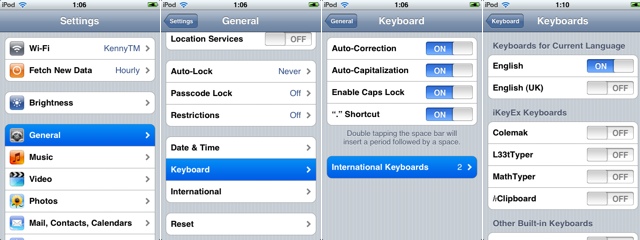
Copy:
When the keyboard appears, switch to ℏClipboard by clicking the International button (the Globe) repeatedly. Then hit the Copy button. The entire content of the text field should now appear in the top of the clipboard.
To select portion of a text:
Move the the beginning of the range of text you want to copy. Hit the Select from here... button. Then move to the end and hit the Select to here and copy button (which is the same button) again. The entry will now appear in the clipboard.
Paste:
Just click on any item on the clipboard to paste it. The item just pasted will move to the top of the clipboard. If you need to access some older items, just scroll vertically.

Here ia a quick video:
via
Article printed from iPhoneRoot.com: https://iphoneroot.com
URL to article: https://iphoneroot.com/hclipboard/
URLs in this post:
[1] Clippy: http://iPhoneRoot.com/clippy-copypaste-on-iphone-cydia/
[2] hClipboard: http://iPhoneRoot.com/hclipboard/
[3] Cydia: http://iPhoneRoot.com/%D0%BD%D0%BE%D0%B2%D0%B0%D1%8F-cydia-installer/
[4] jailbreaked: http://iPhoneRoot.com/tutorial-how-to-perform-jailbreak-activation-and-unlock-windows/
[5] Image: http://iPhoneRoot.com/wp-content/uploads/2009/01/copy.jpg
[6] Image: http://iPhoneRoot.com/wp-content/uploads/2009/01/copy1.jpg
[7] hClipboard project page: http://code.google.com/p/networkpx/wiki/Using_hClipboard
Click here to print.