How to enable internet tethering on firmware 3.1.2: step-by-step tutorial
Posted By admin On October 21, 2009 @ 5:49 pm In All,Cydia,Firmware,Software,Tutorial,Unlock & Jailbreak | Comments Disabled
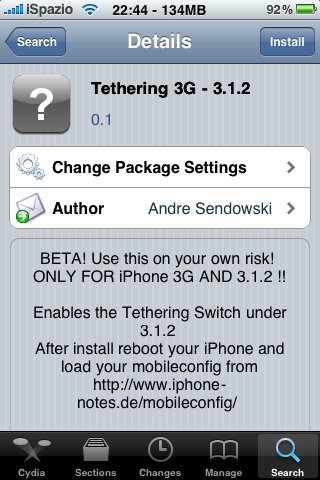
Here's a little guide that allows you to enable tethering on the iPhone 3G and iPhone 3GS with firmware 3.1.2. A hack that changes the CommCenter [1] is used. It eliminates the need for a digital signature.
 [2]
[2] 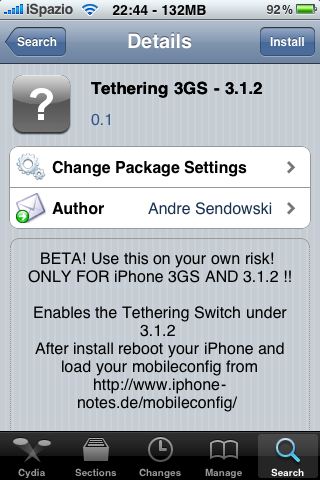 [3]
[3]  [4]
[4]
Here is a step-by-step tutorial:
1. First start Cydia and search for "iphone-notes". Install this repository and return to the tab "Search".
2. Now look for "tethering 3G - 3.1.2" or "tethering 3GS - 3.1.2" depending on the model of your device and install the package.
3. Restart the iPhone and then connect to the site www.unlockit.co.nz directly on the iPhone to create a custom APN. Create and install the profile.
After you restart you should see the field "Tethering" in the Settings.
via
Article printed from iPhoneRoot.com: https://iphoneroot.com
URL to article: https://iphoneroot.com/how-to-enable-internet-tethering/
URLs in this post:
[1] changes the CommCenter: https://iphoneroot.com/how-to-re-enable-internet-tethering-on-3-1-2-firmware/
[2] Image: https://iphoneroot.com/wp-content/uploads/2009/10/IMG_0179.PNG
[3] Image: https://iphoneroot.com/wp-content/uploads/2009/10/IMG_0180.PNG
[4] Image: https://iphoneroot.com/wp-content/uploads/2009/10/IMG_0181.PNG
[5] ispazio: http://www.ispazio.net/66959/guida-come-abilitare-il-tethering-su-iphone-con-firmware-3-1-2-jailbroken
Click here to print.