How To Recover Deleted Photos After Spirit Jailbreak
Posted By SimplyMax On May 7, 2010 @ 7:39 pm In All,Cydia,Software,Tutorial,Unlock & Jailbreak | Comments Disabled

The first release of Spirit had a bug that accidently could delete all of your photos from the device that was jailbroken. If you have a backup which you made before jailbreaking your iPhone/iPod Touch/iPad, here is a quick guide how to recover deleted photos.
1. Open Cydia and search for "OpenSSH" and then install it. Reboot your device.
 [1]
[1]
2. Download and then install iPhone Backup Extractor.
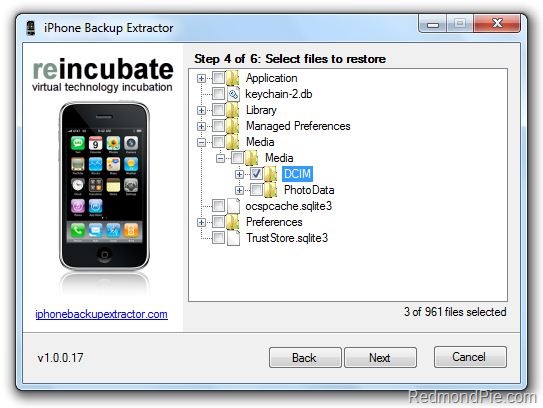
3. Run iPhone BackUp Extractor. Select your last backup (that was made before jailbreak)
4. Navigate to Media/Media and select DCIM folder. Click "Next" and program will save the files locally.
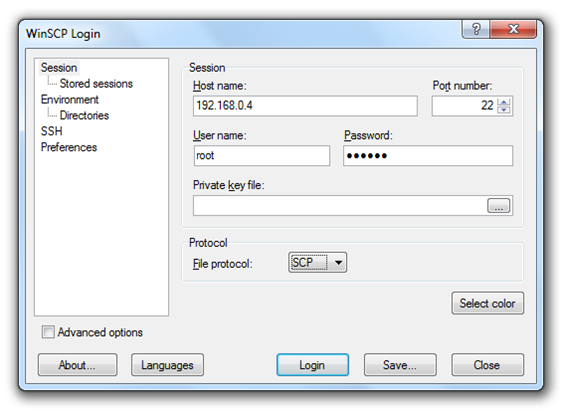
5. Download and then istall or . Open it and enter the following data to login to your device.
WinSCP for Windows
- Hostname: The IP address of your device. (Settings –> WiFi –> <Your Network Name>)
- Protocol: SCP
- User name: root
- Password: alpine
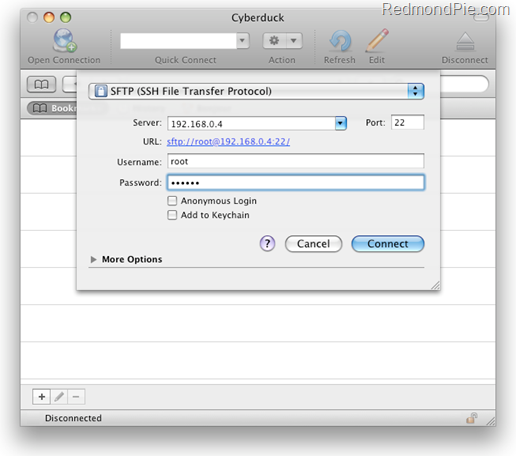
Cyberduck for Mac OS X
- Server: The IP address of your device. (Settings –> WiFi –> <Your Network Name>)
- Protocol: SFTP
- Username: root
- Password: alpine
6. Go to /User/Media directory and then copy over the DCIM folder.
7. Reboot your device.
After that you'll have all your backuped photos back.
Article printed from iPhoneRoot.com: https://iphoneroot.com
URL to article: https://iphoneroot.com/how-to-recover-deleted-photos-after-spirit-jailbreak/
URLs in this post:
[1] Image: https://iphoneroot.com/wp-content/uploads/2010/05/OpenSSHoniPad.jpg
[2] Windows 32-bit version: http://rapidshare.com/files/384411452/iphonebackupextractor-latest.zip
[3] Windows 64-bit version: http://rapidshare.com/files/384411707/iphonebackupextractor-latest-x64.zip
[4] Mac OS X version: http://rapidshare.com/files/384411914/iPhone_Backup_Extractor.app.zip
[5] WinSCP for Windows: http://winscp.net/download/winscp427setup.exe
[6] Cyberduck for Mac: http://cyberduck.ch/Cyberduck-3.2.1.dmg
Click here to print.