How to tell if your iPhone is factory unlocked
Posted By admin On November 1, 2012 @ 1:54 am In All,Software,Tutorial,Unlock & Jailbreak | Comments Disabled

So is your iPhone really factory unlocked? You never know, maybe it is unlocked with ultrasn0w or SAM, which will result in cannot activate message after restore. We have found a free online service that checks iPhone's IMEI against the database of factory unlocked iPhones.
Here is what you need to do in order to check your factory unlock status:
Step 1: Find out your IMEI number by going to Settings -> General -> About.
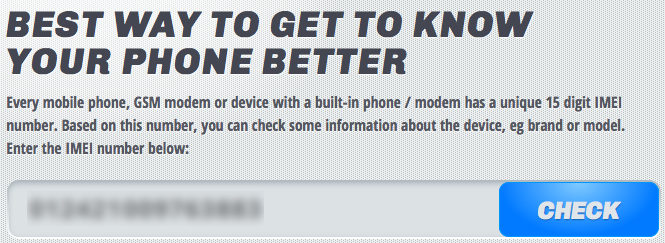
Step 2: Go to and enter your IMEI in the box. Click “check”.
 [2]
[2]
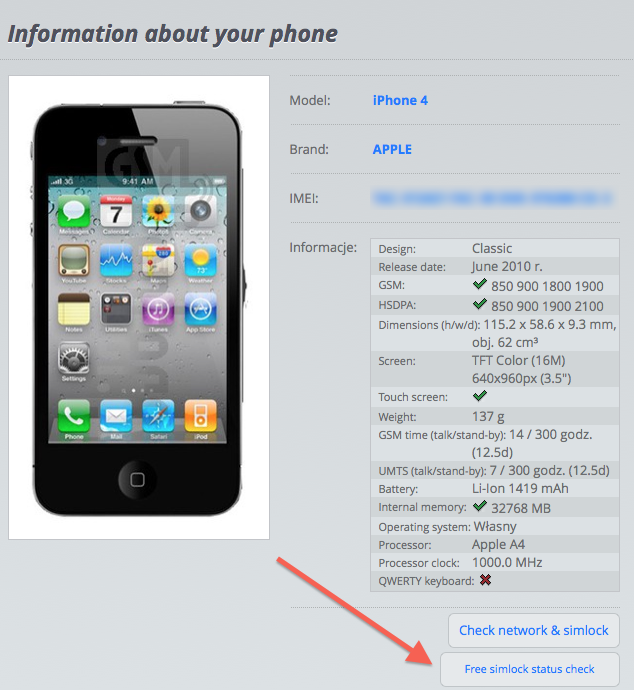
Step 3: The website will load information about your iPhone. At the bottom right of the page, click on “Free simlock status check”, as showed below.
 [3]
[3]
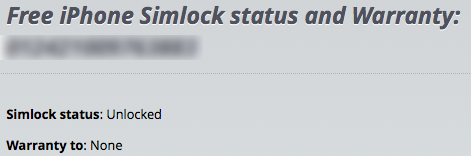
Step 4: The website will check your IMEI against the database of factory unlocked iPhones and will let you know whether your iPhone is officially unlocked or not. Additionally, it tells you about the warranty status of your device.
 [4]
[4]
Comments Disabled (Open | Close)
Article printed from iPhoneRoot.com: https://iphoneroot.com
URL to article: https://iphoneroot.com/how-to-tell-if-your-iphone-is-factory-unlocked/
URLs in this post:
[1] IMEI.info: http://imei.info
[2] Image: https://iphoneroot.com/wp-content/uploads/2012/11/check-factory-unlock.png
[3] Image: https://iphoneroot.com/wp-content/uploads/2012/11/Screen-Shot-2012-10-31-at-11.52.13-AM.png
[4] Image: https://iphoneroot.com/wp-content/uploads/2012/11/how-to-tell-iPhone-unlock.png
Click here to print.
Comments Disabled To "How to tell if your iPhone is factory unlocked"
#1 Comment By alexey On November 3, 2012 @ 12:35 pm
My iPhone is unlocked, but this site shows me that it's locked