Step-by-step Tutorial: How to Untether Jailbreak iPad 2 Using Absinthe (Mac OS X) [iOS 5.0.1]
Posted By admin On January 21, 2012 @ 1:39 am In All,Cydia,Firmware,Software,Tutorial,Unlock & Jailbreak | Comments Disabled
 [1]
[1]
UPDATE: Apple released iOS 5.1 firmware. Apple has stopped signing iOS 5.0.1, so you can NOT restore to 5.0.1 any more. If you are on 5.0.1 you can jailbreak with Absinthe.
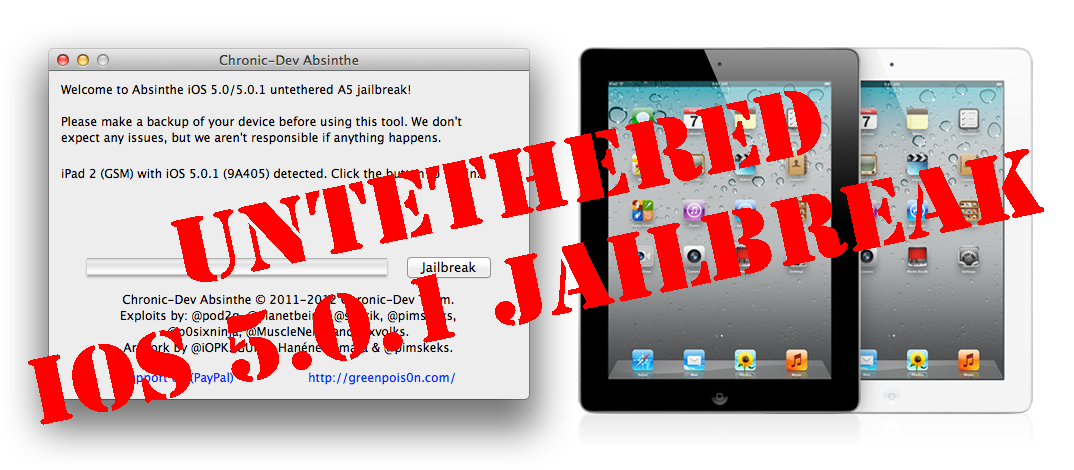
This is step-by-step instructions on how to perform untethered jailbreak of your iPad 2 on iOS 5.0.1 firmware using Absinthe for Mac OS X.
Tutorial for Windows version is here [2].
Untethered jailbreak means that each time you restart your device you will NOT need to connect it to a computer and run utilities.
Important: Please, consider reading our Jailbreak & Unlock FAQ [3], if you have other device or firmware and especially if you have questions or troubles.
Important information.
Please think first, before you do something.
Step One
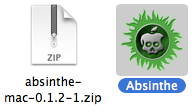
Make a folder called "Pwnage" on the desktop. Download the latest version Absinthe from here [4]. Double click to extract the downloaded archive.
Step Two
Connect your iPad to the computer and launch iTunes.

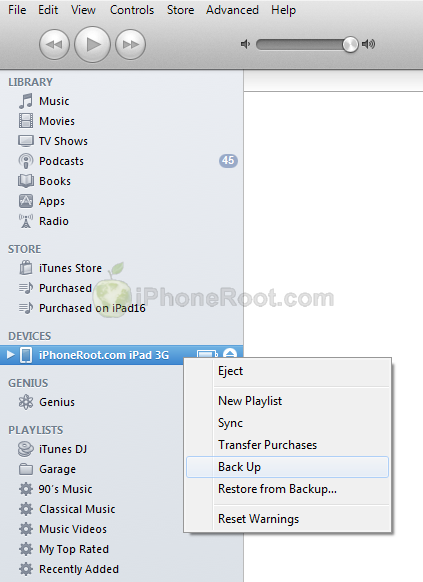
Select your iPad from the list of devices on the left. Create a backup by right-clicking on iPad name in Devices (iTunes left pane) and choosing Back Up.
 [5]
[5]
If you are already on iOS 5.0.1 you can now skip to step three.
Download iPad firmware iOS 5.0.1 to Pwnage folder. It is better to use Firefox, because some browsers (f.e., Safari) extract ipsw:
Open iTunes. Now hold down Option (Mac) or Shift (Windows) key and click the Restore button.
![Step by step Tutorial: How to Untether Jailbreak iPad 1 and iPad 2 Using JailbreakMe [iOS 4.3.3] (itunes ipad 500x257)](https://iphoneroot.com/wp-content/uploads/2011/07/itunes-ipad.png "itunes-ipad") [9]
[9]
Navigate to the Pwnage folder on your desktop and select the iOS 5.0.1 firmware ipsw. Click the Open button to continue.
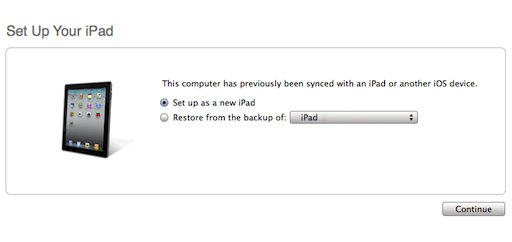
iTunes will ask if you want to setup your iPad as a new device or restore from the backup. Choose Restore from Backup if you want to preserve your contacts and other information.
Step Three
Once iTunes has finished updating your iPad to the desired firmware open the Pwnage folder on your desktop and launch the Absinthe application.
As prompted, connect your iPad 2 to the computer via USB. Make sure to remove any passcodes or VPN settings you've previously set.
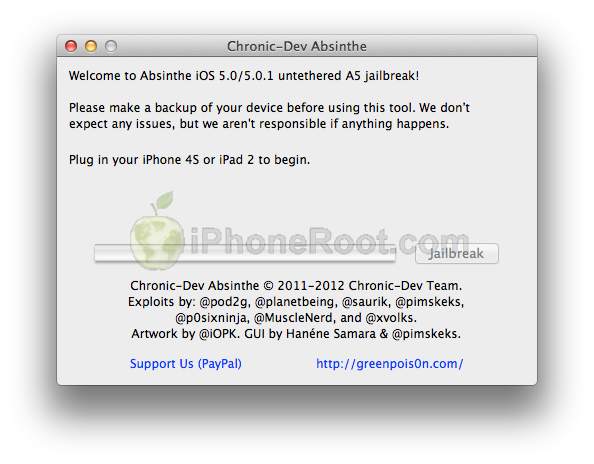 [10]
[10]
Step Four
Absinthe will detect iPad 2. Click the Jailbreak button to begin
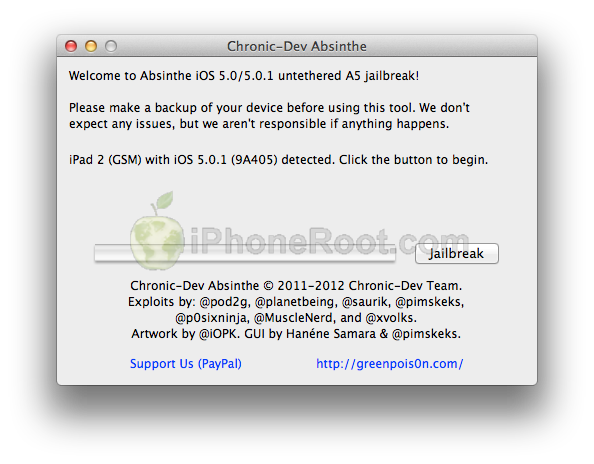 [11]
[11]
Step Five
The application will take you through several steps of the jailbreak: Sending initial data, waiting for reboot, waiting for device to finish booting, Preparing jailbreak data, and Sending payload data.
 [12]
[12] 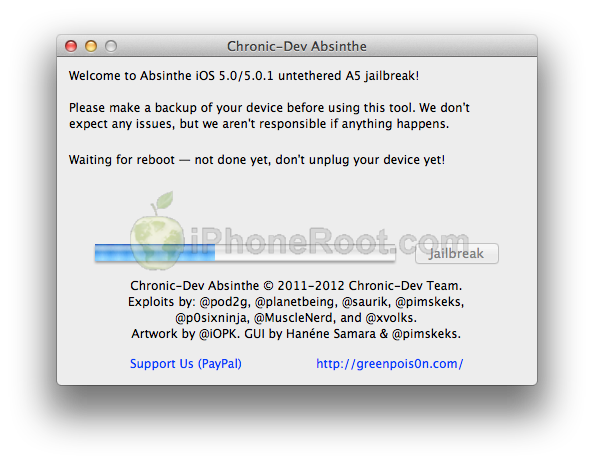 [13]
[13] 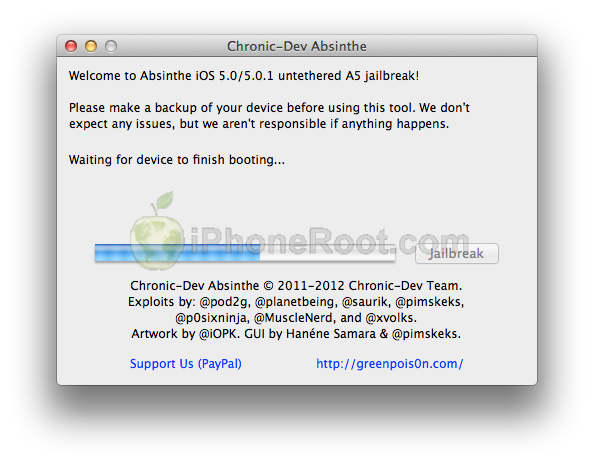 [14]
[14] 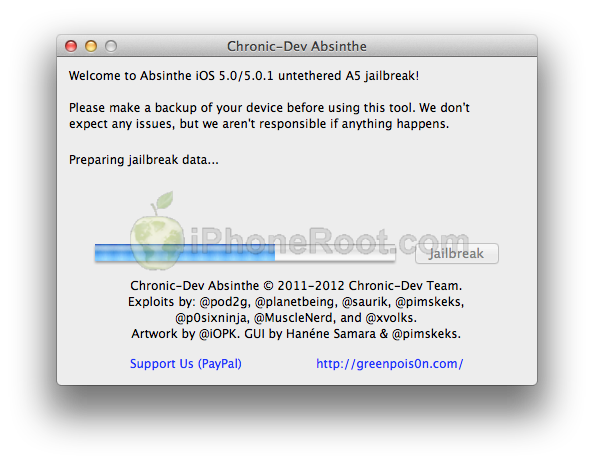 [15]
[15] 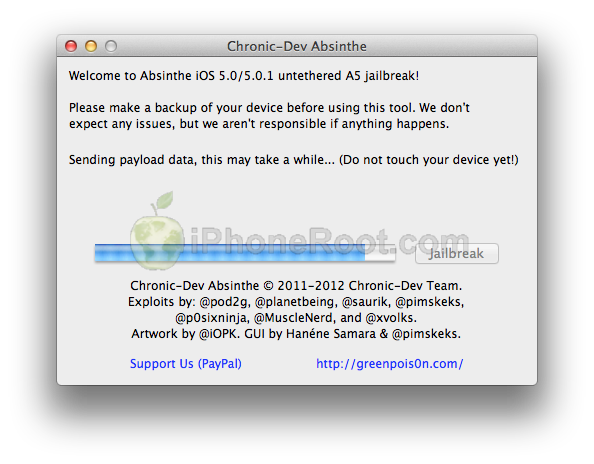 [16]
[16]
Step Six
You will be informed that the jailbreak is 'Almost done'.
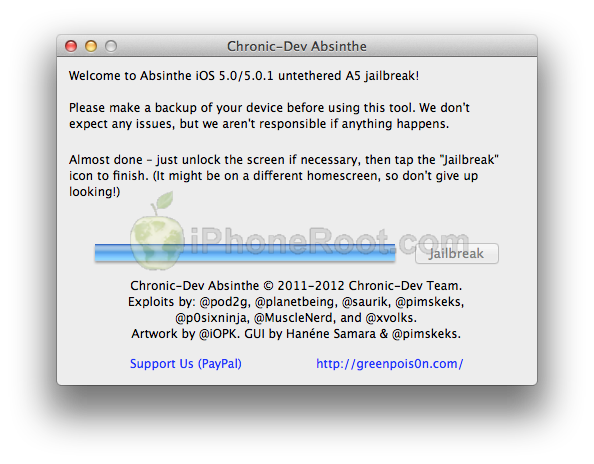 [17]
[17]
Step Seven
On you device, locate the Absinthe icon and press it to complete your jailbreak. It could be on any homescreen.
 [18]
[18]
If the server is down and you get an Error establishing a database connection message then tap the Settings icon on your springboard and turn on VPN.
 [19]
[19]  [20]
[20]
You will get a configuration error; however, after about a minute your device will reboot with Cydia on the Springboard!
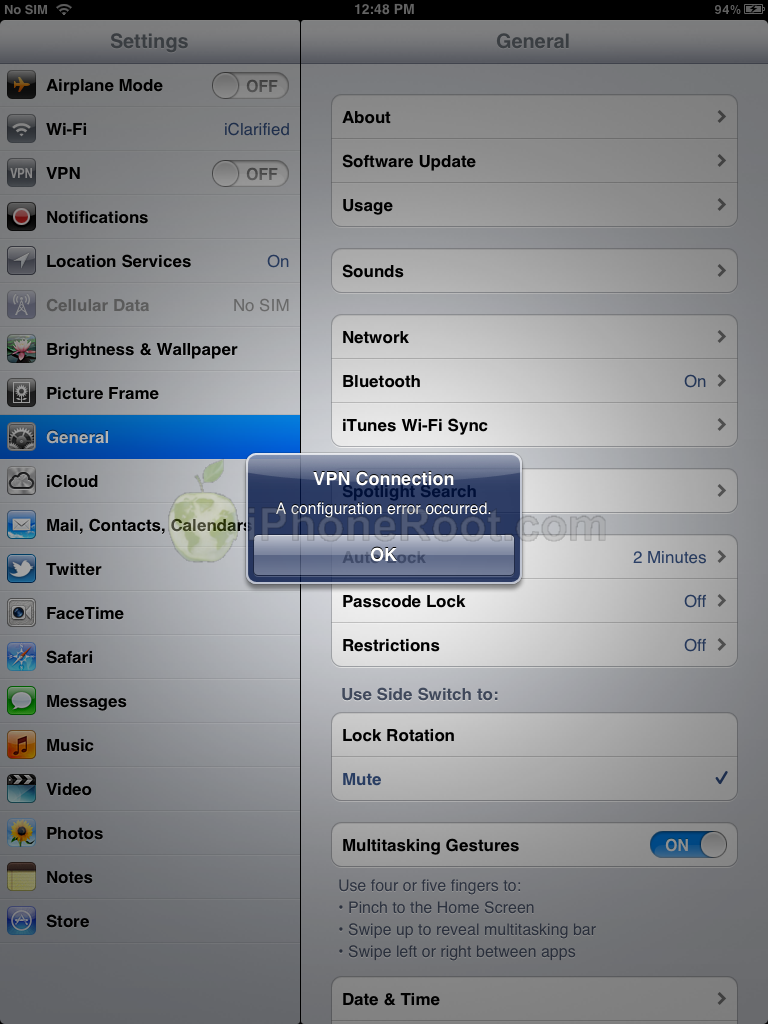 [21]
[21]  [22]
[22]
If you are still unable to succeed please be patient as the dev team's servers are under heavy load right now!
Step Eight
Run Cydia. Let it do all the necessary updates.
Step Nine
To have access to the root file system of your iPad (via file managers like iFunBox or iPhone Explorer) install application called afc2add in Cydia.
Step Ten
Do not forget to change your default password [23] if you've installed openssh.
Comments Disabled (Open | Close)
Article printed from iPhoneRoot.com: https://iphoneroot.com
URL to article: https://iphoneroot.com/howto-untether-jailbreak-ipad2-absinthe-mac-ios501/
URLs in this post:
[1] Image: https://iphoneroot.com/wp-content/uploads/2012/01/ipad2-mac.png
[2] here: https://iphoneroot.com/howto-untether-jailbreak-ipad2-absinthe-windows-ios501/
[3] Jailbreak & Unlock FAQ: https://iphoneroot.com/jailbreak-unlock-tutorials-and-faq/
[4] here: https://iphoneroot.com/utilities/#Absinthe
[5] Image: https://iphoneroot.com/wp-content/uploads/2011/07/jailbreakme-ipad-2.png
[6] iPad 2 WiFi: http://appldnld.apple.com/iPhone4/041-3310.20111109.Cfp76/iPad2,1_5.0.1_9A405_Restore.ipsw
[7] iPad 2 WiFi+3G: http://appldnld.apple.com/iPhone4/041-3311.20111109.Vpr43/iPad2,2_5.0.1_9A405_Restore.ipsw
[8] iPad 2 WiFi+CDMA: http://appldnld.apple.com/iPhone4/041-3312.20111109.zp3ws/iPad2,3_5.0.1_9A405_Restore.ipsw
[9] Image: https://iphoneroot.com/wp-content/uploads/2011/07/itunes-ipad.png
[10] Image: https://iphoneroot.com/wp-content/uploads/2012/01/absinthe-1.png
[11] Image: https://iphoneroot.com/wp-content/uploads/2012/01/absinthe-2.png
[12] Image: https://iphoneroot.com/wp-content/uploads/2012/01/absinthe-3.png
[13] Image: https://iphoneroot.com/wp-content/uploads/2012/01/absinthe-4.png
[14] Image: https://iphoneroot.com/wp-content/uploads/2012/01/absinthe-5.png
[15] Image: https://iphoneroot.com/wp-content/uploads/2012/01/absinthe-6.png
[16] Image: https://iphoneroot.com/wp-content/uploads/2012/01/absinthe-7.png
[17] Image: https://iphoneroot.com/wp-content/uploads/2012/01/absinthe-8.png
[18] Image: https://iphoneroot.com/wp-content/uploads/2012/01/absinthe-9.png
[19] Image: https://iphoneroot.com/wp-content/uploads/2012/01/absinthe-10.png
[20] Image: https://iphoneroot.com/wp-content/uploads/2012/01/absinthe-11.png
[21] Image: https://iphoneroot.com/wp-content/uploads/2012/01/absinthe-12.png
[22] Image: https://iphoneroot.com/wp-content/uploads/2012/01/absinthe-13.png
[23] change your default password: https://iphoneroot.com/secure-your-jailbroken-iphone/
[24] : http://iphoneroot.com/RU/tutorials-for-ios-5-1-1-untethered-jailbreak/
[25] : http://iphoneroot.com/howto-untether-jailbreak-ipad2-absinthe-windows-ios501/comment-page-1/#comment-207233
[26] : http://iphoneroot.com/RU/howto-untether-jailbreak-ipad-redsn0w-0910-windows-ios501/
Click here to print.
Comments Disabled To "Step-by-step Tutorial: How to Untether Jailbreak iPad 2 Using Absinthe (Mac OS X) [iOS 5.0.1]"
#1 Comment By Alex On January 21, 2012 @ 9:20 am
Здорово, все получилось, все жесты четырьмя пальцами работают! Установка Cydia занимает 2-3 мин!
При первой попытке сделать джейл Cydia встала норм, но после того как открыл ее, как и положено стала обновлять данные и повисла, ждал около 15 мин потом пытался сделать reboot зажатием Sleep и Home кнопок после чего получил висячее яблоко, после просто восстановил и настроил как новый, после чего при второй попытке все встало как по маслу!
Ребят думаю лучше сделать сначала Backup, после восстановить как новый а потом уж делать джейл чтоб наверняка, ну а после восстановить с Backupa!
Алексей Головин Reply:
July 23rd, 2012 at 1:30 pm
А есть JailBreak для iPod touch 4g?
admin Reply:
July 23rd, 2012 at 4:13 pm
есть. какая у вас прошивка?
Алексей Головин Reply:
July 23rd, 2012 at 8:22 pm
iOS 5.1.1
Алексей Головин Reply:
July 23rd, 2012 at 8:23 pm
iPod touch 4g
admin Reply:
July 23rd, 2012 at 10:30 pm
Алексей Головин Reply:
July 24th, 2012 at 8:29 am
А только для виндовс?
Алексей Головин Reply:
July 24th, 2012 at 8:31 am
У меня Mac os x
admin Reply:
July 24th, 2012 at 11:13 am
под мак все то же самое, по аналогии, только утилиту скачать под мак.
#2 Comment By Vova On January 21, 2012 @ 9:20 am
Когда для вин сделают
DeadUser Reply:
January 21st, 2012 at 4:34 pm
+
Реал когда он выйдет то?
#3 Comment By ATsyplakov On January 21, 2012 @ 11:04 am
Прога для iPad 2 3G подходит?
admin Reply:
January 22nd, 2012 at 3:45 am
да
#4 Comment By валюшка On January 21, 2012 @ 11:49 am
у меня не МАС а виндовс , а что делать если я не установил openssh (то что в 11 шагу)
de@dangel Reply:
January 21st, 2012 at 3:25 pm
У тебя заработал джеил?
валюшка Reply:
January 21st, 2012 at 7:14 pm
он не заработал
iAlex Reply:
January 21st, 2012 at 9:18 pm
А тебе это точно надо?
admin Reply:
January 22nd, 2012 at 3:45 am
ничего можно не делать
#5 Comment By Костя On January 21, 2012 @ 5:07 pm
Как нибудь можно вынуть приложенки из ipad 2 не через itunes
#6 Comment By Ladygaga On January 21, 2012 @ 10:27 pm
аааааааааааааа не могу хочууууууууЯаааААААААААААААа
#7 Comment By qwerty On January 22, 2012 @ 12:39 am
а как выполнить последний пункт если мобайлтерминал не работает???
admin Reply:
January 22nd, 2012 at 3:42 am
откуда ставили mobileterminal?
пароль можно не менять, если не ставили openssh.
#8 Comment By artem10 On January 22, 2012 @ 1:13 am
Руководство для взлома iPad 2 с windows!
Скачиваем с blog.iPhone-dev.org листаем вниз, там где обновления. Скачиваем из пункта 3.
Создаем папку downloads в корне диска C. Извлекаем Туда скаченный файл.
Запускаем CMD на windows. Пишем "cd downloads" (без ковычек). Нажимаем enter. Дальше пишем: "cd cinject_0.4.3" потом: "cinject.exe -i payloads/jailbreak.mobileconfig"(между I и payloads пробел)
iPad должен быть не подключен к компьютеру!!! если же вы его уже подключили, то высветится окно с установкой на iPad. Просто нажмите отмена.
Зайдите в настройки - основные - сброс - удалить контент и настройки. Подтверждаем. После этого iPad перезагрузится. теперь надо его настроить. Настраиваем как обычно, но ОТКЛЮЧАЕМ ГЕОЛАКАЦИЮ!!! После настройки подключаем iPad к компу. Появляется окно на ipad, нажимаем установить. Пароль не вводим, просто нажимаем далее! Всё. Теперь снова переходим к компу.
Вставляем в CMD: "cinject.exe -j payloads" потом немного подождите, пока будут бежать строки! Когда остановятся, введите: "execute the command: cinject.exe -w"
Наконец, включите VPN в настройках iPad. Ждите, он должен перезагрузится. И мы видим иконку cydia на iPad! Приятного отдыха.
admin Reply:
January 22nd, 2012 at 3:36 am
вышла утилиты Absinthe для Windows - там проще.
#9 Comment By 123 On January 23, 2012 @ 4:20 pm
Ребят , а что делать , если при запуске программы , вот она запустилась ,а после того , как нажал jailbreak проходит 3\4 загрузки и вылетает ошибка и windows её закрывает
НО в VPN конфигурация jailbreak есть ?
admin Reply:
January 23rd, 2012 at 5:55 pm
я бы заново все сделал
thug Reply:
January 26th, 2012 at 7:48 pm
таже проблема почти сделал и выкидывает и винда ошибку не показывает уже раз 20 пробовал ((((
admin Reply:
January 27th, 2012 at 12:28 am
#10 Comment By вестерн On January 24, 2012 @ 1:16 am
ребят подскажите как перенести игры на ipad 2 я установил Absinthe всё сделал. кидаю игру в iTunes а она мне пишет на ipad .. не удалось установить
admin Reply:
January 24th, 2012 at 9:54 pm
апсинк поставили?
walter l Reply:
January 26th, 2012 at 4:39 pm
вот такая же ситуация, апсинк поставил, все как надо..
walter l Reply:
January 26th, 2012 at 4:42 pm
но все равно: не удалось восстановить..
admin Reply:
January 26th, 2012 at 4:56 pm
попробуйте поставить любое бесплатное приложение из апстора. потом синхронизируйте уже
#11 Comment By Zolddonn On January 24, 2012 @ 10:09 am
Народ рад сообщить что на ipad2 3G wi-fi с прошив кой 5.0.1 все работает только имейте терпение не все с первого раза у меня пошло с четвертого! Да и к стати wi-fi не обязательно я устанавливал через 3g так что дерзайте и удачи вам !
#12 Comment By walter l On January 26, 2012 @ 4:55 pm
Получилось устанавливать после того, как зашел в Cydia и в Hackulo.us установил "AppSync for iOS 5.0+" после чего напротив в этой же строчке появилась зеленая галочка, до этого айдевайс отказывался))
#13 Comment By Ринат On January 27, 2012 @ 12:56 am
напишите в пост что после всего нужна перезагрузка, так как игры до перезагрузки устройства не скачиваются из Installous'a!
admin Reply:
January 27th, 2012 at 2:15 pm
ага добавлю спасибо
#14 Comment By Joni On January 30, 2012 @ 2:14 am
Ребята помогите разобраться!!!!!????с Ipad2!!!!!!!!
Все делаю по шагово дохожу до 7 , открываю иконку, в последствии выходить, jailbreak c зеленой надписью в последствии жму на него и выходит ошибка не удалось открыть Абсент,(не удается показать URL).Потом захожу в настройки-основные-сеть-включаю VPN,и девайс выдает ошибку"Произошла ошибка конфигурации.И так ждал 3 часа, попробовал еще раз испытать терпение.Но все по прежнему. И еще один вопрос на засыпку из-за частичной зоны охвата сети это может происходить???????
admin Reply:
February 7th, 2012 at 12:01 am
интернет нужен - если он пропадает, то могут быть ошибки.
Agva Reply:
February 7th, 2012 at 12:12 am
У меня все прекрасно с нетом(wifi >20Мбит, 3g>3 Мбит), а ерунда такая же. Не подключается к VPN.
#15 Comment By piro On January 30, 2012 @ 8:22 am
все тоже самое что и постом выше
#16 Comment By Agva On February 6, 2012 @ 11:45 pm
И у меня
#17 Comment By vlas On February 7, 2012 @ 3:07 pm
тоже самое...а счастье было близко...
#18 Comment By Валера On February 9, 2012 @ 6:16 pm
помогите пожалуйста
джейл сделал, в сидии прописал hackulo.us , поставил апсинк, но не могу залить взломанные приложения через айтюнс
что делать?
admin Reply:
February 10th, 2012 at 12:49 am
какие ошибки возникают? попробуйте поставить любое бесплатные приложение из Appstore
#19 Comment By valvyn On February 10, 2012 @ 12:19 pm
Скажите, пожалуйста, для чего и в какой директории создавать папку "Pwnage"
admin Reply:
February 10th, 2012 at 1:28 pm
для того, чтобы не бегать и не искать файлы. а так в любой папке можно создать.
admin Reply:
February 10th, 2012 at 1:28 pm
и называть можно как угодно. можно хоть на десктоп все свалить.
#20 Comment By HaqpTu3uH On February 16, 2012 @ 10:14 pm
ребят,сделал все до 11 пункта(Mobile Terminal не стоит)
Все равно не могу закачать игры на IPad 2 через ITunes.
Подскажите что мне делать?
admin Reply:
February 17th, 2012 at 12:45 am
поставили AppSync?
#21 Comment By HaqpTu3uH On February 17, 2012 @ 1:53 pm
Всмысле забил ли я ссылку в cydia?
Да
admin Reply:
February 18th, 2012 at 12:32 am
нет в смысле необходимо поставить пакет AppSync. после ввода репозитория
#22 Comment By HaqpTu3uH On February 18, 2012 @ 4:28 pm
Каким образом?
admin Reply:
February 20th, 2012 at 12:02 am
например, найти в поиске AppSync, выбрать и нажать Install.
#23 Comment By саша On March 14, 2012 @ 1:40 pm
что делать если я нажал обновить айпад и он у меня обноволися до версии 5.1 а не как требуеться 5.0.1 и джеал брейк не хочет действовать
admin Reply:
March 14th, 2012 at 7:34 pm
ждать выхода джейлбрейка для 5.1.
#24 Comment By сергей On March 18, 2012 @ 2:17 pm
а что делать с первым айпадом дайте ссылку чтобы все понятно было
admin Reply:
March 19th, 2012 at 7:26 am
если вы про джейлбрейк 5.0.1 на первом айпаду, то вот руководство:
#25 Comment By mirk On May 1, 2012 @ 6:06 am
сделал все как написано, но в конфигурации vnp jailbreak нету. как настроить сомому??
откатиться не могу, ибо тюнс предлагает восстановление с обновлением.
admin Reply:
May 1st, 2012 at 12:46 pm
я бы через redsn0w сделал, если не получается с абсинте