iOS 5 features gesture-based control panel that replaces hardware buttons
Posted By Svetlana Osipova On July 12, 2011 @ 12:14 pm In All | Comments Disabled
 [1]
[1]
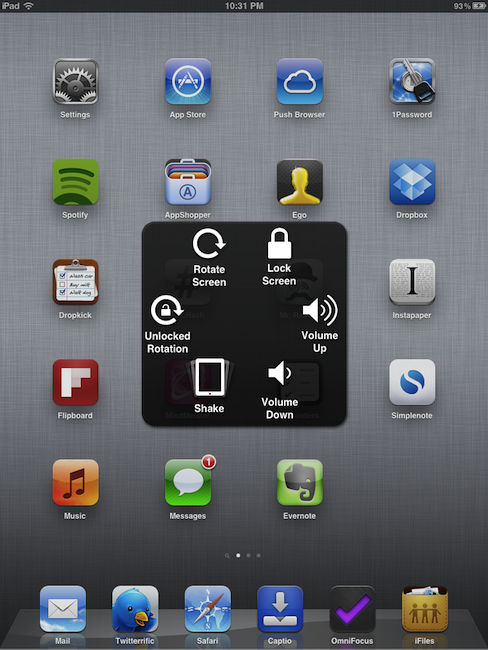
iOS 5 Beta 3 includes a new floating panel that provides users with access to a variety of hardware controls and gesture-based commands without using an iPad or iPhone’s physical buttons. The panel could also replace hardware controls when they are damaged. To enable the panel, go to Settings->General->Accessibility->AssistiveTouch. That new menu is available for four sections: Home, Device, Gestures and Favorites. In the Settings users can set up custom gestures and play with the built-in ones. The Home tab performs the same function as the Home button, Device tab opens a sub-menu with other controls to increase / decrease volume, lock or rotate the screen, and unlock rotation, while the usage of Favorites and Gestures are not clear yet.
Article printed from iPhoneRoot.com: https://iphoneroot.com
URL to article: https://iphoneroot.com/ios-5-features-gesture-based-control-panel-that-replaces-hardware-buttons/
URLs in this post:
[1] Image: https://iphoneroot.com/wp-content/uploads/2011/07/controls.png
Click here to print.