iPhone Configuration Utility
Posted By admin On July 12, 2008 @ 10:58 pm In All,Official,Software | Comments Disabled
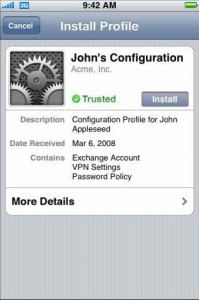
iPhone Configuration Utility lets you create configuration profiles for your devices. There are two versions of iPhone Configuration Utility—one is a Mac OS X application and the otheris a web-based version for Mac OS X or Windows. Application-based looks a bit different, has more functionality, but web-based could be used on windows platform.
After installation of Web utility open a web browser and go to: http://localhost:3000. Log in with the user name admin and the password admin. You're all set. Create profiles and distribute them by email or web.
There are several tabs here:
Passcode Settings
Для настройки policies в устройстве, если не используются Exchange passcode policies.
Wi-Fi Settings
Для настройки Wi-fi/ Можно ввести несколько конфигураций с помощью кнопки (+).
VPN Settings
Настройка VPN
Email Settings
Настройка POP или IMAP email.
Exchange Settings
Настройки пользователя для Exchange server.
Credentials Settings
Сертификаты. Поддерживаются PKCS1 (.cer, .der, .crt) и PKCS12 (.p12, .pfx).
Advanced Settings
Для изменения Access Point Name (APN) settings. Нужны для конфигурирования того, как устройство соединяется с телефонной сетью.
Article printed from iPhoneRoot.com: https://iphoneroot.com
URL to article: https://iphoneroot.com/iphone-configuration-utility/
URLs in this post:
[1] Image: http://iPhoneRoot.com/wp-content/uploads/2008/07/profile2.jpg
[2] Image: http://iPhoneRoot.com/wp-content/uploads/2008/07/profile6.jpg
[3] Image: http://iPhoneRoot.com/wp-content/uploads/2008/07/profile7.jpg
[4] Image: http://iPhoneRoot.com/wp-content/uploads/2008/07/profile3.jpg
[5] Image: http://iPhoneRoot.com/wp-content/uploads/2008/07/profile4.jpg
[6] Image: http://iPhoneRoot.com/wp-content/uploads/2008/07/profile5.jpg
Click here to print.