JailBreak for iPad is Finally Available!
Posted By SimplyMax On May 3, 2010 @ 4:07 pm In All,Cydia,Software,Tutorial,Unlock & Jailbreak | Comments Disabled
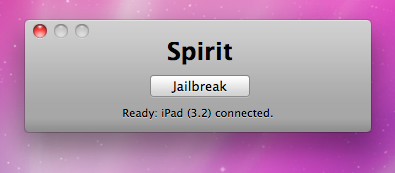
Finally the jailbreak for iPad, iPhone and iPod Touch from the Dev Team is available for download. It's free and untethered and it's called "Spirit". The jailbreak supports every iDevice with firmware version 3.1.2, 3.1.3 or 3.2.
If you have iPhone 3GS or an iPad you should backup your SHSH blobs before using the jailbreak. ECID SHSH or SHSH blob is a unique signature given to every Apple mobile device. When you decide to restore the firmware on your iPhone, iPod Touch or iPad, Apple servers checks this signature.
As you know, if a new firmware is released it becomes impossible to restore the older firmware from iTunes. But Cydia creator tuned up a new server and now it mimics Apple's verification server and saves your older SHSH blobs so that you can restore back your device to the older firmware. Without having your SHSH blobs saved you may accidentally update new firmware and then you not only lose your jailbreak but also won't be able to restore the older firmware to re-jailbreak your device.
This is also important because there is a big possibility that Apple will soon find out what exploit is used by the jailbreak and then it will be patched in the form of new firmware.
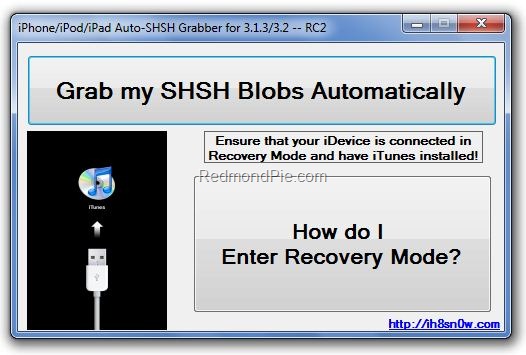
You can save your SHSH blob in three ways. Here is a guide to make it using AutoSHSH.
- Download AutoSHSH. (Latest version is ).
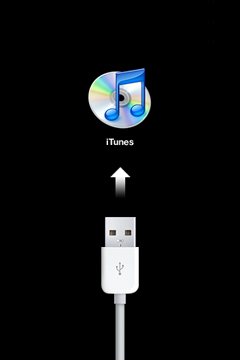
- Start AutoSHSH and plug in you iPhone/iPod Touch/iPad in recovery mode (only one device at a time). Recovery mode launches when you turn off your device and hold down the "Home" button when connecting the USB cable. Then you must see "Connect to iTunes" message and logo on your device.
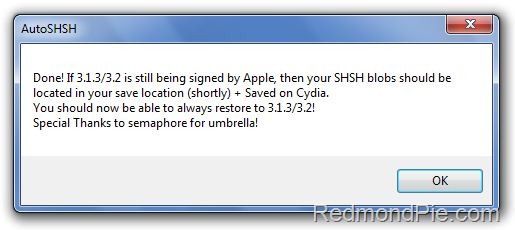
- In AutoSHSH click on "Grab my SHSH Blobs Automatically". When the app will grab the signature you must choose whether you want to save it locally or not. Do not forget where you saved the signature. In the end of the procedure AutoSHSH will also upload it to saurik's server.
If you have some problems with using AutoSHSH to save your blobs, write it in comments or try or instead.
Now, when you saved you SHSH blobs, you can make the jailbreak. It is recommended for you to sync your device with iTunes beforehand. Then use the following guide:
- Download "Spirit" (, ).
- Plug in your device (it will be instantly recognized).
- Hit the "Jailbreak" button.
That’s all!
Additionally here is a video tutorial for jailbreaking:
Please note that Spirit is not a carrier unlock so it won't allow you to use unauthorized wireless carriers. The jailbreak is also "sort of beta", so it may be buggy. DevTeam notifies that some apps in Cydia that are NOT designed for iPad may crash your system and require you to restore so be careful.
Comments Disabled (Open | Close)
Article printed from iPhoneRoot.com: https://iphoneroot.com
URL to article: https://iphoneroot.com/jailbreak-for-ipad-is-finally-available/
URLs in this post:
[1] here: http://rapidshare.com/files/381847434/AutoSHSH-3.1.3_3.2--RC2.exe
[2] saurik's method: http://www.saurik.com/id/12#howto
[3] Firmware Umbrella: http://thefirmwareumbrella.blogspot.com/
[4] link for Windows: http://spiritjb.com/win
[5] link for Mac OS X: http://spiritjb.com/mac
[6] : http://letitbit.net/download/1976.14bc0120575f5933d70ab082285a8b3c/iPhone2_1_3.1.3_7E18_Custom_Restore.ipsw.html
[7] : http://iphwn.org/rslite102semi.zip
[8] : http://itunes.apple.com/us/app/air-display/id368158927?mt=8
Click here to print.
Comments Disabled To "JailBreak for iPad is Finally Available!"
#1 Comment By DemoN On May 4, 2010 @ 4:50 pm
Кто знает почему ошибка? у меня iPhone 3Gs
#2 Comment By SimplyMax On May 5, 2010 @ 5:48 pm
Попробуйте вновь скачать Spirit по вышеуказанной в статье ссылке - разработчики выпустили и разместили новую версию, в которой были устранены некоторые возможные ошибки.
#3 Comment By DemoN On May 8, 2010 @ 10:34 pm
Почему Spirit не находит iPhone? с iTunes синхронизировал.
#4 Comment By SimplyMax On May 11, 2010 @ 8:07 pm
Если у вас Windows Vista/Windows 7, необходимо в окне свойств файла Spirit.exe во вкладке совместимость выбрать совместимость с Windows 98, и там же отметить галочкой пункт "Запускать от имени администратора". Возможно, проблема в этом.
Если нет - сообщите, какая версия прошивки (а также установлен ли анлок), iTunes и ОС.
#5 Comment By DemoN On May 13, 2010 @ 4:37 pm
Не получилось:iPhone 3Gs 3.1.3 анлока уже нет побывал на двух компьютерах на Viste и на Windows 7 iTunes 9.1.0.79
#6 Comment By admin On May 16, 2010 @ 12:07 am
делать джейл спиритом необходимо на свежей прошивке (на которых не делался джейлбрейк другими приложениями) и на активированном или хактивированном айфоне.
у вас не получается сделать джейлбрейк, видимо, из-за того, что ваш айфон не активирован.
#7 Comment By admin On May 16, 2010 @ 12:16 am
если у вас нет SHSH ключей для 3.1.2, то попробуйте прошить кастом прошивку 3.1.3 с встроенной активацией:
Если стандартными способами не получается - используйте rslite -
#8 Comment By савелий On March 14, 2011 @ 7:29 am
возможно ли использовать ipad2 как экран. например, есть mac mini и чтобы сделать "мобильный" вариант, подоткнуть к нему ipad2 как монитор.
admin Reply:
March 14th, 2011 at 5:22 pm
да, установив vnc должно получиться. или teamviewer еще можно попробовать.
admin Reply:
March 14th, 2011 at 5:22 pm
еще я бы глянул в сторону AirPlay, а именно AirDisplay