Step-by-step Tutorial: How to Untether Jailbreak iPhone 4S Using Absinthe (Mac OS X) [iOS 5.0, iOS 5.0.1]
Posted By admin On January 21, 2012 @ 2:23 am In All,Cydia,Firmware,Software,Tutorial,Unlock & Jailbreak | Comments Disabled
 [1]
[1]
UPDATE: Apple released iOS 5.1 firmware. Apple has stopped signing iOS 5.0.1, so you can NOT restore to 5.0.1 any more. If you are on 5.0.1 you can jailbreak with Absinthe.
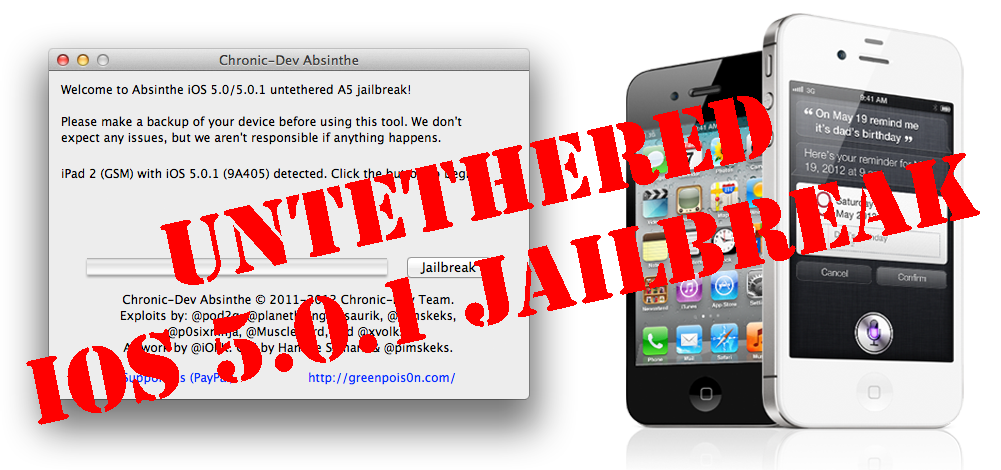
This is step-by-step instructions on how to perform untethered jailbreak of your iPhone 4S on iOS 5.0 or iOS 5.0.1 firmware using Absinthe for Mac OS X.
Tutorial for Windows version is here [2].
Untethered jailbreak means that each time you restart your device you will NOT need to connect it to a computer and run utilities.
Important: Please, consider reading our Jailbreak & Unlock FAQ [3], if you have other device or firmware and especially if you have questions or troubles.
Important information.
Please think first, before you do something.
Step One
Make a folder called "Pwnage" on the desktop. Download the latest version Absinthe from here [4]. Double click to extract the downloaded archive.
Step Two
Connect your iPhone to the computer and launch iTunes.

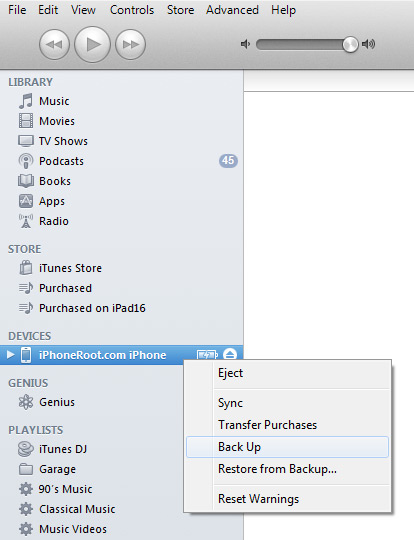
Select your iPhone from the list of devices on the left. Create a backup by right-clicking on iPhone name in Devices (iTunes left pane) and choosing Back Up.
 [5]
[5]
If you are already on iOS 5.0 / iOS 5.0.1 you can now skip to step three. If you need unlock stay on 5.0!
Download iPhone firmware iOS 5.0.1 to Pwnage folder. It is better to use Firefox, because some browsers (f.e., Safari) extract ipsw:
- iPhone 4S iOS 5.0.1:
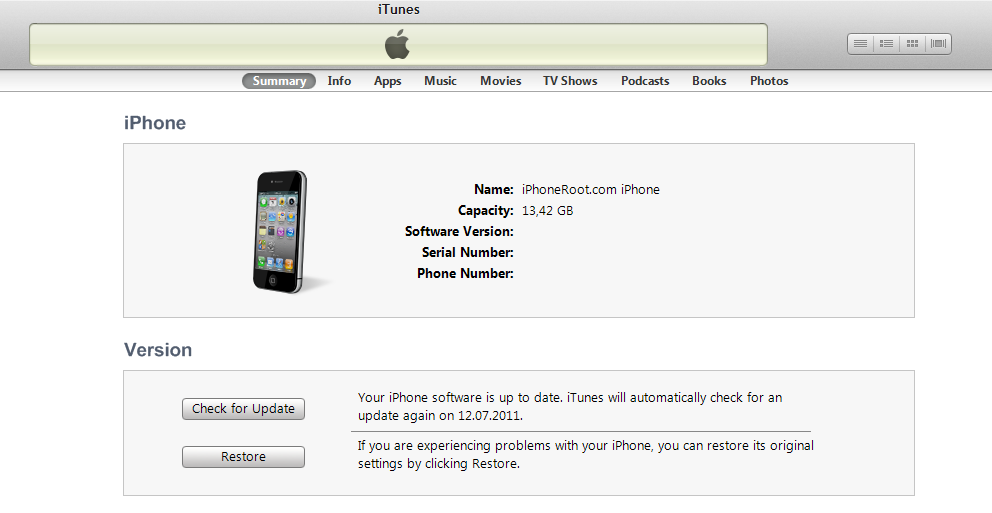
Open iTunes. Now hold down Option (Mac) or Shift (Windows) key and click the Restore button.
 [7]
[7]
Navigate to the Pwnage folder on your desktop and select the iOS 5.0.1 firmware ipsw. Click the Open button to continue.
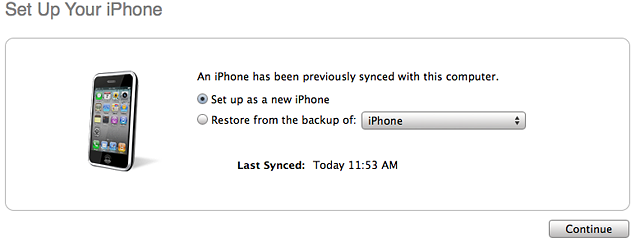
iTunes will ask if you want to setup your iPhone as a new device or restore from the backup. Choose Restore from Backup if you want to preserve your contacts and other information.
 [8]
[8]
Step Three
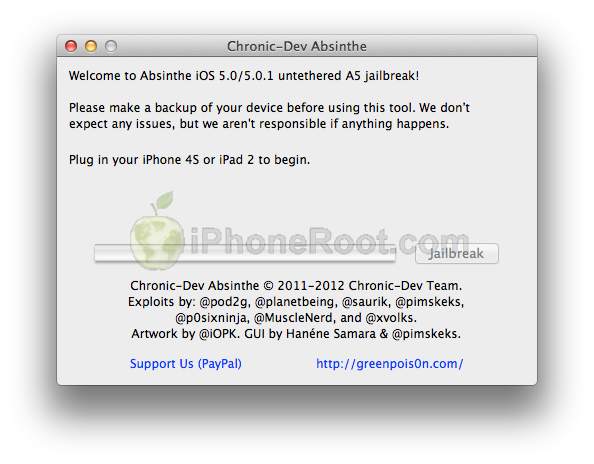
Once iTunes has finished updating your iPhone to the desired firmware open the Pwnage folder on your desktop and launch the Absinthe application.
As prompted, connect your iPhone 4S to the computer via USB. Make sure to remove any passcodes or VPN settings you've previously set.
 [9]
[9]
Step Four
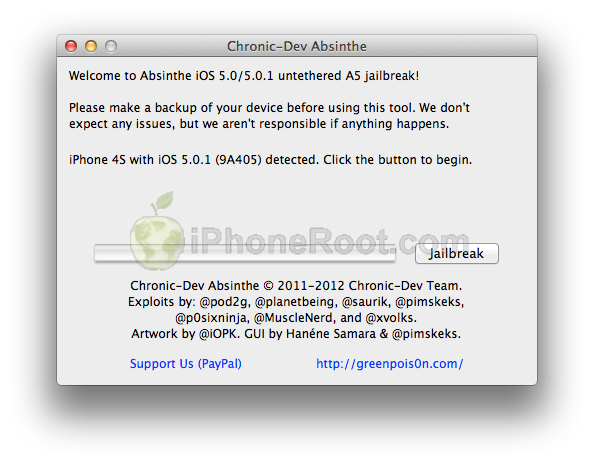
Absinthe will detect iPhone 4S. Click the Jailbreak button to begin
 [10]
[10]
Step Five
The application will take you through several steps of the jailbreak: Sending initial data, waiting for reboot, waiting for device to finish booting, Preparing jailbreak data, and Sending payload data.
 [11]
[11] 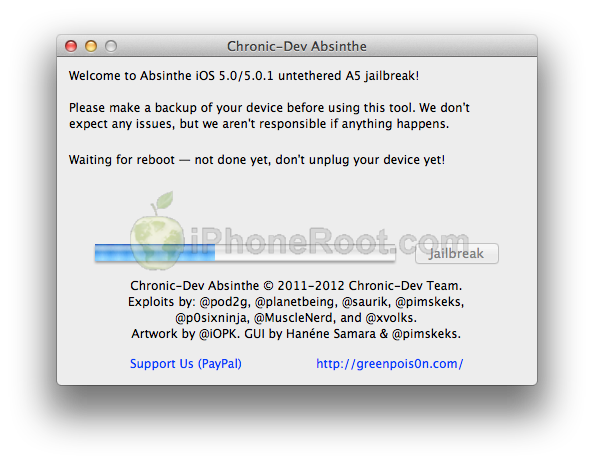 [12]
[12] 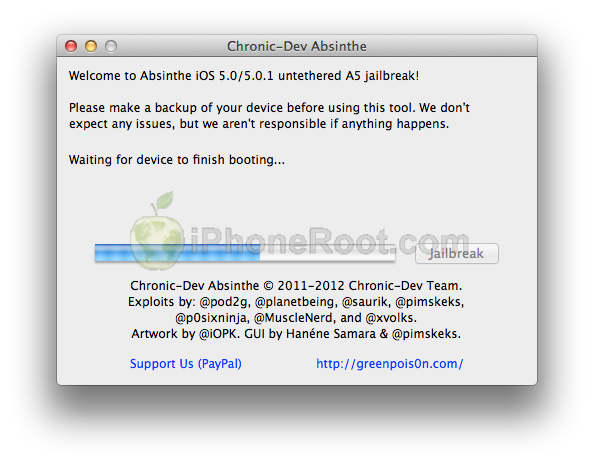 [13]
[13] 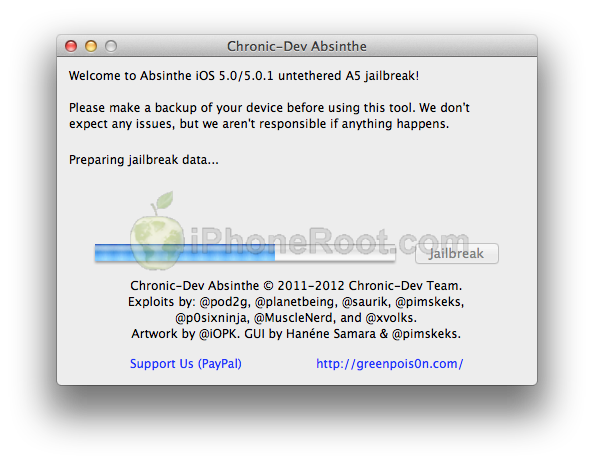 [14]
[14] 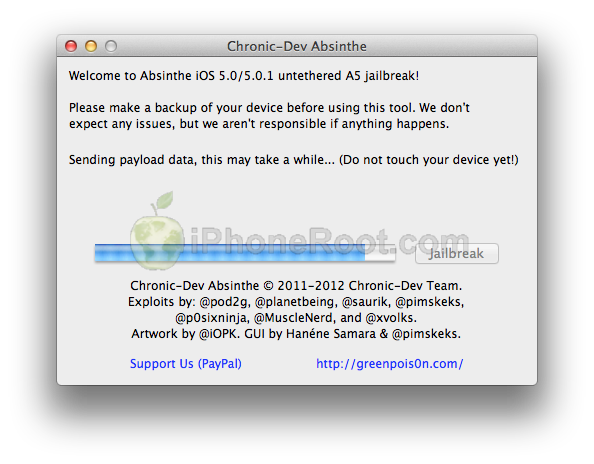 [15]
[15]
Step Six
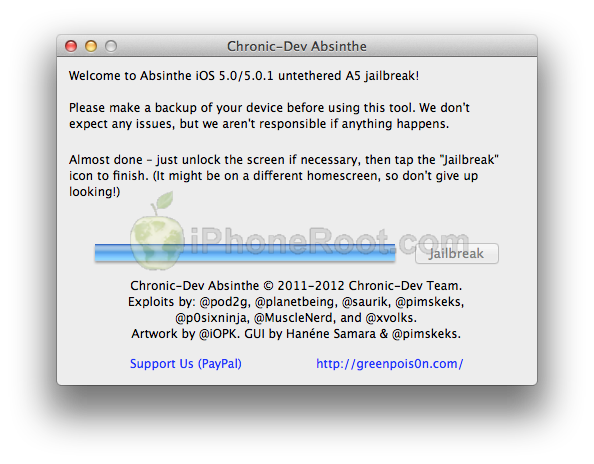
You will be informed that the jailbreak is 'Almost done'.
 [16]
[16]
Step Seven
On you device, locate the Absinthe icon and press it to complete your jailbreak. It could be on any homescreen.
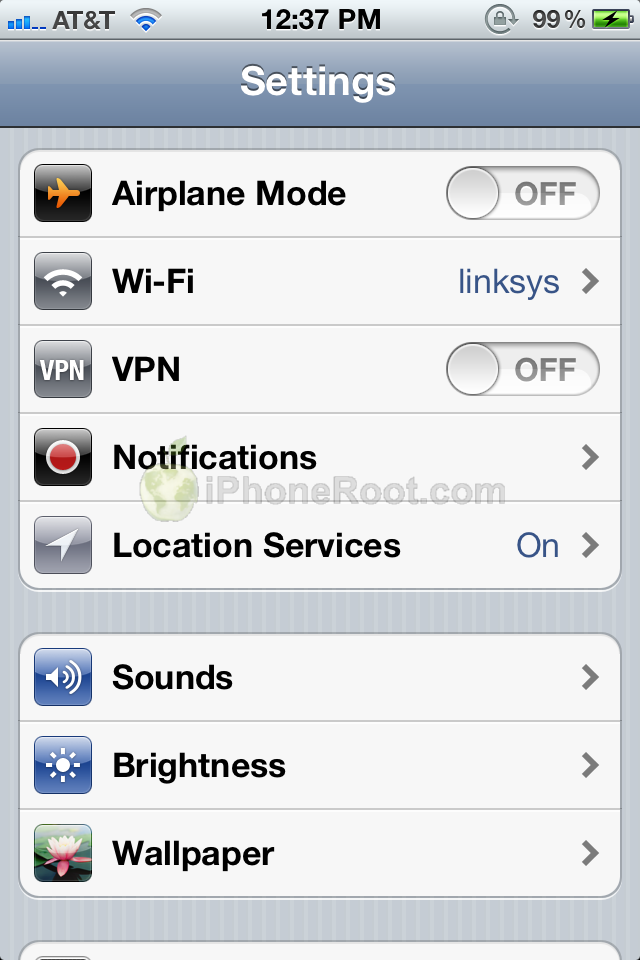
If the server is down and you get an Error establishing a database connection message then tap the Settings icon on your springboard and turn on VPN.
 [17]
[17] 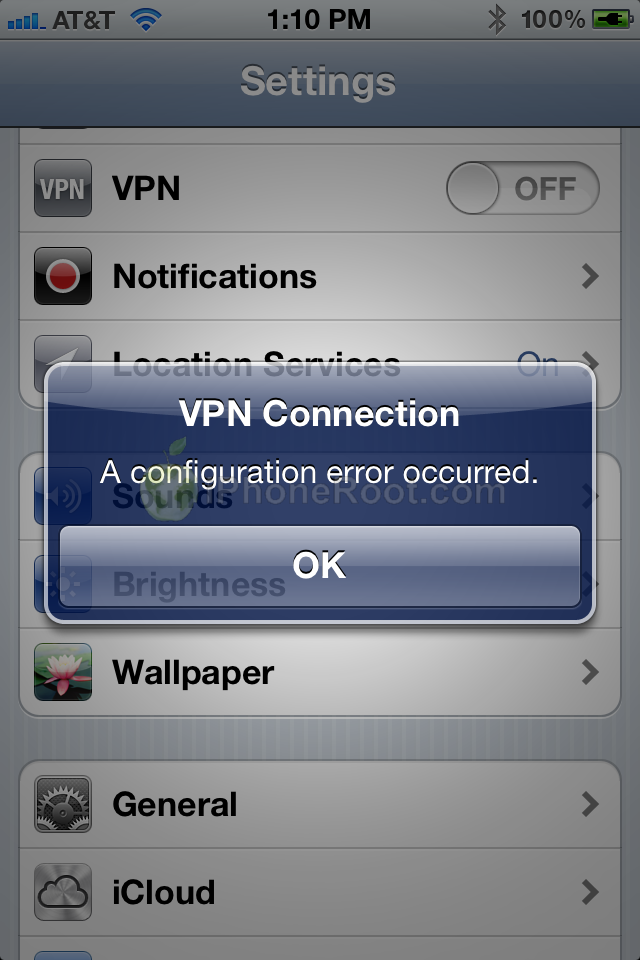 [18]
[18]
You will get a configuration error; however, after about a minute your device will reboot with Cydia on the Springboard!

If you are still unable to succeed please be patient as the dev team's servers are under heavy load right now!
Step Eight
Run Cydia. Let it do all the necessary updates.
Step Nine
To have access to the root file system of your iPhone (via file managers like iFunBox or iPhone Explorer) install application called afc2add in Cydia.
Step Ten
Do not forget to change your default password [19] if you've installed openssh.
Comments Disabled (Open | Close)
Article printed from iPhoneRoot.com: https://iphoneroot.com
URL to article: https://iphoneroot.com/step-by-step-tutorial-how-to-untether-jailbreak-iphone-4s-using-absinthe-mac-os-x-ios-5-0-ios-5-0-1/
URLs in this post:
[1] Image: https://iphoneroot.com/wp-content/uploads/2012/01/iphone-4s-mac.png
[2] here: https://iphoneroot.com/howto-untether-jailbreak-iphone4s-absinthe-windows-ios501/
[3] Jailbreak & Unlock FAQ: https://iphoneroot.com/jailbreak-unlock-tutorials-and-faq/
[4] here: https://iphoneroot.com/utilities/#Absinthe
[5] Image: https://iphoneroot.com/wp-content/uploads/2011/08/itunes-iphone-left.jpg
[6] iPhone4,1_5.0.1_9A406_Restore.ipsw: http://appldnld.apple.com/iPhone4//041-3417.20111215.Slnt4/iPhone4,1_5.0.1_9A406_Restore.ipsw
[7] Image: https://iphoneroot.com/wp-content/uploads/2011/08/itunes-iphone.png
[8] Image: https://iphoneroot.com/wp-content/uploads/2011/10/itunes-new-or-backup.png
[9] Image: https://iphoneroot.com/wp-content/uploads/2012/01/absinthe-1.png
[10] Image: https://iphoneroot.com/wp-content/uploads/2012/01/absinthe-detect-iph4s.png
[11] Image: https://iphoneroot.com/wp-content/uploads/2012/01/absinthe-3.png
[12] Image: https://iphoneroot.com/wp-content/uploads/2012/01/absinthe-4.png
[13] Image: https://iphoneroot.com/wp-content/uploads/2012/01/absinthe-5.png
[14] Image: https://iphoneroot.com/wp-content/uploads/2012/01/absinthe-6.png
[15] Image: https://iphoneroot.com/wp-content/uploads/2012/01/absinthe-7.png
[16] Image: https://iphoneroot.com/wp-content/uploads/2012/01/absinthe-8.png
[17] Image: https://iphoneroot.com/wp-content/uploads/2012/01/absinthe-iph4s-2.png
[18] Image: https://iphoneroot.com/wp-content/uploads/2012/01/absinthe-iphone4s-vpn-error.png
[19] change your default password: https://iphoneroot.com/secure-your-jailbroken-iphone/
[20] : http://iphoneroot.com/RU/utilities/#Absinthe
[21] : http://ru.wikipedia.org/wiki/%D0%A0%D0%B0%D0%B1%D0%BE%D1%87%D0%B8%D0%B9_%D1%81%D1%82%D0%BE%D0%BB
Click here to print.
Comments Disabled To "Step-by-step Tutorial: How to Untether Jailbreak iPhone 4S Using Absinthe (Mac OS X) [iOS 5.0, iOS 5.0.1]"
#1 Comment By Jack On January 21, 2012 @ 9:00 am
Ждём для Винды..
admin Reply:
January 21st, 2012 at 9:28 am
да, с виндой пока что-то задерживаются.
#2 Comment By de@dangel On January 21, 2012 @ 9:31 am
Айпад 2 можно перепрошить с этой прогой на винде???
admin Reply:
January 21st, 2012 at 9:57 am
можно, когда выйдет версия для винды
#3 Comment By Sasha On January 21, 2012 @ 12:28 pm
Версия для винды сегодня выйдет?
#4 Comment By Sasha On January 21, 2012 @ 12:31 pm
И ещё анлок на ios 5.0.1 будет?
admin Reply:
January 23rd, 2012 at 3:39 pm
возможно да. в таких вопросах никогда нет ясности.
#5 Comment By Гека On January 21, 2012 @ 1:13 pm
а получится сделать джейл, если телефон еще не активирован? И получится обойти эту галимую активацию??? <-----ЭТО ГЛАВНЫЙ ВОПРОС!))))
Андрей Reply:
January 21st, 2012 at 2:23 pm
Как такой человек может пользоваться айфоном,желая пропустить активацию я в шоке...пока ты не активируешь телефон,ты его не включишь!!!!
Jack Reply:
January 21st, 2012 at 2:45 pm
admin Reply:
January 23rd, 2012 at 3:41 pm
в чем проблема активировать телефон?
#6 Comment By Bodun69 On January 21, 2012 @ 2:14 pm
Ну наконец то ) в данный момент по всему миру трещат целки 4S )
#7 Comment By Jam On January 21, 2012 @ 3:55 pm
подскажите пожалуйста, если у меня прошивка 5.0 (9А334) у меня джел пойдёт? А то в шапке написано только (9A405 и 9A406). И Стоит ли вначале обновиться до 5.0.1??? Спасибо!
deadpk Reply:
January 21st, 2012 at 4:13 pm
Необязательно.
Alex Reply:
January 21st, 2012 at 9:03 pm
Лучше обновиться, в iMessage можно будет фотки и картинки передавать! Да и не зря выпускают новые прошивки, стабильней и функций больше!
admin Reply:
January 23rd, 2012 at 3:45 pm
для iOS 5 тоже должно все заработать. если вам анлок не нужен, я бы обновился на iOS 5.0.1
#8 Comment By deadpk On January 21, 2012 @ 4:00 pm
Вышло для винды, ну там такой бред, я лично не понял как делать, у кого хорошие знания анг.языка и опыт работы с cmd, посмотрите блог dev-team.
Sasha Reply:
January 21st, 2012 at 8:27 pm
Это просто обсуждение!!!
de@dAngeL Reply:
January 21st, 2012 at 8:31 pm
нет там для винды не чего (((
(((
#9 Comment By Jam On January 21, 2012 @ 4:15 pm
а что на счёт цефер (9А334) или они большого значения не имеют?
admin Reply:
January 23rd, 2012 at 3:46 pm
это номер сборки прошивки iOS 5
#10 Comment By Alex On January 21, 2012 @ 6:01 pm
Ааааа, молодцы красаучеги))) как-тока куплю сразу хакну его к чертям))) вот только для винды надо подождать(( Нубо вопрос: что бы взяли вы: 4 или 4s и какой объём памяти?
deadpk Reply:
January 21st, 2012 at 6:14 pm
Естественно 4s 32 gb
iAlex Reply:
January 21st, 2012 at 9:25 pm
4S как минимум 32 если фин позволяют то конечно же бери 64 чтоб не думать а стоит мне устанавливать это? А нужна ли мне эта музыка? А как долго я могу снимать видео? И.т.д. И.т.п.
#11 Comment By Sasha On January 21, 2012 @ 7:29 pm
Когдана винду выцйдет
#12 Comment By deadpk On January 21, 2012 @ 8:52 pm
Да вышло уже все, я лично сделал и доволен.
deadpk Reply:
January 21st, 2012 at 8:53 pm
Я разобрался кстате)видюху нашел одну.
Alex Reply:
January 21st, 2012 at 8:55 pm
ссылку ссылку ссылку)))
Sasha Reply:
January 21st, 2012 at 9:42 pm
Сылку плиз!
Fred Reply:
January 21st, 2012 at 8:54 pm
Кааак??
#13 Comment By iRun 09 On January 21, 2012 @ 9:55 pm
Здорово всем)У меня Mac OS X 10.5.8 работает?,у меня не получилось его открыть,помогите плиз))))
#14 Comment By de@dangel On January 21, 2012 @ 10:41 pm
Ссылку киньте на винду
admin Reply:
January 22nd, 2012 at 3:36 am
#15 Comment By igavrik On January 22, 2012 @ 1:46 am
Все получилось! СПАСИБО!!!
#16 Comment By Andrey111 On January 22, 2012 @ 12:56 pm
Ребят каму не сложно напишите что вообще с айфоном может случиться если чтото пойдет не так? какие проблемы и можно ли их решить(или апарат в мусорку)
admin Reply:
January 23rd, 2012 at 3:52 pm
случиться может все что угодно, то, что у вас все будет ок никто вам пообещать не сможет. но шанс совсем все испортить очень мал.
#17 Comment By Михаил On January 24, 2012 @ 3:17 am
Доброго времени суток. Который час уже пытаюсь взломать телефон, не получается. Подскажите, если встречалась у кого такая проблема: после нажатия кнопки jailbreak программа работает минуту, потом вылетает с надписью: Произошло неожиданное завершение работы "Absinthe". Пробовал уже и перзагружать(как тел. так и мак(10.6.8)), в безопасном режиме заходил, ничего не помогает. Если вдруг встречались и нашли решение, то буду очень благодарен за помощь. Заранее спасибо!
admin Reply:
January 24th, 2012 at 9:55 pm
попробуйте последнюю версию 0.3
#18 Comment By игорь On January 28, 2012 @ 9:39 pm
пропала cudia что делать?
#19 Comment By grisha On February 9, 2012 @ 2:59 pm
что делать после того как загрузил сидию? как после этого загружать приложения у меня эппсинс5.0+ не открывает пишет что ни одна программа не может его открыть
admin Reply:
February 10th, 2012 at 12:45 am
его не надо открывать, его надо установить в сидии
#20 Comment By grisha On February 9, 2012 @ 3:09 pm
ой извините невнимательно прочитал, кстати а как загружать приложения когда всё сделал
#21 Comment By Niiiiiiiko On February 12, 2012 @ 10:40 pm
Извинюсь вот вопрос Что такое дисктоп и где он на винде
admin Reply:
February 12th, 2012 at 11:28 pm
)))
#22 Comment By grisha On February 18, 2012 @ 11:32 am
а что делать если когда я захожу в absinthe он пишет wait fo absinthe to complete а потом внизу появляется табличка didn't work? try this: 1. tap jailbreak to open the settings applications and turn on the VPN named jailbreak. а он у меня и так включён а после включения ВПН он пишет ошибка конфигурации и не в какую не перезагружается!!=((
#23 Comment By NG On February 28, 2012 @ 9:00 pm
Добрый вечер! после загрузки ПО на 4s (шаг 3) нажала иконку absinthe пишет ошибку error consistency check failed could not find required files ...подскажите что делать
Елена Reply:
April 12th, 2012 at 2:53 pm
Здравствуйте, на шаге3, при подключение устройства пишет, что устройство не поддерживается, у меня 4S 5.0.1 уже было установлена, почему? внизу ссылка на оплату, платить за установку программы нужно?
admin Reply:
April 12th, 2012 at 4:40 pm
странно.
приложение бесплатное, оплата совершенно не обязательна.