 iPhoneRoot.com

News tagged ‘phishing’
New Piece of Malware Discovered That Attacks iOS Users
A new piece of malicious software that affects iOS devices has been recently discovered by the security researchers from FireEye. The malware is called Masque Attack and it can replace the legitimate apps you have installed on your device with their malicious copies. These copies look so similar to the trustworthy apps that it is nearly impossible for an average user to notice his or her device has been infected.

 Leave a comment
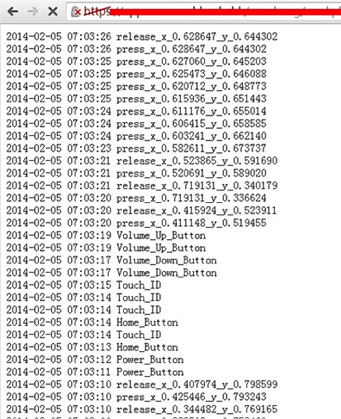
iOS Vulnerability Allows Malicious Apps to Monitor User Touch Inputs
A new iOS bug has been recently found that allows malicious apps to monitor and log user’s touch inputs and button pressings. Such apps are capable of running in background and sending sensitive data to remote servers. That is why you should carefully choose, which apps to install and which not.
Viber AppStore Description was hacked
The AppStore description for Viber app has been changed by hackers. It is not the first time the App's support page is attacked. The Syrian Electronic Army took whole responsibility for this latest attack as well as for the previous ones. Now the description of the app says "We created this app to spy on you, please download it!"
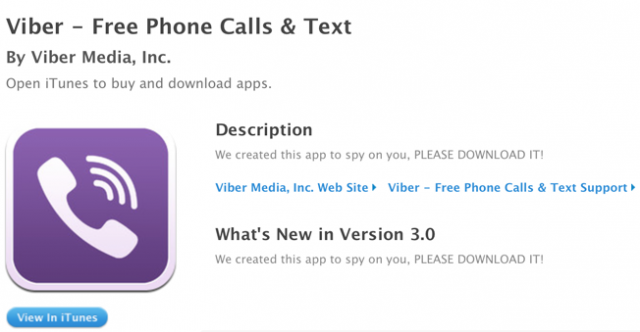
That is what Viber posted concerning the matter:
Read the rest of this entry »
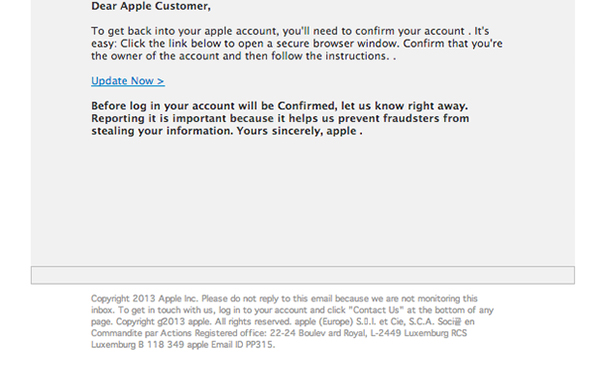
Apple Developers Get Attacked by Scammers
Scammers do their best to take advantage of Apple’s Developer Center outage, ZDNet reports. This time they began sending fraudulent email messages to developers aiming to steal their Apple ID passwords.
PayPal Executive Looks For Apple To Implement Fingerprint Sensors In Its New iPhone
CIO on a keynote presentation made yesterday at by chief information security officer of PayPal Michael Barrett, in which he told about the future of account security and suggested that PINs and passwords will soon become a thing of the past. Michael Barret is a president of the Fast Identity Online (FIDO) Alliance, which is seeking alternative user authentication methods. The report said:
Apple improving iTunes account security with stricter requirements

Ars Technica reports that Apple has began asking users of iOS devices to select and answer some question related to their Apple IDs. Such measures were reportedly taken by the company to improve security of iTunes accounts.
After being shown the message, users are asked to select from a number of security questions and provide personal answers. Users are also prompted to provide a backup e-mail address in case the primary address associated with their Apple ID is compromised.
Apple Promises OS X Update to Delete Mac Defender Malware
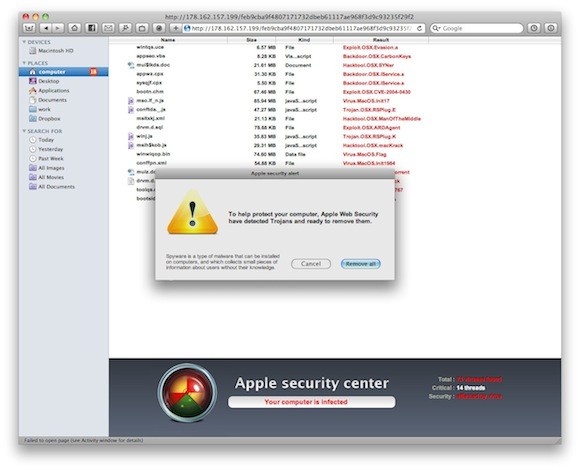
Apple will release a Mac OS X software update in the next few days that will automatically find, block and remove the popular Mac Defender malware from infected OS X machines.
A recent phishing scam has targeted Mac users by redirecting them from legitimate websites to fake websites which tell them that their computer is infected with a virus. The user is then offered Mac Defender “anti-virus” software to solve the issue. This “anti-virus” software is malware (i.e. malicious software). Its ultimate goal is to get the user’s credit card information which may be used for fraudulent purposes. The most common names for this malware are MacDefender, MacProtector and MacSecurity.
New iPhone Worm Wants User's Bank Passwords

A second iPhone worm virus has been found by security company F-Secure. It is specifically targeting people in the Netherlands who are using their iPhones for internet banking with Dutch online bank ING.
It redirects the bank's customers to a site with a log-in screen (). The worm attacks "jailbroken" phones - a modification which enables the user to run non-Apple approved software on their handset. Only handsets with installed SSH (secure shell) are at risk. SSH is a file-transfer program that enables users to remotely connect to their phones. It comes with a default password, 'alpine' which should be changed.
Here is a tutorial how to change the default SSH password and minimize the risk.
Apple released firmwares 3.1 for iPhone and 3.1.1 for iPod Touch

Apple released new iPhone 3.1 and iPod Touch 3.1.1 firmwares. Here is a quick changelog:
- Improved syncing for music, movies, TV shows, podcasts, and photos
- iTunes U content organization
- Redeem iTunes Gift Cards, codes, and certificates in the App Store
- Display available iTunes account credits in the App Store and iTunes Store
- Save video from Mail and MMS into Camera Roll
- Option to "Save as new clip" when trimming a video on iPhone 3GS
- Better iPhone 3G Wi-Fi performance when Bluetooth is turned on
- Remotely lock iPhone with a passcode via MobileMe
- Use Voice Control on iPhone 3GS with Bluetooth headsets
- Paste phone numbers into the keypad
- Option to use Home button to turn on accessibility features on iPhone 3GS
- Warn when visiting fraudulent websites in Safari (anti-phishing)
- Improved Exchange calendar syncing and invitation handling
- Fixes issue that cause some app icons to display incorrectly
iPhone OS 3.1 is available and is a free download for iPhone customers. iPod Touch users already running iPhone OS 3.0 can update to 3.1.1 for free. iPod Touch users running earlier firmware versions can upgrade to OS 3.1.1 for $4.95.
Users of jailbreaked and unlocked devices - do not update, wait for utilities updates!!
113 new features of firmware 3.0
Here is a list of 113 new features in 3.0 firmware. The information is from hackint0sh site forum:
1. Cut/Paste
2. Copy/Paste
3. Shake to undo/redo typing
4. Text selection for easy mass deletion
5. MMS
6. Landscape keyboard in Notes
7. Landscape keyboard in Mail
8. Landscape keyboard in Messages
9. Forward texts or picture messages
10. Delete individual texts or picture messages
What's new in iPhone OS 3.0 beta 2?
Here is an unofficial changelog of iPhone 3.0 beta2 firmware:
- Better Spotlight feature
- Better Copy-Cut-Paste
- Greater speed and overall stability
- MMS natively supported (without any hack) for a lot of new countries
- In-App Purchase first APIs released
- Push notifications first APIs released
- New APIs available to developers
- Bugs afflicting Beta 1 fixed
- Safari’s lower bar is no more transparent
- New “Store” entry in Settings App: it links to a blank page
- Contacts now divided in “All contacts”, “All contacts on My iPhone” and “All contacts (Mobile Me)”
- New Safari’s landscape mode when clicking on a image or a link
- Anti-phishing mode in Safari. Activate it in Settings App > Safari, switching Fraud alert ON. The green title bar on 3.0 firmware means a security certified and reliable website. The “htpps” protocol icon instead has been moved on the left of the title.
- SpringBoard has now up to 11 pages and 180 applications.
via ispazio