Tutorial: install Java on the IPhone
Posted By admin On June 9, 2008 @ 12:51 pm In All,Java,Java applications,Software,Tutorial | Comments Disabled
This is a tutorial, that shows step by step how to install Java on the IPhone.
What we need is a working IPhone with . I used latest firmware 1.1.4, unlocked, jailbreaked and customized by .
First of all I'd like to say we all want to use legal IPhones and operators. So everything written below is for testing purposes only  . Hopefully this technology will be avaliable on all IPhones sold worldwide. You also might need to recover your IPhone, so make sure you backed up all your data. I personally did everything without any problems and needs to recover. Everything you do is your responsibility, etc...
So let's start, because it's worth it! It's just one evening and you will be able to create your personal Java application, compile and run it on the IPhone, and amaze all your friends .
There are two steps:
Step 1: Go to Installer and install Mobile Terminal and Cydia Installer.
- Go to Settings -> General -> Auto-Lock and set it to Never. This will avoid some troubles during installation.
- Run Installer. Repository for Terminal should be already there (BigBoss), because it is in latest Community Sources.
- Add repository http://apptapp.saurik.com for Cydia Installer and refresh
- Go to Install -> System
- Find Term-vt100 - Mibile Terminal App. I used version svn278. Install it.
- Go to System again and find Cydia Installer - The Future of the IPhone. I used version 1.0. Install it.
- Exit. Restart IPhone. Two icons for Terminal and Cydia should appear.
Here are some screenshots for Step1:
Step 2: Go to Cydia Installer and install Java.
- Run Cydia Installer.
- Go to Install - Java section. You will find many programms there.
- Select IPhone/Java. It will install most of the needed packages, which includes vm, libraries, etc.
- Click confirm and wait a little bit.
- Go to Java section again and install Jikes package (itwill be probably the only one left). Jikes is a compiler.
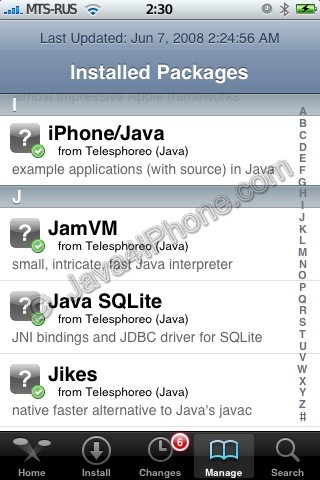
- Go to Installed Packages tab. Check that Classpath, IPhone/Java, JamVM, Jikes are installed. Several other packages will be there too (Java SQLite, JocStap, etc).
- Exit Cydia and restart IPhone. Congratulations!!! You're done installing Java.
That's it. The tutorial about using all this stuff is
Comments Disabled (Open | Close)
Article printed from iPhoneRoot.com: https://iphoneroot.com
URL to article: https://iphoneroot.com/tutorial-install-java-on-the-iphone/
URLs in this post:
[1] unlocked and jailbraked: http://iPhoneRoot.com/tutorial-how-to-perform-jailbreak-activation-and-unlock-windows/
[2] Installer: http://iphone.nullriver.com/beta/
[3] winpwn: http://winpwn.com/
[4] Image: http://iPhoneRoot.com/wp-content/uploads/2008/06/step1_0.jpg
[5] Image: http://iPhoneRoot.com/wp-content/uploads/2008/06/step1_1.jpg
[6] Image: http://iPhoneRoot.com/wp-content/uploads/2008/06/step1_2.jpg
[7] Image: http://iPhoneRoot.com/wp-content/uploads/2008/06/step1_3.jpg
[8] Image: http://iPhoneRoot.com/wp-content/uploads/2008/06/step1_4.jpg
[9] Image: http://iPhoneRoot.com/wp-content/uploads/2008/06/step1_5.jpg
[10] Image: http://iPhoneRoot.com/wp-content/uploads/2008/06/step1_6.jpg
[11] Image: http://iPhoneRoot.com/wp-content/uploads/2008/06/step2_1.jpg
[12] Image: http://iPhoneRoot.com/wp-content/uploads/2008/06/step2_2.jpg
[13] Image: http://iPhoneRoot.com/wp-content/uploads/2008/06/step2_3.jpg
[14] Image: http://iPhoneRoot.com/wp-content/uploads/2008/06/step2_4.jpg
[15] Image: http://iPhoneRoot.com/wp-content/uploads/2008/06/step2_5.jpg
[16] Image: http://iPhoneRoot.com/wp-content/uploads/2008/06/step2_6.jpg
[17] Image: http://iPhoneRoot.com/wp-content/uploads/2008/06/step2_7.jpg
[18] Image: http://iPhoneRoot.com/wp-content/uploads/2008/06/step2_8.jpg
[19] Image: http://iPhoneRoot.com/wp-content/uploads/2008/06/step2_9.jpg
[20] Image: http://iPhoneRoot.com/wp-content/uploads/2008/06/step2_10.jpg
[21] Image: http://iPhoneRoot.com/wp-content/uploads/2008/06/step2_13.jpg
[22] here : http://iPhoneRoot.com/tutorial-compile-and-run-java-application-on-the-iphone/
[23] : http://apptapp.saurik.com
[24] : http://apt.saurik.com
[25] : http://pokercompatibility.com/poker-blog/39-news/74-3-steps-how-to-play-java-real-money-poker-on-iphone-3g.html
[26] : http://iphoneroot.com/install-mobileterminal-iphone-ios4/
Click here to print.
Comments Disabled To "Tutorial: install Java on the IPhone"
#1 Comment By dach On January 8, 2009 @ 1:34 pm
got problem with the repository
when i try add it in cydia its say is not a right address.
the adresse in this guides says.
anyone know what to do?
fg Reply:
March 7th, 2011 at 2:09 am
I can't find any install section or java anywhere tho..
#2 Comment By ollie On May 27, 2009 @ 12:04 am
Hello
I am new to the iPhone community and just wanted to check if I jailbreak my iPhone and install java will I be able to run .jar mobile applications. I would like to use a text application from fishtext.
Cheers for your help
Riaan
#3 Comment By admin On May 27, 2009 @ 1:15 am
2dach: For firmware 2.x you do not have to add repository, just go to section Java and install.
#4 Comment By admin On May 27, 2009 @ 1:17 am
2ollie: no you will not be able to run regular jar monile app. There is support only for command line and user interface through special libs (jocstrap). The application has to be written on Java specially for iPhone
#5 Comment By jampster09 On June 3, 2009 @ 4:49 pm
does this work on ipod touch?
#6 Comment By jampster09 On June 3, 2009 @ 5:48 pm
aw it works! but i can only compile simple program
#7 Comment By admin On June 3, 2009 @ 8:50 pm
it should work on iPod Touch
#8 Comment By WithRat On June 25, 2009 @ 4:00 am
I found a program in the Package IPhone/Java ,and unpacked it,in the data.tar.gz file ,i found HelloJava.app,so i copied it to my iPod,and ran it .
It did run,but i couldn't see any windows on the screen. Using the ps command ,it was sure in the processes.
Does anybody know why?
Thanks
#9 Comment By admin On December 20, 2009 @ 2:19 am
Unfortunately, there is no support of awt or swing.
#10 Comment By rmoran On January 18, 2010 @ 10:36 pm
I have 3.1 OS on my iPhone and have gone to Icy (Think it's same as installer). I went to the "Java" directory and installed EVERYTHING in that directory. It wouldn't let me install Jikes. It told me JVM repository wasn't there. I went to Cydia and installed Jikes from there. Restarted my iPhone. Have two new icons "HelloScript" and "HelloJava", but don't know what either of them do. I'm trying to play poker online. The website brought me to your page. I go to the "Instant Play" optoin on "AbsolutePokercom" and it says that safari cannot download file. It's supposed to be a java based website that allows me to play poker on iPhone for real money. Can you tell me what I'm doing wrong? Thanks a million!
#11 Comment By admin On January 18, 2010 @ 11:05 pm
There is no support fo Java applets, only command line java and gui via jocstrap libraries.
#12 Comment By rmoran On January 19, 2010 @ 4:58 am
Ok, I do apologize, but that is greek to me. What do you mean? The site I went to to find your site says what I am doing can be done. Can you expain it in lamens terms?
#13 Comment By admin On January 19, 2010 @ 1:08 pm
Sorry about that. I'll try to explain in detail.
There is no Java for iPhone as it is on a desktop or many other phones. Apple doesn't want Java to be on the iPhone.
Saurik made a project to port Java to the iPhone. For now you can use Java with many many limitations. You cannot just run regular java application, you cannot use java in Safari.
The site you mention uses my marerial to make users sign up on a poker site through banner links. Users click on links (banners), sign up and that site gets a lot of money. The bad thing about all this is that you cannot play java poker on the iPhone.
#14 Comment By rudvalis On January 28, 2010 @ 2:55 am
Question for Admin: What about the new iTablet? Will
it have Java on it like I have for my PC and my
MacBookPro? or is it part of "Apple doesn't want
Java to be on the iPhone. I suspect that they still
don't want it because in your iTablet demo at time
stamp 10:15, Steven Jobs (using Safari) goes to some
website and gets the same little Box icon that I get
on my iPod Touch when I try to use Safari to go to
websites that use Runtime/Flash? Java. I sure wish
someone could create a workaround for this b/c then
I might be tempted to buy an iTablet and jailbreak
it so as to be able to use Java through Safari.
Without this I feel the iTablet (just like my
current iPod Touch) is crippled from doing many
things it should be able to do. I am sure it is
not as cool and as small, but until they bring Java
into the picture I guess I will have to continue
using a Hackintosh of Snow Leopard on my Dell
Mini Netbook (poor man's iTablet) which even has a
(Dell Version) of iSight, which I guess won't appear on the iTablet until we get to the next generation.
#15 Comment By admin On January 28, 2010 @ 2:47 pm
Hi, rudvalis.
So far iPad (iTablet) is just a big iPod/iPhone. It runs iPhone OS 3.2. So unfortunately no Java. Even if you jailbreak you will just get unofficial Java without Safari support.
#16 Comment By tomczak On February 1, 2010 @ 11:18 am
Hi what about data base connection ?
and could I run jar files ?
#17 Comment By daznights On October 10, 2010 @ 9:00 pm
how come i followed all the steps and still programs say i dont have java?
#18 Comment By Boss Jo On January 26, 2011 @ 9:46 am
good info !. thanks for sharing.
#19 Comment By ahshog On February 13, 2011 @ 5:40 pm
please i have iphone 3gs 4.2.1 and when i try to add the repository something goes wrong and tells me that the repository is not found.. please may you help me with this? i need the java on my iphone
admin Reply:
February 13th, 2011 at 5:47 pm
This tutorial is a bit outdated. Here is a link for tutorial to install MobileTerminal:
#20 Comment By fg On March 7, 2011 @ 2:14 am
Can someone update this guide? There is no INSTALL section anymore at Cydia!!!
#21 Comment By S Briggs On August 27, 2011 @ 2:00 pm
This is 2011 - this tutorial is 2 years old and still no one has found a solution yet to make java work fully on iSO - what is happening - We need java - we need java - we need java
admin Reply:
August 28th, 2011 at 4:43 pm
Unfortunately this is true. Not much has been changed since 2008.
#22 Comment By STAM On December 20, 2012 @ 2:09 am
Проделал все с шага 2, тк на моем 4м фоне есть сидия и от инсталлятора давно разработчики отказались. Все установилось прекрасно.