 iPhoneRoot.com

How to Jailbreak Your Device Running iOS 8.4 Using Taig for Windows
As you know, Taig has released a tool capable of jailbreaking the devices running iOS 8.4.
If you have already upgraded to the latest version of Apple’s mobile operating system, you can use the steps below to jailbreak your iPhone 6, iPhone 6 Plus, iPhone 5s, iPhone 5c, iPhone 5 and iPhone 4s as well as compatible iPad and iPod touch models.

- First of all, download the latest version of Taig and save it on your computer

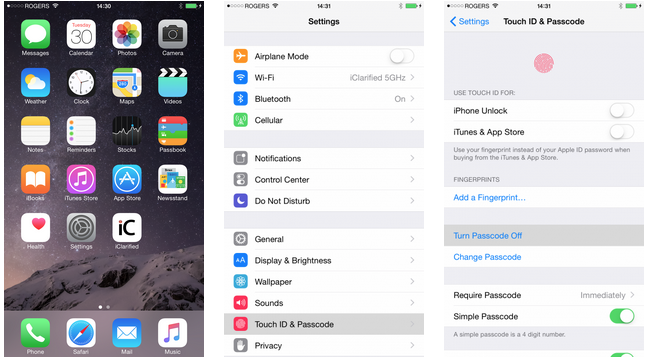
- On your iOS device, go to Settings - Touch ID & Passcode and turn off Passcode
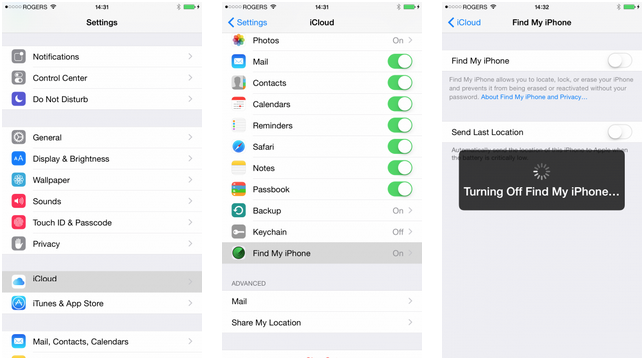
- Go back to Settings and tap iCloud. Turn off the Find My iPhone feature
- Connect your device to iTunes via USB cable and backup all the data on it
- Locate the folder, where you saved the Taig tool for jailbreak and open the file called TaiGJBreak.exe

- Taig tool should detect your device
- Once the device is detected, uncheck the second checkbox (this won’t allow TaiG App Store to install on your device)

- Hit the Start button at the bottom of the window and wait for the jailbreaking process to end

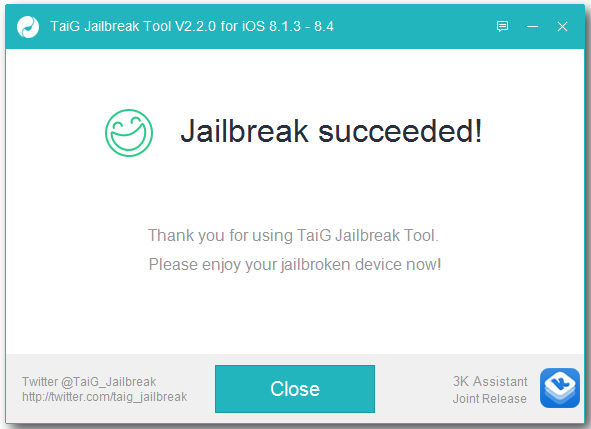
- Once the jailbreak is over, you will see a smiley face, your device will respring and a Cydia app will appear on it. That’s it
Feel free to ask any questions connected with the Taig jailbreak in the comments section below this post.
[Images: ]
Follow us on :
Latest posts
 Leave a comment, read comments [14]