 iPhoneRoot.com

News tagged ‘application’
Updates in Cydia: iComing, myFox, LockDown
Couple more updates today.
 iComing allows you to be alerted when you are reaching a target location and / or send an sms to warn someone that you are coming. It uses GPS, GSM cells and WiFi. iComing updated to version 0.3.
 is an alternative browser for iPhone. Updated to version 1.3.
 allows users to protect iPhone applications with a password. Updated to version 4.0.
All these applications are avaliable via .
 Leave a comment
PdaNet updated to 1.31

updated to version 1.31.This tool allows you to . Here is a changelog:
This application is avaliable via .
First official iPhone 3G sold in Russia
This video is from Vladivostok, a big city in the east part of Russia. It is October 3rd there already. In Moscow and St.-Petersburg the sales will start in about 3.5 hours.
Update: the price was 33000 RUB, which is $1278 for an unlocked 16Gb iPhone.
One more self-made iPhone/iPod dock
Yesterday we wrote about .
This idea of self-made dock is quite popular. Now what you need are notebook clips 🙂
The number of Cydia packages hits 400

Today the 400th package was added to Cydia 2.0 repository today. This number includes all kind of applications, modding themes, sound packages, themes, etc. Most of this stuff is free. All you need to use this is to jailbreak your iPhone.
Kroll game
Nice game. Avaliable for $7.99 via AppStore ().
iPhone paper clip stand
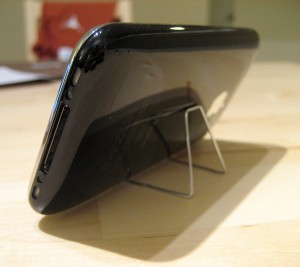
Here is a nice and cheap self-made stand for iPhone. Watch the video:
Want to create one? Here are the instructions:
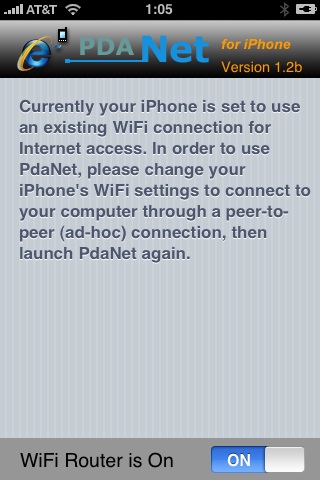
Connect desktop or notebook to internet through iPhone 3G
Many iPhone 3G users would like to use internet on a desktop or notebook through their phone. There were several solutions: iPhoneModem, NetShare, 3Proxy.. they all used SSH and SOCKS proxy. One of the working ones was described here .
Couple days ago PdaNet (fullname is PdaNet WiFi Router) was ported to iPhone. Now our life is much much easier.
Jailbreak on firmware 2.2 beta 1
appeared just a day ago. It seems that DevTeam never sleeps 🙂 They published a screenshot of jailbreaked iPhone 2G with this new firmware:
It runs Terminal.app (non-apple application) running on 2.2b1 firmware. Thay say that version 2.2 is still vulnerable to pwnage and quickpwn on everything but iPod Touch 2G.
No news about software unlock for iPhone 3G or jailbreak for iPod Touch 2G.
Cydia updated to 1.0.2595-36
The popular application Cydia Installer is updated. Minor bugs fixed. Cydia is now a bit more stable (especially on 2.1 firmware) and users will get lewss "Bad URL" errors.
App Store: applications price drop

This week, there are many good deals on the App Store. Several developers lowered the price of thir applications:
- (was $4.99 now $2.99)
- (was $5.99 now $1.99)
- (was $5.99 now $1.99)
- (was $5.99 now $2.99)
via tuaw
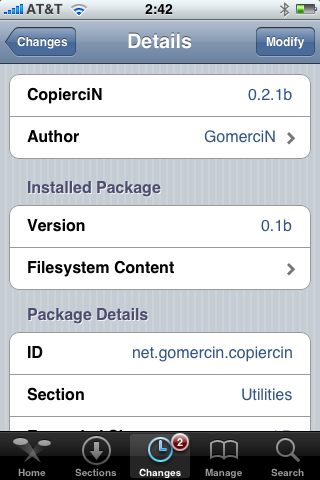
CopierciN updated to 0.2.1b

, copy/paste utility for iPhone, is updated. This application is avaliable in Cydia.
Minor changes:
Fixed:
- com.apple.MobileSMS.plist file is not overwritten now, it is modified instead.
Added:
- BiteSMS support
- Very basic “import from contacts” interface
Compatibility:
- Works with 2.1 firmware
iYo
Nice charger for an iPhone.
T-Mobile G1 vs AT&T Apple iPhone
iPhone’s security issue: fix it

You probably know about latest . The good news is that there is a solution to fix it.
Jonathan Zdziarski has deviced a way to disable this writing to disk, so that screenshots cannot be recovered. On a jailbroken iPhone, you can disable these screenshots with the following commands in MobileTerminal or through SSH connection to iPhone:
# rm -rf /var/mobile/Library/Caches/Snapshots
# ln -s /dev/null /var/mobile/Library/Caches/Snapshots
Screenshots themselves actually get written to /var/mobile/Library/Caches/Snapshots. So these commands delete this folder and symlink it to /dev/null, so the screenshots don’t get written to disk.
The side effect to this is that when resuming an application, you’ll get the default screen in the zoom-in effect. Once the application resumes, however, you’ll have your application screen back. For example, your mail application will always zoom to the front as if you had an empty inbox, but will quickly correct itself once the application resumes.
“To return to the default behavior, just delete the symlink and the directory will get recreated. Mind you, this has no effect on the many other pieces of data stored on the iPhone, and therefore your iPhone will always be at risk for leaking private data, especially to seasoned forensic examiners. Use at your own risk.”
via iphoneatlas