 iPhoneRoot.com

News from category ‘Unlock & Jailbreak’
iPhone 3GS jailbreak and unlock soon
And after the various Key and provocations made by GeoHotz, the DevTeam has decided to write a new article on the official blog with good news for all owners of an iPhone 3GS! The DevTeam has verified that the exploit called 24Kpwn (used for the first time to unlock the iPod Touch 2G) is still valid and it works wonderfully for iPhone 3GS.
It seems the new version of bootrom used by Apple in 3GS dates back in August, a few months before the release of 24Kpwn, so there was no time to solve the problem.
In addition, the new daemon released by the team under the name of ultrasn0w (unlock for iPhone 3G) will work with iPhone 3GS.
New versions of redsn0w (jailbreak) and ultrasn0w (unlock) with iPhone 3GS support will be released soon.
Jailbreak and firmware stats from PinchMedia
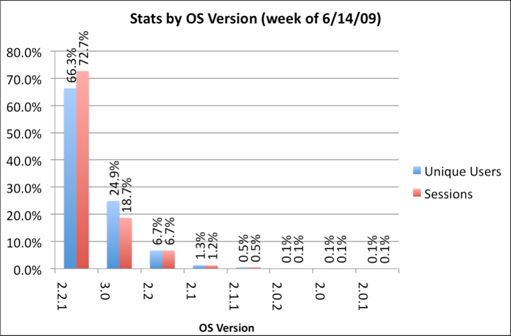
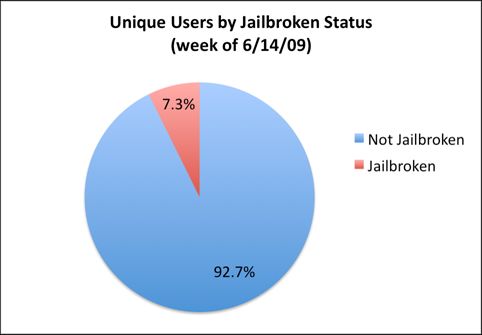
We just posted statistics from AdMob about firmwares on iPhones and iPods. Here are the numbers from another company - PinchMedia. This company deals with monitoring the use of applications.
The results below show that:
- most users (66%) use firmware 2.2.1,
- only 1 of 4 users installed the new 3.0 firmware,
- 7.3% of iPhone and iPod Touch owners performed jailbreak.
Easy way to enable tethering using Safari [Video]
Here's an extremely easy way to enable tethering on your iPhone 3G and 3GS (even on AT&T!) by just visiting a site on your iPhone's Safari. No jailbreaking needed. Here's where you go:
Then scroll down to the Tethering & Internet Settings, then choosing your country and provider. This works for both AT&T and T-Mobile, and will let you install the appropriate configuration. Just be careful though, that AT&T doesn't officially sponsor this and might charge you extra for using tethering while you're not supposed to.
And if this disables visual voicemail on your phone, just go and reset your network settings, and it should be fixed. If that doesn't work, try updating your phone with an older version of the AT&T carrier settings.
via gizmodo
iPhone 3GS jailbreak is fast approaching

GeoHotz published the codes of the RAM Disk for the new iPhone 3GS. It seems the Jailbreak of this device is possible.
Ramdisk Key
KEY: 44514633CE2AEAD62BCFA8836CDA4A3C KEY: 44514633CE2AEAD62BCFA8836CDA4A3C
and a little more...
7BDE483F8B1E9F19D22F9D8FDF753E02 7BDE483F8B1E9F19D22F9D8FDF753E02
Ultrasn0w: iPhone 3G Unlock for firmware 3.0 is ready
DevTeam released Ultrasn0w - application that will unlock your iPhone 3G with firmware 3.0. Here are the instructions:
- Ensure you have upgraded to iPhone OS 3.0
- Jailbreak your iPhone using redsn0w (this will also install Cydia)
- Run Cydia
- Please add the repo repo666.ultrasn0w.com to Cydia. That last “o” is actually the number zero “0”! If you use the letter “o” you’ll get an error.
- Search for ‘ultrasn0w’ in cydia or icy and install ultrasn0w
- Reboot your iPhone 3G
- T-Mobile USA users should disable 3G before using ultrasn0w
- Enjoy
 Leave a comment, read comments [2]
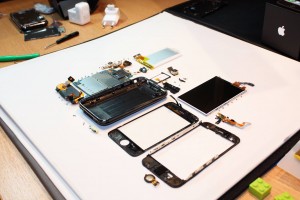
iPhone 3G S interlals photos
Firmware 3.0 jailbreak: RedSn0w for iPhone and iPod Touch
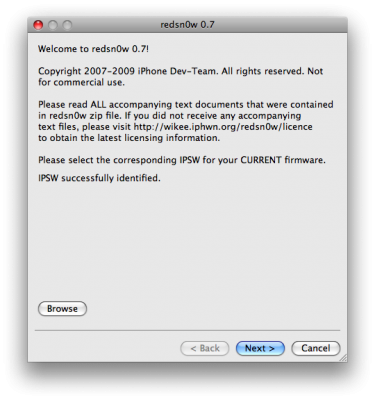
RedSn0w is an easy to use, multi-platform, multi-device jailbreaking and unlocking (iPhone 2G only) tool from DevTeam. It supports firmware 3.0 and iPhone 2G (original iPhone), the iPhone 3G (but not the 3GS) and also the iPod touch (first and second generation):
Leave a comment, read comments [3]
PwnageTool 3.0 for Mac OSX
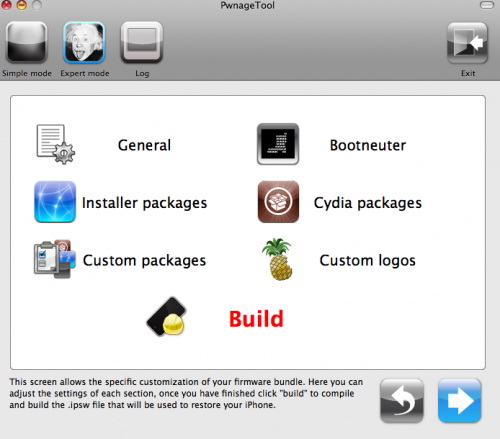
DevTeam released PwnageTool for firmware 3.0. Here is the list of supported deviced:
- iPhone 2G - jailbreak and unlock
- iPhone 3G - only jailbreak, use only with official unlocked iPhones
- iPod Touch - jailbreak
- iPod Touch 2G - not supported, use redsn0w
- iPod Touch 3GS - not supported
If you are using a 3G iPhone with yellowsn0w and rely on yellowsn0w to obtain cellular service, then you should NOT use PwnageTool right now. Ultrasn0w is not included with this release and therefore your baseband will be locked and unable to use an operator other than the official one it was bought for. Ultrasn0w will be release via APT (cydia and icy) soon (update: Ultrasn0w released). If you have an original iPhone (1st generation) then 3.0 unlock works with this PwnageTool release.
Yellowsn0w in its current form will NOT work with the baseband version that is present in the 3.0 update, you will need Ultrasn0w, which will be released sometime soon, Ultrasn0w will work with all iPhone 3G models (but not 3GS), even ones that were previously unlockable, Ultrasn0w will be released via APT (this means you can get it via Cydia or Icy).
PwnageTool will NOT work for the iPhone 3GS. PwnageTool WILL work for Original iPhone (1st Generation), Original iPod touch (1st Generation) and the iPhone 3G.
You can donwload PwnageTool 3.0 here.
Leave a comment, read comments [1]
Installer: now only a memory

The RipDev announced through the official blog that they will no longer support the Installer. That means that we will have only Cydia and Icy on firmware 3.0. Say goodbye to Installer.
iPhone OS 3.0 released

iPhone OS 3.0 is now available. Update via iTunes (you need 8.2) or download here. Firmwares are avaliable for all devices: iPhone, iPhone 3G, iPhone 3GS, iPod Touch and iPod Touch 2G. Here is a to official Apple site about this upgrade.
Do not upgrade if you want jailbreak and/or unlock. Just wait for DevTeam to release their software.
ultrasn0w - software unlock for firmware 3.0
Here is a demonstration of ultrasn0w - software jailbreak and unlock for new firmware 3.0.
iTunes 8.2 released

Apple released iTunes 8.2. You can download it .
This update breaks your ability to use QuickPwn, PwnageTool, and iPhone Tunneling Suite (ssh over usb). Many file managers do not work with iTunes 8.2 installed. We don’t think this is a deliberate breakage of these tools. It’s just that Apple has updated a low-level USB protocol. It may also break Palm Pre’s connection to the device.
So if you jailbreak, we recommend you not to update.
Fuzzyband replaces 3G Baseband Downgrader
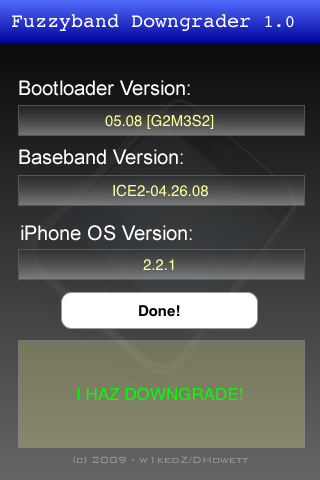
3G Fuzzyband Downgrader is now available in Сydia. This should be used instead of 3G Baseband Downgrader for downgrading the baseband on phones containing the 5.8 bootloader.
Benefits over original downgrader:
- Does version checking, will only downgrade if phone is eligible
- Downgrades all versions of baseband from 2.30.03 to 4.26.08 (3.0 beta5)
- Reports current bootloader version on screen
The original downgrader was a possibly dangerous app, as it relied on a failed downgrade to decide whether downgrading was possible. Anytime you run BBUpdaterExtreme you are potentially doing damage to the modem, so the version checking in this app minimizes the chances of accidently corrupting the baseband.
Cydia for firmware 3.0 is ready

Saurik had finished the bundle of Cydia for QuickPwn, working on Firmware 3.0. This includes major packages and extensions, like Mobile Substrate. Cydia for 3.0 will be ready before 3.0 firmware's release.
iPhone 3G Baseband Downgrade GUI [Cydia]
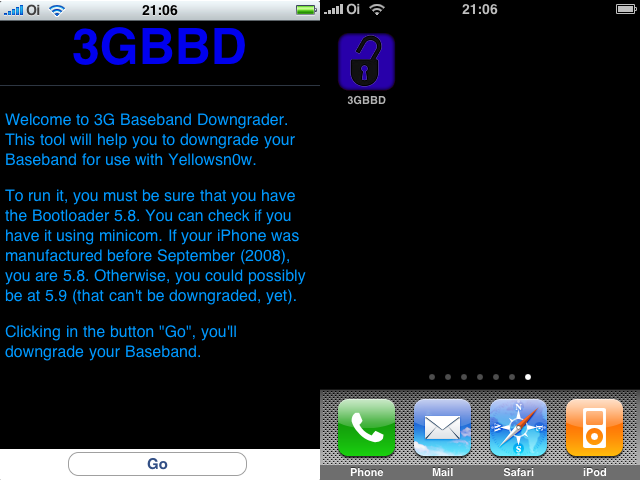
WARNING: This tool is NOT a toy. Just use it if you can’t use yellowsn0w on your 2.2.1 iPhone 3G. Otherwise, DO NOT INSTALL IT JUST TO TEST! YOU HAVE BEEN WARNED!
This software is for iPhone 3G users who upgraged to 2.2.1 firmware, but still need yellowsnow unlock. Yellowsnow doesn't work with 2.2.1 firmware's 02.30.03 baseband. So we need to downgrade it to version 02.28.00, that was used in 2.2 firmware. To downgrade it you need this software, that you can install via Cydia. It is very easy to use. Just download it from Cydia (called 3G BaseBand Downgrage), open the app and click Go.
The 3G Baseband Downgrade just works on iPhones 3G with Bootloader 5.8, that can be detected using minicom. If you don’t know how to use minicom, there’s a “simple” way to know if you are 5.8 or 5.9 (but this is not 100% sure). If your iPhone was manufactured before September (2008), you are 5.8. Otherwise, you are 5.9 (that can’t be downgraded).
Leave a comment, read comments [1]