 iPhoneRoot.com

News tagged ‘.NET’
xGPS 1.2.5

The new 1.2.5 xGPS version will appear in Cydia in a few hours. If you want to try it asap, you can manually download it .
Video of iPhone OS 3.0 Preview Event
Apple has posted the video of iPhone OS 3.0 Preview Event. Watch it .
Two thirds iPhones have latest 2.2.1 firmware
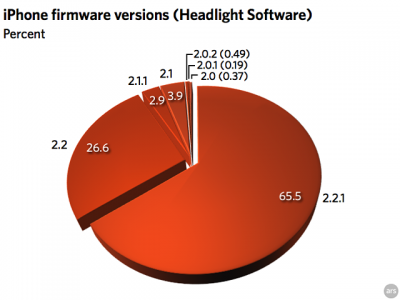
The data, covering one week and provided by Headlight Software, showed no one on 1.x, less than 2% total on 2.0.x, less than 7% on 2.1.x, 26.61% on 2.2, and a whopping 65.49% on the current firmware, 2.2.1 released January 27.
So two-thirds on the latest/greatest firmware, just over a quarter on the previous release. This meants iPhone users try to keep their firmware up to date.
via theiphoneblog
Our sponsor: http://3d-land.net/3D_category/sofas/
Mac Plus emulator for iPhone [Cydia]
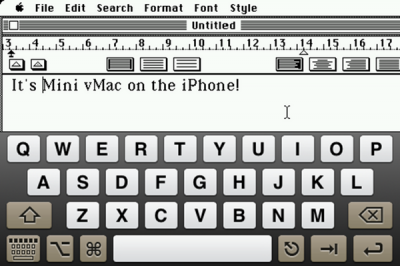
Mini vMac is a crazy emulator for jailbroken iPhones that lets you run the Mac Plus OS on your iPhone. This is not an official appstore product so you’ll have to jailbreak your iPhone and add namedfork.net to your Cydia repository list. It will appear under Emulation.
Clippy: Copy/paste on iPhone [Cydia]

Clippy adds copy-paste functionality to iPhone and iPod Touch. It is avaliable in (iSpazio.net repository) for iPhones. The only limitation is you cannot select text in Safari and copy it to clipboard.
QuickPwn & PwnageTool for 2.2 firmware

The new tools are out, thanks to DevTeam. Here are couple notes:
If you have a 3G iPhone and want potential soft unlock in the near future do NOT use QuickPwn, and do not use the official ipsw or the iTunes update process without using PwnageTool.
Preserving the baseband will give you the maximum chance for any upcoming software unlock. To upgrade your phone to 2.2 and preserve the state of the baseband you need to create a custom .ipsw with PwnageTool. This custom .ipsw will not contain the baseband update but of course will still allow all the cool new stuff from 2.2.
The ‘late 2008’ MacBook/air/pro line of computers have an issue with DFU mode. While it’s possible to go from Pwned 2.1 -> Pwned 2.2 (using PwnageTool), you can’t yet go from stock to pwned. If in any doubt use a different machine.
Here are download links:
Bittorrent Releases
- PwnageTool 2.2.1 for Mac OSX is SHA1 Sum - 3a91f2bf4f342baaa700ae7d35959d7ade186134
- QuickPwn 2.2 for Mac OSX is SHA1 Sum - 254b8af0e19870a4660b7b11e3b6f6ae1d6bc66f
- QuickPwn 2.2 for Windows is SHA1 Sum - ffdbc561224c61ffc2713cb6a6e696b6d429c4ca
Mac PwnageTool 2.2.1
Mac QuickPwn 2.2
Windows QuickPwn 2.2
Asterope game is free [AppStore, Free]

This is a nice game. It is now free, the price dropped from $2.99 to $0. But this is a limited time offer until sometime between Nov 3 - 7.

Here is an AppStore . Watch the video below.
Box.net for iPhone [AppStore, Free]

This tool lets you access your Box.net account directly from your iPhone.
Some features:
- Scroll through and view all the files and folders stored on Box.net account.
- Share individual files or entire folders of files stored on their Box.net accounts with any of their iPhone contacts
- Snap pictures, upload them to Box and share them
- Monitor updates to your Box.net account, such as files or folders added by you and people that are collaborating and contributing to your Box.net account
- Open work files such as Word, Excel, Powerpoint and PDF documents.
Box.net lite version is free: 1GB of online storage and 10GB of bandwidth a month. AppStore .
iRa - the most expensive iPhone app [AppStore]
iRa application is the most expensive iPhone application. It costs $899.99 (AppStore ). iRa provides the user with viewing and control of IP based surveillance equipment. The company recommends users contact a reseller/integrator to make sure the proper equipment is used to run the app.
Features include:
- Easily view many video feeds simultaneously
- Full screen video view
- PTZ (pan, tilt, zoom) control for camera motion
- Familiar finger drag and pinch controls
- Group cameras for quick access
- Automatic discovery of properly configured network cameras
Here is a demo video:
via macrumors
Record: one more free recoder [AppStore, Free]

Another nice application became free today. The price dropped from $1.99 to $0. The app is called Record (AppStore ). This is audio and voice recorder for iPhone.
Features:
- Launch and shake to start recording, or if you prefer, use the button on the lower right toolbar.
- Pause and resume recordings.
- Search recording titles.
- Organise recordings into folders.
- Setup smart folders based on keywords, or the location you recorded.
- Email recordings from your iPhone (15 minute recordings or shorter).
- Rename and reorder recordings.
- Seek and pause during playback.
- Compressed IMA4 AIFF format.
- Records when iPhone is locked.
NOTE: iPod Touch 2nd Gen users will need an Apple headset with microphone to use Record.
Veency: remote control your iPhone [Cydia]
This application is developed by Jay Freeman, the creator of the Cydia. Veency is a free app that allows iPhone owners to remotely control their iPhone from PC or Mac desktop via a VNC client.
Here are some of the features:
- Launch applications on your iPhone
- Reply to emails, text messages, and more
- Rearrange icons
- Lock/Unlock your iPhone
- Browse through Photos and Contacts
Of course you cannot do two finger gestures with this app. All other actions can be done with the click of your mouse. The only area in which Veency fails tragically at is when opening any video recording application on the iPhone.
This application is avaliable for jailbreaked iPhones via Cydia installer.
Be sure to restart your iPhone after installing Veency and connect to the server using a Wi-Fi connection. We recommend using UltraVNC or TightVNC to connect your Windows desktop. If you're using a Mac, we recommend Chicken VNC.
Here is a video demonstration:
Remote access software or remote desktop software is software that allows you to access a remote computer.
via readwriteweb
DiskAid
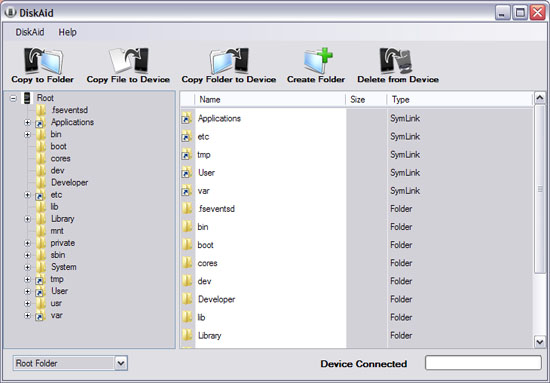
This is one more iPhone file manager. Quite good. I use , and I like this one. I'll definitely try it.
Download:
QuickPwn 2.1 for Windows is ready
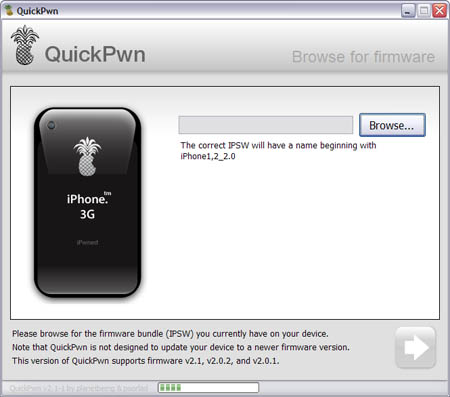
Congratulations, Windows users. The support for new firmware 2.1 is added. So here is what you can do:
- Support for FW v2.0.1, v2.0.2, v2.1.0
- Jailbreaking and Pwning iPhone 2G, iPhone 3G and iPod Touch
- Adding Cydia and Installer
- Replacing boot logos
- Unlocking iPhone 2G
Changes from QuickPwn RC3
- Support for firmware 2.1
- Auto-detection of firmware version, insistence on correct firmware bundle to prevent user epic fail.
- Use of iASign to activate to prevent bspatch epic fail.
- Removed buggy and never really tested 2.0 support
Sorry, no jailbreak for new iPod Touch and no unlock for iPhone 3G.
Here are download links:
Firmwares v2.1: ,
Related posts:
QuickPwn and PwnageTool for 2.1 firmware

Dev Team released QuickPwn and PwnageTool for firmware 2.1 (, ). It doesn't work with new iPod yet. Mac OS versions only for now.
Direct Downloads - QuickPwn
Direct Downloads - PwnageTool
 Leave a comment, read comments [2]
XiPhone
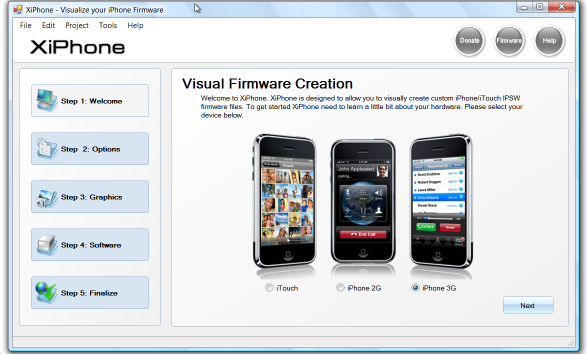
Recently a new project has been started, called XiPhone. It will be based on XPWN. So functionality similar to WinPwn and Pwnage will be present (jailbreak, unlock, etc). In addition to that developers plan to include:
- Auto downloading of stock firmware files from apple’s site (no need to hunt for it then select it)
- Wizard based modern GUI (created with .net 2.0), and Vista Style UI.
- Export of firmware settings so users can pass around an XML file which contains a configuration that works for them.
- Auto updates to the XiPhone software.
- Community based wallpapers used for Bootscreen, Restore screen and others
- Enabling / Disabling of options available based on the device you select.
Unfortunately, only Windows platform users will be able to use XiPhone.