 iPhoneRoot.com

News tagged ‘WiFi’
Remote Windows on iPhone
Citrix is porting XenApp to the iPhone. XenApp is a remote Windows application that is presently available for Mac, Windows and some mobile platforms. XenApp allows users to remotely log into their corporate networks to access their Windows applications.
The functionality seems similar to existing VNC clients for the iPhone, but Citrix's XenApp apparently transmits window display information rather than the raw graphics (wikipedia ). This is much better than VNC over network connections such as 3G and WiFi.
iPhone robot
This robot is made in Japan. The main part is a jailbroken iPhone 3G running some Ruby code. Other parts include an Arduino CPU, a TA7291P motor, and 4 AA batteries. The robot is controlled via WiFi from a nearby computer.
More pictures:
Free Translator [AppStore, Free]

This is a translator. It uses free Google Translate API. Users can choose between many languages including Chinese, Czech, Danish, Dutch, English, French, German, Hindi, Italian, Japanese, Korean, Polish, Portuguese, Romanian, Russian, Serbian, Spanish and Vietnamese.
Application is free, here is a to AppStore.
PS: It requires internet connection (WiFi, 3G, EDGE or regular GPRS).
Handshake: contact exchange app [AppStore, Free]

Handshake makes it easy to share your contact information and photos with people around you. Works across EDGE, WiFi, and 3g on the iPhone and iPod Touch.
The app is free (AppStore ), but it involves advertising. You can buy Handshake Premium (AppStore ) for $2.99, which is advertisement-free.
MID device: another iPhone killer?

Intel showed off a prototype handheld based on Moorestown, its upcoming Mobile Internet Device (MID) platform designed to enable a new generation of ultra-thin, touchscreen devices with extensive battery life.
Moorestown will consist of a system-on-a-chip (SOC), codenamed "Lincroft," which integrates a 45nm processor, graphics, memory controller and video encode/decode onto a single part. The platform will support a range of wireless technologies including 3G, WiMAX, WiFi, GPS, Bluetooth and mobile TV.
The divice will be avaliable sometime in the 2009-2010 time. Here is a video with presentation from IDF:
Skype for iPhone - now avaliable and is FREE [AppStore, Free]
Fring allows you to chat and interact with others on a variety of networks including Skype, MSN, GoogleTalk, AIM, Yahoo, Twitter, ICQ.
In addition, Fring offers voice over ip (VoIP) using the iPhone's WiFi connection. Features listed include:
- VoIP Calls over WiFi
- Instant Messaging
- Integrated dynamic contact list with real-time contact availability
- SIP integration
- Multiple Connection types
Fring supports SkypeOut and SIP which allows you to make calls to landline and mobile phones. Available for free via App Store. ()
via macrumors
 Leave a comment, read comments [1]
Updates in Cydia: iComing, myFox, LockDown
Couple more updates today.
 iComing allows you to be alerted when you are reaching a target location and / or send an sms to warn someone that you are coming. It uses GPS, GSM cells and WiFi. iComing updated to version 0.3.
 is an alternative browser for iPhone. Updated to version 1.3.
 allows users to protect iPhone applications with a password. Updated to version 4.0.
All these applications are avaliable via .
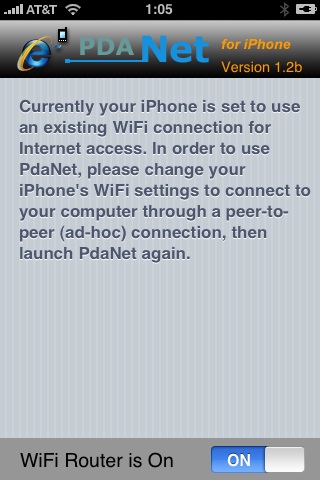
Connect desktop or notebook to internet through iPhone 3G
Many iPhone 3G users would like to use internet on a desktop or notebook through their phone. There were several solutions: iPhoneModem, NetShare, 3Proxy.. they all used SSH and SOCKS proxy. One of the working ones was described here .
Couple days ago PdaNet (fullname is PdaNet WiFi Router) was ported to iPhone. Now our life is much much easier.
iPhone 3G in China - no 3G, no WiFi?

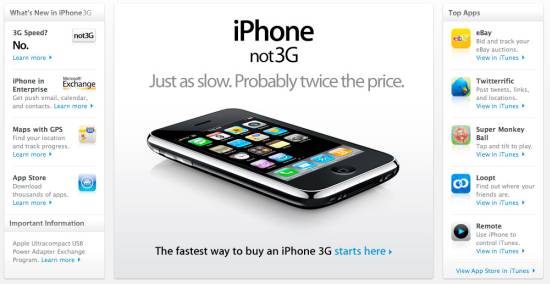
According to the South China Morning Post, the carrier wants Apple to supply a custom version of the iPhone which disables both W-CDMA (3G) and Wi-Fi. China Mobile doesn't yet have a 3G network in place and is afraid that customers will buy the iPhone and unlock it for use on more capable networks. This explains the lock-out for 3G, but killing the Wi-Fi is just spiteful.
Given that Apple ships an identical iPhone to every other world market, it's doubtful that China Mobile will get its way. But then, no other world market has a potential customer base of two billion people. If these functions are disabled, it will most likely be done in software.
via gadgetlab, gizmodo, cellular news
BossPrefs updated to v2.15

utilities updated. Here is a change log from 2.13b to 2.15:
- Thanks to Pumpkin of the dev team who figured it out for me, I fixed the 3g toggle to work just like the built in 3g toggle. No more wifi going on or off, no more taking 30 seconds. It's nice and fast.
- Updated the power icon to use the one sent by user Lucas (thanks).
- Added remapping internally into fast respring so now on 2.1 when you add an app and use fast respring, the app will show up. Note that regular respring does not do this.
- Properly signed the app removing the dependency on springbridge to launch apps off the dock. If you updated categories to 2.17 or greater and bossprefs to 2.15 or greater, you can uninstall springbridge.
Firmware 2.1 screenshots
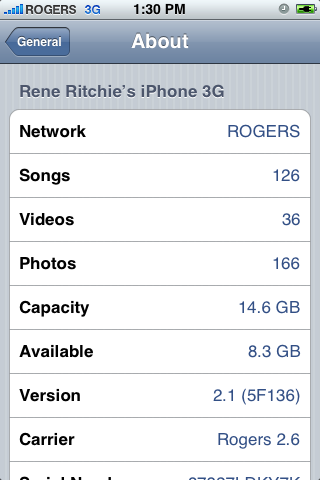
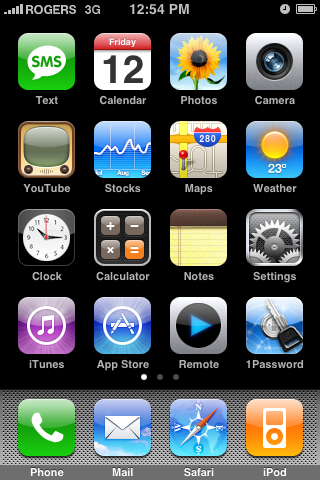
Theiphoneblog just published first screenshots of the new iPhones firmware 2.1.
Running 2.1 (5F136) now, and here’s what we’re noticing: WiFi works fine (tried on Apple and Linksys routers). New icons for connection type (3G/Edge) in the top bar. New blue filled and half-filled dots to describe state of video and podcasts (watched/listened to). Genius Playlists don’t seem to work as well as iTunes 8, at least for me, with lots of songs coming back as “not related”.
New iPod touch internals
The folks at iFixIt received a brand new iPod Touch, which they disassembled right away.
Both the touch's 3.5-inch LCD display as well as its Lithium-ion polymer battery are held in place with strips of double-sided tape. The WiFi antenna and circuitry, which are located at the top of the unit, are connected to the main logic board by wide orange cable that were designed to prevent external noise from interfering with the digital signals as they travel along the device, iFixIt says.
The specialty online reseller, which offers replacement parts for Macs and iPods, was particularly excited by its discovery of an unpublicized Broadcom BCM4325 Bluetooth chip within the device. The particular chipset supports BT2.1+EDR, and is necessary for the touch's built-in support of Nike+ iPod technology. It's unclear, however, whether the chip supports A2DP, which would pave the way for Apple and third-party developers to introduce stereo headphones for the player.
iFixIt also discovered brown rectangular component centered about three quarters of the way down the touch's logic board, which is suspected to be the device's speaker. Other discoveries include a 3.7 V Lithium-ion polymer battery with part number 616-0404, NAND flash memory from Micron with part number 29F64G08TAA, and an Apple-branded Samsung-manufactured ARM processor with SDRAM that's similar to the one employed by the iPhone.
via appleinsider and ifixit
Leave a comment, read comments [1]
Simplify Media for iPhone
With Simplify Media installed on your computer you can stream your home iTunes library to your mobile device wherever you may be. It will supposedly work over EDGE, 3G, or WiFi
Simplify Media for Mac/PC is a . Only the first 100,000 copies of the are free to download, after that it will be $3.99.
Qik: broadcast video live from iPhone, now with 2.0 support
There was a post about Qik:. At that time only users of old iPhones with firmware 1.1.4 could use it. Now there is a new version for 2.0 users.
You can get Qik with the iPhone 3G and old iPhone with firmware 2.0 by doing the following:
- If you have not already, you'll need to sign up at and receive an SMS from us to activate the application.
- Launch Cydia.
- Go to the "Sections" tab at the bottom and scroll down to "Multimedia."
- Under Multimedia, you will find Qik. Tap on it then select "Install" at the top right, then in the same spot tap "Confirm."
- Now you will see Qik get installed. You may hit the "Return to Cydia" button at the bottom or just quit Cydia when it is done installing.
- You'll now notice a "Qik" icon on your home screen - Go ahead and launch it.
- As long as your initial signup SMS/text message is still in your inbox for the first launch, your account will be linked to your device.
- Make sure you have 3G service or are on WiFi (edge is not sufficient enough to stream video) before you begin broadcasting.
- Hit record and enjoy Qik!
pTerm - terminal application in AppStore
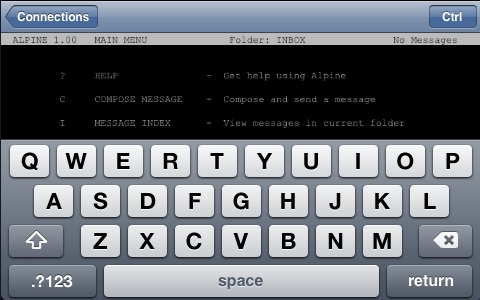
Newly arrived in the App Store is , an iPhone port of the PuTTY terminal emulator. It supports SSH and Telnet, among other things, and has a built-in Control key.
Eric Maland says that a 1.1 update is already on its way (it has been submitted to Apple and is awaiting approval). Unfortunately a handful of "major crashy bugs" (as Eric puts it) were discovered after the 1.0 release had been submitted.
Planned features for future releases include multiple simultaneous connections, custom sizes and colors, port forwarding and lots more.
And in the meantime, if you download and experience crashy behavior, Eric's message is: be patient. The fixes are done, but when they reach the Store is out of his hands.
pTerm is $4.99US in the US
More screenshots and the list of features: