 iPhoneRoot.com

News tagged ‘EDGE’
Handshake: contact exchange app [AppStore, Free]

Handshake makes it easy to share your contact information and photos with people around you. Works across EDGE, WiFi, and 3g on the iPhone and iPod Touch.
The app is free (AppStore ), but it involves advertising. You can buy Handshake Premium (AppStore ) for $2.99, which is advertisement-free.
Record: one more free recoder [AppStore, Free]

Another nice application became free today. The price dropped from $1.99 to $0. The app is called Record (AppStore ). This is audio and voice recorder for iPhone.
Features:
- Launch and shake to start recording, or if you prefer, use the button on the lower right toolbar.
- Pause and resume recordings.
- Search recording titles.
- Organise recordings into folders.
- Setup smart folders based on keywords, or the location you recorded.
- Email recordings from your iPhone (15 minute recordings or shorter).
- Rename and reorder recordings.
- Seek and pause during playback.
- Compressed IMA4 AIFF format.
- Records when iPhone is locked.
NOTE: iPod Touch 2nd Gen users will need an Apple headset with microphone to use Record.
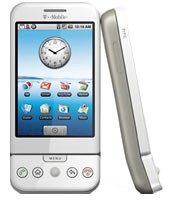
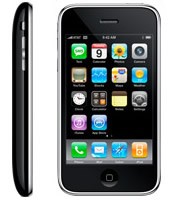
iPhone 3G and G1 specs
The specs are taken from and .
 |
 |
|
| CPU | Qualcomm® MSM7201A™, 528 MHz | Samsung ARM11 |
| Memory | ROM: 256 MB, RAM: 192 MB | 8-16 Gb |
| Dimentions | 117.7 mm x 55.7 mm x 17.1 mm | 115.5 mm x 62.1 mm x 12.3 mm |
| Weight | 158 grams | 133 grams |
| Display | 3.2-inch 320 x 480 | 3.5-inch 320 x 480 |
| Communications | HSDPA/WCDMA 1700, 2100 MHz (3G)
GSM/EDGE 850, 900, 1800, 1900 MHz Wi-Fi 802.11b/g Bluetooth 2.0 + EDR GPS |
UMTS/HSDPA 850, 1900, 2100 MHz (3G)
GSM/EDGE 850, 900, 1800, 1900 MHz Wi-Fi 802.11b/g Bluetooth 2.0 + EDR Assisted GPS |
| Control | Trackball with Enter button
QWERTY keyboard |
MultiTouch |
| Camera | 3.2 megapixel | 2.0 megapixel |
| Сonnectors | HTC ExtUSB™(mini-USB 2.0 and audio jack in one)
microSD™ |
3.5-mm stereo minijack |
| Battery | Talk time:
350 min (3G) 400 min (GSM) Standby time: up to 400 hours |
Talk time:
300 min (3G) 600 min (GSM) Standby time: up to 300 hours |
via habrahabr
QuickPwn 2.1 for Windows is ready
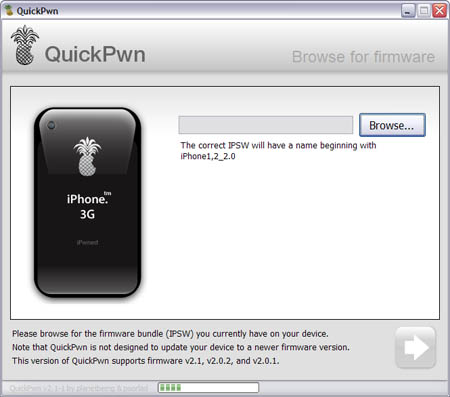
Congratulations, Windows users. The support for new firmware 2.1 is added. So here is what you can do:
- Support for FW v2.0.1, v2.0.2, v2.1.0
- Jailbreaking and Pwning iPhone 2G, iPhone 3G and iPod Touch
- Adding Cydia and Installer
- Replacing boot logos
- Unlocking iPhone 2G
Changes from QuickPwn RC3
- Support for firmware 2.1
- Auto-detection of firmware version, insistence on correct firmware bundle to prevent user epic fail.
- Use of iASign to activate to prevent bspatch epic fail.
- Removed buggy and never really tested 2.0 support
Sorry, no jailbreak for new iPod Touch and no unlock for iPhone 3G.
Here are download links:
Firmwares v2.1: ,
Related posts:
Block ads in Safari browser
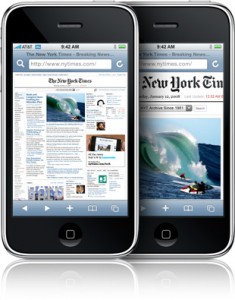
Jamesisbored published a guide, that shows how to block ads, that show up in Safari browser during web surfing.
MobileSafari has one major drawback. Up until now, there was no way to block ads. Ads increase the load time of a webpage, and especially on EDGE cause the internet to crawl. Blocking them will give you a lot of extra speed. This is one of the simplest hacks available for your iPhone. You will need to be Jailbroken and have the 2.0 Update, or later.
- Connect to your iPhone through SSH, iPhoneBrowser, or some other tool.
- Navigate to /etc/.
- Now download replacement hosts file. Replace iPhone's file with this one.
- Restart your iPhone!
This hack has been tested and confirmed to be working on the iPhone 2.1 Update.
QuickPwn and PwnageTool for 2.1 firmware

Dev Team released QuickPwn and PwnageTool for firmware 2.1 (, ). It doesn't work with new iPod yet. Mac OS versions only for now.
Direct Downloads - QuickPwn
Direct Downloads - PwnageTool
 Leave a comment, read comments [2]
Firmware 2.1 screenshots
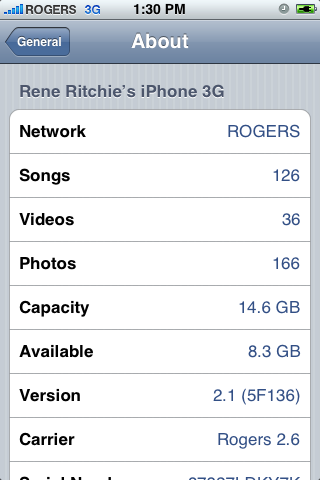
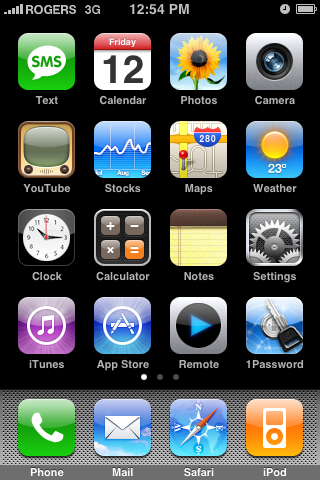
Theiphoneblog just published first screenshots of the new iPhones firmware 2.1.
Running 2.1 (5F136) now, and here’s what we’re noticing: WiFi works fine (tried on Apple and Linksys routers). New icons for connection type (3G/Edge) in the top bar. New blue filled and half-filled dots to describe state of video and podcasts (watched/listened to). Genius Playlists don’t seem to work as well as iTunes 8, at least for me, with lots of songs coming back as “not related”.
iPod nano internals
After folks from iFixIt disassembled iPod Nano:
Separately, iFixIt dissected the new iPod nano and observed that the unit's 3.2 mm wide dock connector "looks pretty big compared to the iPod" itself, making it unlikely that Apple will be able to slim down player any further without developing a new dock connector.
A particularly surprising find was that the new nano uses a real piece of curved glass, "about .7 mm thick on the edges, and 1.7 mm thick in the middle," to cover the LCD display. The glass is said to be completely separate from the player's anodized aluminum enclosure, with nothing holding it in place outside the force of the adjacent components.
The LCD itself "is actually almost exactly the same size as the 3rd Gen Nano LCD," iFixIt said, with the only difference being a resolution of 240x320 rather than 320x240.
Among the nano's internal components are a Apple-branded ARM processor manufactured by Samsung in July with on-board DRAM on-package, three other small Apple-branded chips of unknown origin, and an 8 GB Toshiba flash chip. "Unfortunately, the battery is soldered to the logic board," iFixIt said. "Replacing the Nano's battery isn't going to be easy."
via appleinsider and ifixit
iPhone's firmware 2.0.2 is out
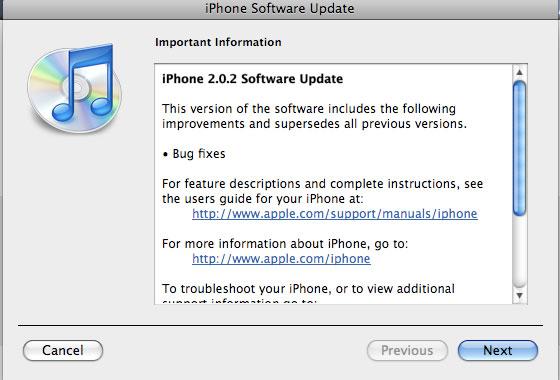
Apple just released new firmware for iPhone - version 2.0.2. As usual, all the company mentioned was that the update includes "Bug fixes."
Notes on the release follow:
- No new settings appear to have been included.
- Some users report faster browsing, though this may be due to cleared cache.
- Typing lag may be reduced.
- No consensus on improved 3G connectivity.
- iPod Touch firmware 2.0.2 also released.
But as always, do not update until we get word on a jailbreak.
Links for firmware downloads: , .
Installer 4.0b5 is out

Installer 4.0 beta 5 is avaliable now.
What's new:
- Many visual enhancements and fixes in regards to source and packages display.
- Fixed an issue with failing installs with dependencies under some circumstances.
- Fixed a bug causing package information to be displayed incorrectly (size 0 bytes) on the first access, or when the custom information HTML page (such as packages from Big Boss' repository) was not displayed.
- When updating a package, and one of its dependencies also has an update available, the dependency will be updated as well.
- The package icons will only be downloaded when on the Wi-Fi to help you save on bandwidth.
- The repositories are being refreshed upon Installer.app launch so you always stay on the bleeding edge with the updates. This is exeperimental behavior and we're not yet sure it will make it to the final release.
- Fixed a script command Confirm that was returning invalid button index for the "OK" button.
- Lots and lots of both cosmetic and internal application core fixes that improve the overall performance, presentation and stability of the application.
Community Sources package is updated. It now includes a repository for modmyifone.com (lot's of stuff there) and iphone-notes.de (BSD Subsystem and OpenSSH), as well as numerous carrier bundles and other useful stuff.
via RipDev
Simplify Media for iPhone
With Simplify Media installed on your computer you can stream your home iTunes library to your mobile device wherever you may be. It will supposedly work over EDGE, 3G, or WiFi
Simplify Media for Mac/PC is a . Only the first 100,000 copies of the are free to download, after that it will be $3.99.
Qik: broadcast video live from iPhone, now with 2.0 support
There was a post about Qik:. At that time only users of old iPhones with firmware 1.1.4 could use it. Now there is a new version for 2.0 users.
You can get Qik with the iPhone 3G and old iPhone with firmware 2.0 by doing the following:
- If you have not already, you'll need to sign up at and receive an SMS from us to activate the application.
- Launch Cydia.
- Go to the "Sections" tab at the bottom and scroll down to "Multimedia."
- Under Multimedia, you will find Qik. Tap on it then select "Install" at the top right, then in the same spot tap "Confirm."
- Now you will see Qik get installed. You may hit the "Return to Cydia" button at the bottom or just quit Cydia when it is done installing.
- You'll now notice a "Qik" icon on your home screen - Go ahead and launch it.
- As long as your initial signup SMS/text message is still in your inbox for the first launch, your account will be linked to your device.
- Make sure you have 3G service or are on WiFi (edge is not sufficient enough to stream video) before you begin broadcasting.
- Hit record and enjoy Qik!
iPhone 3G: advertising and real world
We all saw iPhone 3G . The funny thing is that in real world everything is much slower than in advertising.
However new iphone 3G is really faster than the old one:
WinPwn 2.0.0.4 with support of 2.0.1 firmware
released just a day ago. And now WinPwn - iPhone jailbreaker and unlocker for windows is avaliable. The main new feature - it supports firmware 2.0.1.
Download 2.0.0.4: [] []
Download firmwares: iPhone , , , iPhone 3G ,
2.0.0.4 features:
- Support for both 1.1.4, 2.0, 2.0.1
- Root partition resize support
- Installer support
- Support for WinXP and Vista 32/64bit.
Notes are as usual:
- You MUST do a full uninstall of winpwn before installing the new version
- Make sure you have the latest version of iTunes (from 7.7)
- WinPwn uses 300MB of ram at peak due to the ipsw being extracted in memory
- You must first click browse and load an IPSW to use WinPwn (i thought this was clear)
- For 2.0 only the *5A347_Restore.ipsw files are valid. The 345 image will not work
- If you see Failed to load image catalog/payload catalog, this is fine and won’t cause problems
- If you already have service with AT&T do not activate or install Youtube Fix
- As usual jailbreak for iPhone and iPhone 3G, unlock only for iPhone.
- It is recommended to use at least 550mb partition size to accommodate a space issue that causes some folks errors such as “the ipsw failed to create”.
How to:
pTerm - terminal application in AppStore
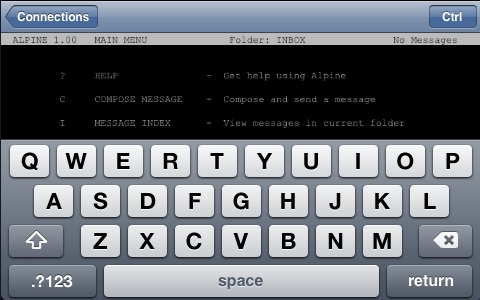
Newly arrived in the App Store is , an iPhone port of the PuTTY terminal emulator. It supports SSH and Telnet, among other things, and has a built-in Control key.
Eric Maland says that a 1.1 update is already on its way (it has been submitted to Apple and is awaiting approval). Unfortunately a handful of "major crashy bugs" (as Eric puts it) were discovered after the 1.0 release had been submitted.
Planned features for future releases include multiple simultaneous connections, custom sizes and colors, port forwarding and lots more.
And in the meantime, if you download and experience crashy behavior, Eric's message is: be patient. The fixes are done, but when they reach the Store is out of his hands.
pTerm is $4.99US in the US
More screenshots and the list of features: