 iPhoneRoot.com

News tagged ‘iPod Touch’
Jelly Car: cool game for free [AppStore, Free]

JellyCar is a driving/platforming game for both iPhone and iPod touch. The game is about driving a squishy car through squishy worlds, trying to reach the exit. JellyCar features soft body physics for all of the objects in the world. Also your car can transform for a limited time to aid progression through the level.
Features:
- Soft-body physics!
- Simple touch and tilt controls
- 12 levels to play
- original music by Matt McCarthy
- full sound effects
- option to listen ti iPod music while playing the game.
Really cool game for free in AppStore ().
GPS for old iPhone
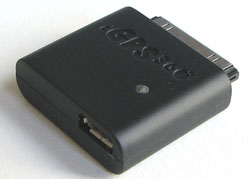
The iGPS360 is a $75 device that brings full GPS to your jailbroken iPhone or iPod touch. Available for preorder now. Check site if you're interested.
via gizmodo
WordPress for iPhone [AppStore, Free]

This is the first open source app that lets you write posts, upload photos, and edit your WordPress blog from your iPhone or iPod Touch. Avaliable via AppStore for free ().
an unknown error 13014

Several users have problems syncing their iPhones after updating to . The most common error message is “an unknown error 13014.”
As one reader writes:
“I just downloaded and installed iTunes 8.0.1 on my iMac running 10.5.5, and synced my non-3G iPhone. I immediately received an error message stating that “The phone ‘[my iPhone's name]‘ cannot be synced. An unknown error occurred (13014). Thinking I’d probably be able to fix it by resetting the phone, I did so.
Now, 15 minutes into the reset, the phone is syncing nicely with no major issues, except that I’m still getting prompted that it can’t be synced about every 15 seconds or so. It’s even kind enough to queue up the errors so that if I ignore them for a few minutes I can go back and just click ‘OK’ half a dozen times and then go back to whatever I was working on. No idea of the cause, outside of the iTunes upgrade.”
Users are reporting similar issues with the iPod touch.
In some cases, simply restarting the host computer and restarting the iPhone can resolve this issue. In other cases, this procedure is unsuccessful.
The other workaround is to reinstall iTunes. If this doesn't help, uninstall it and install iTunes version 8.0.
via iphoneatlas
Jailbreak on firmware 2.2 beta 1
appeared just a day ago. It seems that DevTeam never sleeps 🙂 They published a screenshot of jailbreaked iPhone 2G with this new firmware:
It runs Terminal.app (non-apple application) running on 2.2b1 firmware. Thay say that version 2.2 is still vulnerable to pwnage and quickpwn on everything but iPod Touch 2G.
No news about software unlock for iPhone 3G or jailbreak for iPod Touch 2G.
QuickPwn 2.1 for Windows is ready
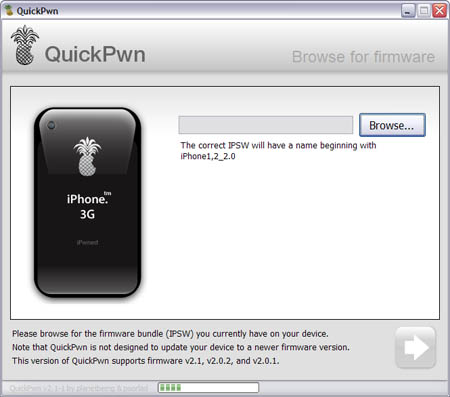
Congratulations, Windows users. The support for new firmware 2.1 is added. So here is what you can do:
- Support for FW v2.0.1, v2.0.2, v2.1.0
- Jailbreaking and Pwning iPhone 2G, iPhone 3G and iPod Touch
- Adding Cydia and Installer
- Replacing boot logos
- Unlocking iPhone 2G
Changes from QuickPwn RC3
- Support for firmware 2.1
- Auto-detection of firmware version, insistence on correct firmware bundle to prevent user epic fail.
- Use of iASign to activate to prevent bspatch epic fail.
- Removed buggy and never really tested 2.0 support
Sorry, no jailbreak for new iPod Touch and no unlock for iPhone 3G.
Here are download links:
Firmwares v2.1: ,
Related posts:
iPod Touch 2G hack soon?
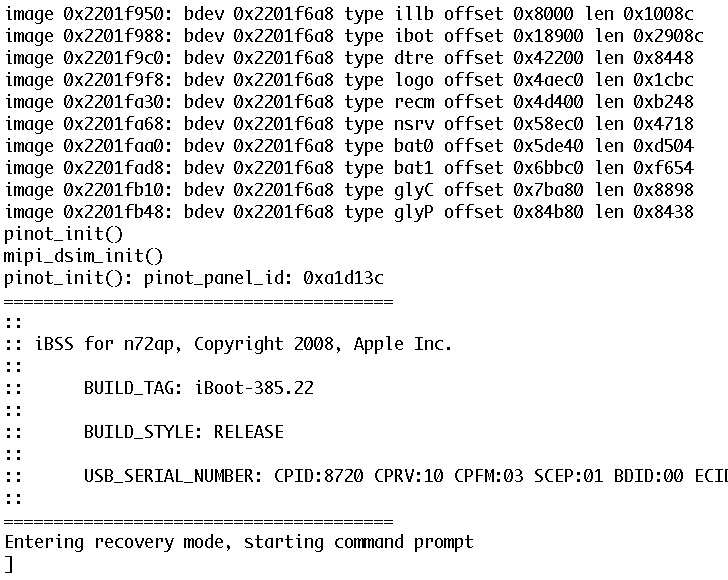
DevTeam published first screenshot about their procress of hacking (jailbreaking, pwning) new iPod Touch. New device has new hardware, that might be used in future iPhones. The DevTeam work just started, so the fun part is coming.
iTunes 8: If Windows Vista displays a blue screen error message when connecting iPhone or iPod
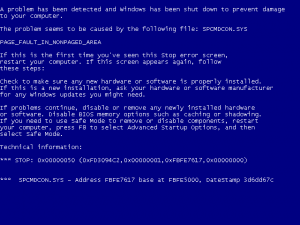
Apple published a kb for this case. Here it is:
Symptoms
After installing iTunes 8 for Windows, some users may see a blue screen error message when connecting iPhone or iPod to a Windows Vista computer. In some cases, the computer may immediately restart when connecting iPhone or iPod to the computer.
Products Affected
iPod, iPhone, iPod touch, Windows Vista, iPod touch (2nd generation), iTunes 8 for Windows, iPhone 3G
Resolution
iPod nano internals
After folks from iFixIt disassembled iPod Nano:
Separately, iFixIt dissected the new iPod nano and observed that the unit's 3.2 mm wide dock connector "looks pretty big compared to the iPod" itself, making it unlikely that Apple will be able to slim down player any further without developing a new dock connector.
A particularly surprising find was that the new nano uses a real piece of curved glass, "about .7 mm thick on the edges, and 1.7 mm thick in the middle," to cover the LCD display. The glass is said to be completely separate from the player's anodized aluminum enclosure, with nothing holding it in place outside the force of the adjacent components.
The LCD itself "is actually almost exactly the same size as the 3rd Gen Nano LCD," iFixIt said, with the only difference being a resolution of 240x320 rather than 320x240.
Among the nano's internal components are a Apple-branded ARM processor manufactured by Samsung in July with on-board DRAM on-package, three other small Apple-branded chips of unknown origin, and an 8 GB Toshiba flash chip. "Unfortunately, the battery is soldered to the logic board," iFixIt said. "Replacing the Nano's battery isn't going to be easy."
via appleinsider and ifixit
New iPod touch internals
The folks at iFixIt received a brand new iPod Touch, which they disassembled right away.
Both the touch's 3.5-inch LCD display as well as its Lithium-ion polymer battery are held in place with strips of double-sided tape. The WiFi antenna and circuitry, which are located at the top of the unit, are connected to the main logic board by wide orange cable that were designed to prevent external noise from interfering with the digital signals as they travel along the device, iFixIt says.
The specialty online reseller, which offers replacement parts for Macs and iPods, was particularly excited by its discovery of an unpublicized Broadcom BCM4325 Bluetooth chip within the device. The particular chipset supports BT2.1+EDR, and is necessary for the touch's built-in support of Nike+ iPod technology. It's unclear, however, whether the chip supports A2DP, which would pave the way for Apple and third-party developers to introduce stereo headphones for the player.
iFixIt also discovered brown rectangular component centered about three quarters of the way down the touch's logic board, which is suspected to be the device's speaker. Other discoveries include a 3.7 V Lithium-ion polymer battery with part number 616-0404, NAND flash memory from Micron with part number 29F64G08TAA, and an Apple-branded Samsung-manufactured ARM processor with SDRAM that's similar to the one employed by the iPhone.
via appleinsider and ifixit
 Leave a comment, read comments [1]
Apple vs jailbreakers

The only way Apple can fix the exploit that the iPhone Dev Team has been using to Jailbreak iPhone’s and iPod Touch’s is to fix their hardware, but it seems Apple has figured out a way to program iTunes 8 to detect and prevent the Pwnage exploit. The screenshot below from iTunes 8 using a Pwned ipsw (with an unPwned device attached) is one example.
The Dev Team reacted promptly:
“The nice thing about iTunes decisions is that we can provide you with patches to counter them. We have one such patch already for Mac iTunes 8 for iPod touch. We’ll be working out the full suite of patches for all the combinations over the next week.”
Dev Team also published two interesting screenshots:


iTunes 8

iTunes 8 includes Genius, which makes playlists from songs in your library that go great together. Genius also includes Genius sidebar, which recommends music from the iTunes Store that you don’t already have.
With iTunes 8, browse your artists and albums visually with the new Grid view; download your favorite TV shows in HD quality from the iTunes Store; sync your media with iPod nano (4th generation), iPod classic (120GB), and iPod touch (2nd generation); and enjoy a stunning new music visualizer.
iTunes 8 and are now accessible with VoiceOver on your Mac.
It is available via Software Update, or download it from

ApolloIM and MobileChat are joining

Both and were jailbreak applications for chatting on the go with your /iPod touch. Alex Schaefer, ApolloIM's founder, has recently joined the MobileChat development team. In a by the developer of MobileChat, he said that both applications underwent "friendly competition" and that, while there was no clear winner in the iPhone IM business, users got the benefit from the ongoing competition.
Now that Alex has joined the other team, you can expect that MobileChat will only get better. The goes on to mention that Alex will be working on stability and user experience for the application.
via tuaw
PS: As for me, I like much better.
QuickPwn updated to 1.2.0
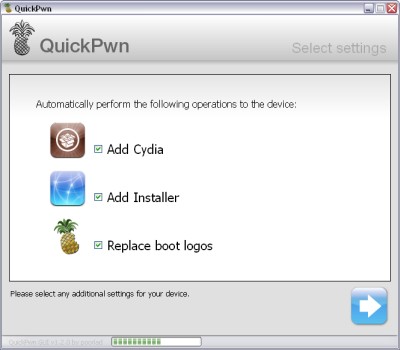
QuickPwn for Windows is updated. Support for all 2.x firmwares is added. So now you can QuickPwn and jailbreak the device if it is running 2.0, 2.0.1 or 2.0.2.
DevTeam reminds that it is still beta software, so usual rules apply, no complaints if anything goes wrong and use the tool at at your own risk!
Using QuickPwn does not update the firmware itself, this tool is designed to ‘Pwn’ (the ability to install future custom non-Apple firmwares) , ‘Jailbreak’ and install Installer and/or Cydia on a given device. If your device is running 2.0.1 and you QuickPwn it, it’ll still be running 2.0.1, although it will now be Pwned and Jailbroken. It will also activate (not unlock) devices that are being used outside of their intended territories and cannot be activated using iTunes.
If you want to update to 2.0.2 then use the normal iTunes update to get to 2.0.2 and then use QuickPwn to Pwn, Jailbreak and Activate, remember that the 2.0.2 update includes a baseband update for the 3G iPhone, so depending what your long term intentions are for the phone, update wisely, of course in the upcoming PwnageTool application you’ll be able to create a custom ipsw without the baseband update enabled.
PS: Mac OS version is on it's way.
LockDown - protect your apps with a password

LockDown v3.0 is out with a lot of improvements. If you need to be able to lock certain apps with a password so you can hand your phone off to someone else for a bit, this is the app for you. There is also a lost password protection.
Avaliable in Cydia installer for iPhone with firmware 2.0 and above.