 iPhoneRoot.com

News from category ‘Firmware’
Next generation iPhone proof in firmware 2.2.1
MacRumors has discovered that iPhone's firmware has evidence of the next generation iPhone which has been designated "iPhone2,1". This new model number can be found in the USBDeviceConfiguration.plist in an unencrypted firmware.

Apple uses these models numbers to distinguish between different hardware models. The original iPhone carries the model number of "iPhone 1,1" while the 3G iPhone is labeled "iPhone 1,2". These numbers do not change for simple storage increases and instead represent functionally different devices. Similarly, the iPod Touch was originally introduced as the "iPod 1,1" and the most recent hardware revision was labeled "iPod2,1".
Meanwhile, at least one developer has noticed actual "iPhone2,1" models in use based on PinchMedia ad serving reports.

via macrumors
iPhone 2.2.1 SDK

Apple has release an update to their SDK (software developer kit). This was done hours after apple releases their update to their iPhone iTouch firmware. To download the sdk you just need to log in to the .
DevTeam says do not update to 2.2.1
Here is an anouncement from DevTeam. They suggest to not update to the new yet. You can loose the ability to jailbreak and unlock. Just wait for them to check everything and release new .
New firmware 2.2.1

Apple has just pushed out Firmware 2.2.1 for iPhone and iPhone 3G, iPod touch, iPod touch 2G. You can download them . Firmware 2.2.1 cannot be jailbroken at this time, so unofficial application users should wait for new version of QuickPwn from DevTeam. Unlock (yellowsn0w) also doesn't work for 2.2.1.
This update contains bug fixes and improvements:
- Version 2.2.1 (Build 5H11)
- Modem Firmware 02.30.03
- Improved general stability of Safari
- Fixed issue where some images saved from Mail do not display correctly in the Camera Roll
- Fixed issue that caused some Apple Lossless (ALAC) to skip during playback
- Unofficially Apple fixed SMS bug: users suddenly experience inability to send SMS text messages on the iPhone 3G, receiving the message "error sending" upon attempting to send.
iPhone 3G unlock tutorial
Dev Team finally made it. They created software called yellowsn0w, that unlocked iPhone 3G. Now you can use any carrier you want. I successfully unlocked my US version.It works much more stable than sim proxy method.
Please, back up everything on your iPhone before you start, just in case. Everything you do is your responsibility. I had to go through all 4 steps to make my iPhone 3G work. I used only my new sim without sim proxy.
Here are the steps:
 Leave a comment, read comments [3]
iPhone 3G unlock on Dec 31

Good news! DevTeam anounced release date for iPhone 3G unlock. It is December 31, 2008. Supported firmware is 2.1, modem baseband 2.11.07 and earlier.
QuickPwn & PwnageTool for 2.2 firmware

The new tools are out, thanks to DevTeam. Here are couple notes:
If you have a 3G iPhone and want potential soft unlock in the near future do NOT use QuickPwn, and do not use the official ipsw or the iTunes update process without using PwnageTool.
Preserving the baseband will give you the maximum chance for any upcoming software unlock. To upgrade your phone to 2.2 and preserve the state of the baseband you need to create a custom .ipsw with PwnageTool. This custom .ipsw will not contain the baseband update but of course will still allow all the cool new stuff from 2.2.
The ‘late 2008’ MacBook/air/pro line of computers have an issue with DFU mode. While it’s possible to go from Pwned 2.1 -> Pwned 2.2 (using PwnageTool), you can’t yet go from stock to pwned. If in any doubt use a different machine.
Here are download links:
Bittorrent Releases
- PwnageTool 2.2.1 for Mac OSX is SHA1 Sum - 3a91f2bf4f342baaa700ae7d35959d7ade186134
- QuickPwn 2.2 for Mac OSX is SHA1 Sum - 254b8af0e19870a4660b7b11e3b6f6ae1d6bc66f
- QuickPwn 2.2 for Windows is SHA1 Sum - ffdbc561224c61ffc2713cb6a6e696b6d429c4ca
Mac PwnageTool 2.2.1
Mac QuickPwn 2.2
Windows QuickPwn 2.2
Unofficial Firmware 2.2 jailbreak

Do you want to jailbreak firmware 2.2? There are many tutorials, guides and howto's came out recently. But I recommend you to stay away from these advices and wait for an official utility with 2.2 support QuickPwn or Pwnage tool.
Leave a comment, read comments [1]
DevTeam about firmware 2.2

DevTeam says that 2.2 update SHOULD NOT be applied using iTunes if you want the chance of a soft-unlock in the near future. Use new version of PwnageTool (not avaliable yet, but will be soon).
Some fact:
- The 2.2 firmware for 3G contains a baseband update for the 3G iPhone
- The 2.2 firmware for 2G (1st gen iPhones) doesn’t contain a baseband update and the baseband is still at 04.05.04
- Pwnage technique (and therefore the Jailbreak) isn’t affected, but and do not support this release as yet, so DO NOT install 2.2 using iTunes as you will lose your
Firmware 2.2 released
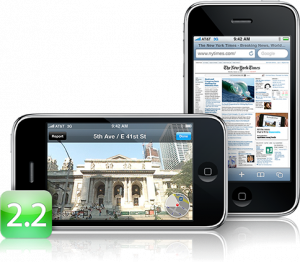
Apple released new firmware version 2.2. are the direct links to all firmwares, including 2.2.
What's new in 2.2:
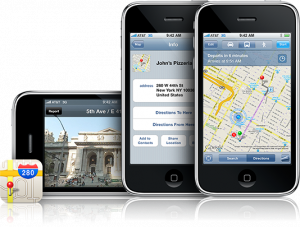
- Enhancements to Maps
- - takes you on a virtual walking tour: Navigate street-level photographs of places you've located in Maps.
- Public transit and walking directions - Get walking directions, find public transit schedules, check fares, and estimate your travel time.
- Display address of dropped pins
- Share location via email - Tap the Share Location button to send an email that includes a Google Maps URL.
Jailbreak for iPhone firmware 2.2 beta 2
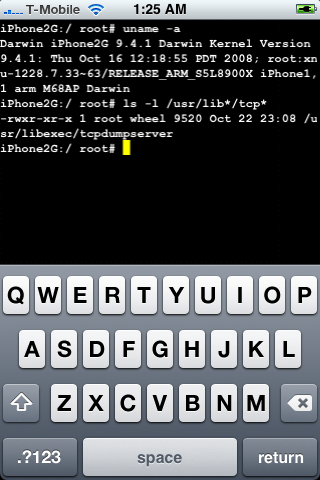
DevTeam posted a screenshot of jailbreaked and unlocked iPhone 2G with new firmware . This is cool that Apple still doesn't have anything to prevent this.
Related post:
iPhone firmware 2.2 beta 2
Apple has seeded iPhone 2.2 Firmware Beta 2 and has fully enabled Google Street View. Beta 1 of iPhone 2.2 had hidden APIs related to the Street View for Google Maps, but was not enabled.
The seed notes also indicated that Line-in audio accessories are now supported in the SDK.
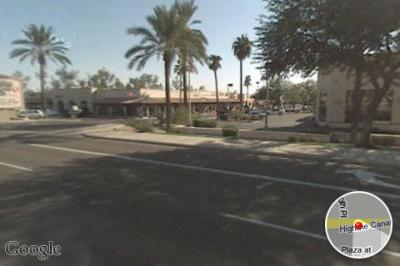
via theiphoneblog and macrumors
Cydia and Installer Sources (firmware 2.x)

Sources
app.ifonetec.com: http://app.ifonetec.com/cydia/
cake.mapleidea.com: http://cake.mapleidea.com/cydia/
BigBoss & Planet-iPhones: http://apt.bigboss.us.com/repofiles/cydia/
Hack&Dev.org: http://iphone.hackndev.org/apt/
Hackers.nl: http://apt.hackers.nl/
iClarified: http://cydia.iclarified.com/
iPhone-notes.de Repo: http://apt.iphone-storage.de/
ispaziorepo.com: http://ispaziorepo.com/cydia/apt/
ModMyiFone.com: http://apt.modmyifone.com/
iPhone 3G with modified baseband
DevTeam, the team that is working on iPhone 3G unlock, publishd a screenshot. This screenshot shows, that a modified baseband is running. This is one more small step towards iPhone 3G software unlock.
The video is avaliable .
Tutorial: How to perform Jailbreak, Activation and Unlock (Windows)
UPDATE: Please, consider reading our Jailbreak & Unlock FAQ, especially if you have questions or troubles.
This is a step-by-step tutorial. If you have iPhone 3G this guide will help you jailbreak and activate the device. For iPhone 2G it will also perform the unlock.
I recommend using 2.2 firmware, because iPhone 3G . But you can use it with old v2.1, v2.0.1 and v2.0.2.