 iPhoneRoot.com

News from category ‘Cydia’
Auto-correction - solution to turn it off
I was amazed that very few people know how to turn auto-correction off. Here is what you need:
- Jailbreak your iPhone and install Cydia
- Install
- Install CToggle BossPrefs Addon
- Run BossPrefs and turn auto-correction off
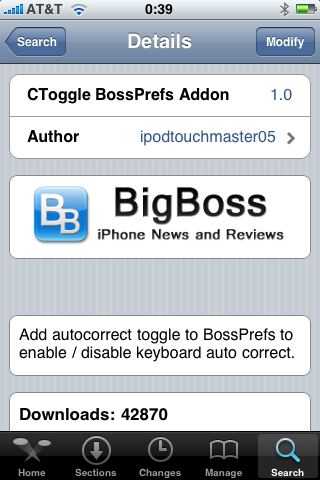
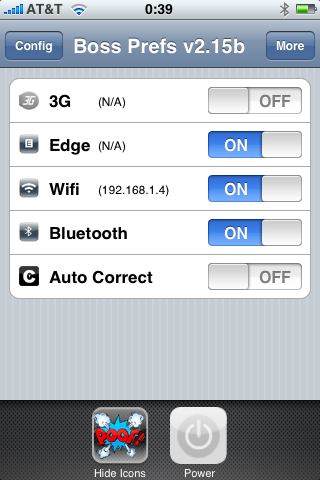
There is even a domain: http://please-let-us-disable-autocorrection-steve.com.. Nice.
 Leave a comment, read comments [1]
Categories updated to v2.18

Right after BossPrefs update, updated to v2.18. Here is a changelog from 2.16 to 2.18:
v2.18
- Settings App: Fixed issue where app kept crashing on load for a few people(most these people had adblockersin their etc/hosts).
v2.17
- Settings App: Replaced Default.png.
- Settings App: Added some new icons by Andreas Ficher.
- Settings App: Added admob into settings app GUI (note, no plans to have any ads in launcher).
v2.16
- Launcher: Removed dependency on springbridge and am lanching apps the old way thanks to Saurik who figured out that it just needed to be signed with the correct entitlements.
- Settings App: Did not rev, still at 2.15.
BossPrefs updated to v2.15

utilities updated. Here is a change log from 2.13b to 2.15:
- Thanks to Pumpkin of the dev team who figured it out for me, I fixed the 3g toggle to work just like the built in 3g toggle. No more wifi going on or off, no more taking 30 seconds. It's nice and fast.
- Updated the power icon to use the one sent by user Lucas (thanks).
- Added remapping internally into fast respring so now on 2.1 when you add an app and use fast respring, the app will show up. Note that regular respring does not do this.
- Properly signed the app removing the dependency on springbridge to launch apps off the dock. If you updated categories to 2.17 or greater and bossprefs to 2.15 or greater, you can uninstall springbridge.
myFox - Firefox for iPhone?
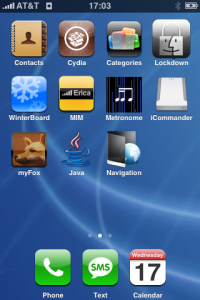
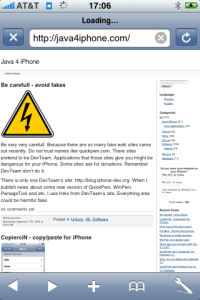
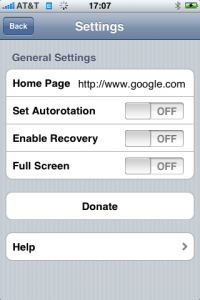
This is a Safari replacement browser for iPhone. It is avaliable via Cydia (Networking category).
- Full Screen Browsing
- Turn Landscape Mode switch on and off
- Bookmarks
- URL Recovery
- Home Page
- Google Search
- Mail Link
It is still in development stage, so more features will be quite soon.
Leave a comment, read comments [1]
SwirlyMMS - MMS for iPhone with 2.x support
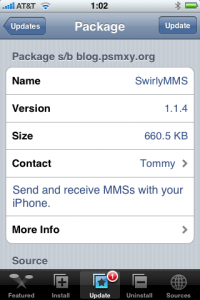
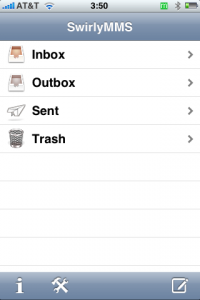
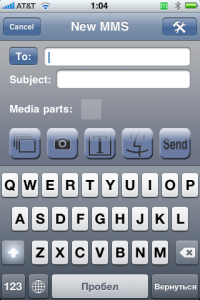
This applicatin allows to send MMS messages. SwirlyMMS is a for iPhone 2G users. Version for 1.x firmwares was in Cydia and Installer for a while. Recently the developers created version for 2.x firmwares. Avaliable through Cydia Installer.
CopierciN - copy/paste for iPhone
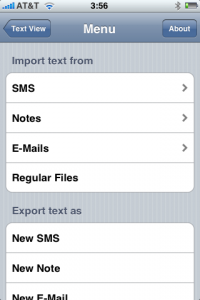
CopierciN is a cool app that implements some copy / paste functionality. It’s in the beta stages but has potential. It lets you import and export between apps like notes, sms, email. Avaliable via Cydia Installer for 2.x firmares.
CopieriN is a basic text editor which, hopefully, bring some kind of copy/paste mechanism to iPhone (to jailbroken ones only, unfortunately). It does not add copy/paste functionality directly to other applications but it provides a mechanism to import text from and export text to SMS, Notes, Mail applications (more to come in the future) and files in the filesystem.
Usage: It basically has two parts: Text Editor and Importer/Exporter. Within the text editor, you can select a piece of text using your finger, cut or copy it, and paste it to a selected location.
BossPrefs and Categories for firmware 2.1
and are updated for 2.1 firmware. As usual, download it from Cydia Installer.
Categories
Categories allows you to create folders on your desktop. This allows you to organize your desktop rather than having it be a huge mess. For example, you can have these icons for folders with all games and communication applications:


The app comes with a GUI configurator so that you do not have to edit text files. When you add an app to a category, it is removed from the springboard list so that it no longer shows up on the main desktop. When you remove the app from the category it is returned back to the springboard. Here is an example of a categories folder full of games:
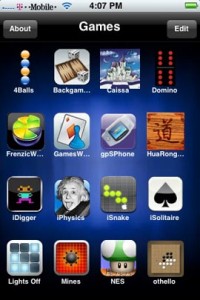
Metronome for firmware 2.0 and above
Couple weeks ago I bought a brand new metronome for $30. I wish I knew about this application for my iPhone:
Fully functional metronome. Include tap tempo feature, ranges from 30 to 250 BPM, 0 to 19 beats per bar, and has 9 selectable rhythms.
Avaliable for free via Cydia Installer. For 2.0 firmware and above.
LockDown - protect your apps with a password

LockDown v3.0 is out with a lot of improvements. If you need to be able to lock certain apps with a password so you can hand your phone off to someone else for a bit, this is the app for you. There is also a lost password protection.
Avaliable in Cydia installer for iPhone with firmware 2.0 and above.
AppBackup - save/restore App Store apps settings and data

AppBackup is a program for the iPhone/iPod touch that lets you back up and restore the saved data and settings for your App Store apps.
To back up one app, open AppBackup, select the app, and then select Backup. To restore an app, select it and then select Restore. (If there is no restore option, then it hasn't been backed up yet.) To back up all apps at once, tap All at the top-left of the screen, and select Backup. To restore all apps that have been backed up at once, tap All and select Restore. (You must have at least one app backed up in order to see this option).
Avaliable for free via Cydia Istaller.
A jailbroken iPhone or iPod touch running iPhoneOS 2.0 or later, with Cydia and at least one App Store app.
Disable Apple's kill switch
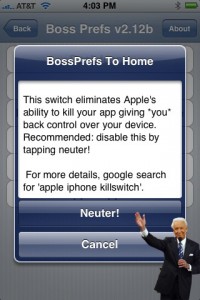
You probable know, that some time ago software developers have found a line of code buried in the iPhone's operating system that could enable Apple to remotely delete applications stored on the device that it no longer approves of. This is known as "Apple's kill switch".
Now you can turn this OFF using BossPrefs 2.12b. This is a major feature in 2.12b version. Avaliable for download from Cydia Installer.
Safari Download Plugin 2.0
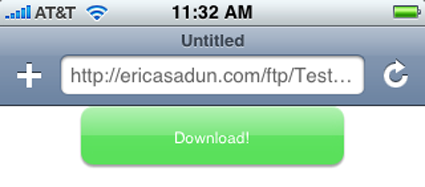
Once installed and customized, it allows you to download data off the Internet and store it on your iPhone or iPod touch local disk. You can download mp3 files, zip archives and much more. It was avaliable for old firmwares (1.1.4 and below). Now 2.0 users can use it too. Avaliable through Cydia Installer.
SwirlyMMS updated to version 1.1.3

This iPhone application is for sending MMS. It works, there are some bugs, but I was able to send MMS. New version has minot bugfixes. It is still only for firmware 1.1.4 nd below. No 2.0 support yet.
You can download it from Installer 3 or Cydia.
Qik: broadcast video live from iPhone, now with 2.0 support
There was a post about Qik:. At that time only users of old iPhones with firmware 1.1.4 could use it. Now there is a new version for 2.0 users.
You can get Qik with the iPhone 3G and old iPhone with firmware 2.0 by doing the following:
- If you have not already, you'll need to sign up at and receive an SMS from us to activate the application.
- Launch Cydia.
- Go to the "Sections" tab at the bottom and scroll down to "Multimedia."
- Under Multimedia, you will find Qik. Tap on it then select "Install" at the top right, then in the same spot tap "Confirm."
- Now you will see Qik get installed. You may hit the "Return to Cydia" button at the bottom or just quit Cydia when it is done installing.
- You'll now notice a "Qik" icon on your home screen - Go ahead and launch it.
- As long as your initial signup SMS/text message is still in your inbox for the first launch, your account will be linked to your device.
- Make sure you have 3G service or are on WiFi (edge is not sufficient enough to stream video) before you begin broadcasting.
- Hit record and enjoy Qik!