 iPhoneRoot.com

News from category ‘Unlock & Jailbreak’
QuickPwn & PwnageTool for 2.2 firmware

The new tools are out, thanks to DevTeam. Here are couple notes:
If you have a 3G iPhone and want potential soft unlock in the near future do NOT use QuickPwn, and do not use the official ipsw or the iTunes update process without using PwnageTool.
Preserving the baseband will give you the maximum chance for any upcoming software unlock. To upgrade your phone to 2.2 and preserve the state of the baseband you need to create a custom .ipsw with PwnageTool. This custom .ipsw will not contain the baseband update but of course will still allow all the cool new stuff from 2.2.
The ‘late 2008’ MacBook/air/pro line of computers have an issue with DFU mode. While it’s possible to go from Pwned 2.1 -> Pwned 2.2 (using PwnageTool), you can’t yet go from stock to pwned. If in any doubt use a different machine.
Here are download links:
Bittorrent Releases
- PwnageTool 2.2.1 for Mac OSX is SHA1 Sum - 3a91f2bf4f342baaa700ae7d35959d7ade186134
- QuickPwn 2.2 for Mac OSX is SHA1 Sum - 254b8af0e19870a4660b7b11e3b6f6ae1d6bc66f
- QuickPwn 2.2 for Windows is SHA1 Sum - ffdbc561224c61ffc2713cb6a6e696b6d429c4ca
Mac PwnageTool 2.2.1
Mac QuickPwn 2.2
Windows QuickPwn 2.2
Unofficial Firmware 2.2 jailbreak

Do you want to jailbreak firmware 2.2? There are many tutorials, guides and howto's came out recently. But I recommend you to stay away from these advices and wait for an official utility with 2.2 support QuickPwn or Pwnage tool.
 Leave a comment, read comments [1]
DevTeam about firmware 2.2
DevTeam says that 2.2 update SHOULD NOT be applied using iTunes if you want the chance of a soft-unlock in the near future. Use new version of PwnageTool (not avaliable yet, but will be soon).
Some fact:
- The 2.2 firmware for 3G contains a baseband update for the 3G iPhone
- The 2.2 firmware for 2G (1st gen iPhones) doesn’t contain a baseband update and the baseband is still at 04.05.04
- Pwnage technique (and therefore the Jailbreak) isn’t affected, but and do not support this release as yet, so DO NOT install 2.2 using iTunes as you will lose your
iPhone 3G unlock: new step forward
News from DevTeam, they try to unlock iPhone 3G for a long time already:
"This ability we now have to spawn background tasks means we are one step closer to the 3G soft unlock. We have a clear path to follow, and “all” that remains is the implementation." Watch the video:
This is the 5th step in the following achievements:
- Unsigned code execution on 3G baseband
- Reverting 01.45 baseband to previous versions
- Patching of static text ()
- Injection of AT routines ()
- Injection of background tasks
The next step is overriding the baseband code that enforces the carrier lock.
Related posts:
Jailbreak for iPhone firmware 2.2 beta 2
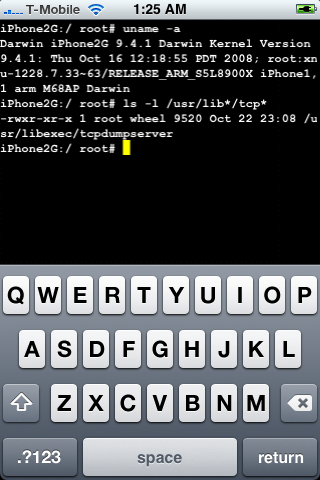
DevTeam posted a screenshot of jailbreaked and unlocked iPhone 2G with new firmware . This is cool that Apple still doesn't have anything to prevent this.
Related post:
News from DevTeam
Not much for regular users. This is just one more step towards software unlock of the iPhone 3G.
High resolution version can be downloaded via .
iPhone 3G with modified baseband
DevTeam, the team that is working on iPhone 3G unlock, publishd a screenshot. This screenshot shows, that a modified baseband is running. This is one more small step towards iPhone 3G software unlock.
The video is avaliable .
Tutorial: How to perform Jailbreak, Activation and Unlock (Windows)
UPDATE: Please, consider reading our Jailbreak & Unlock FAQ, especially if you have questions or troubles.
This is a step-by-step tutorial. If you have iPhone 3G this guide will help you jailbreak and activate the device. For iPhone 2G it will also perform the unlock.
I recommend using 2.2 firmware, because iPhone 3G . But you can use it with old v2.1, v2.0.1 and v2.0.2.
Windows Mobile running on iPhone
This is a video from myPhoine 2008 conference. Young developer Erik created Boot Camp for iPhone.
Leave a comment, read comments [1]
Jailbreak on firmware 2.2 beta 1
appeared just a day ago. It seems that DevTeam never sleeps 🙂 They published a screenshot of jailbreaked iPhone 2G with this new firmware:
It runs Terminal.app (non-apple application) running on 2.2b1 firmware. Thay say that version 2.2 is still vulnerable to pwnage and quickpwn on everything but iPod Touch 2G.
No news about software unlock for iPhone 3G or jailbreak for iPod Touch 2G.
QuickPwn 2.1 for Windows is ready
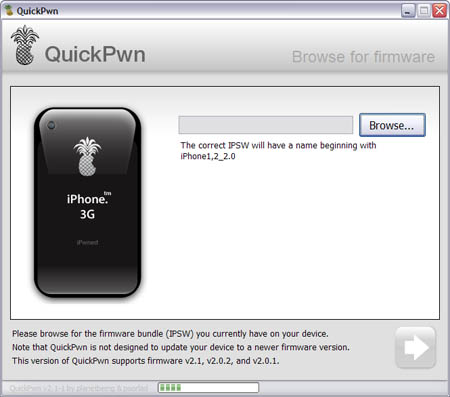
Congratulations, Windows users. The support for new firmware 2.1 is added. So here is what you can do:
- Support for FW v2.0.1, v2.0.2, v2.1.0
- Jailbreaking and Pwning iPhone 2G, iPhone 3G and iPod Touch
- Adding Cydia and Installer
- Replacing boot logos
- Unlocking iPhone 2G
Changes from QuickPwn RC3
- Support for firmware 2.1
- Auto-detection of firmware version, insistence on correct firmware bundle to prevent user epic fail.
- Use of iASign to activate to prevent bspatch epic fail.
- Removed buggy and never really tested 2.0 support
Sorry, no jailbreak for new iPod Touch and no unlock for iPhone 3G.
Here are download links:
Firmwares v2.1: ,
Related posts:
Be carefull - avoid fakes

Be very very carefull. Because there are so many fake web sites came out recently. Do not trust names like quickpwn.com. There sites pretend to be DevTeam. Applications that those sites give you might be dangerous for your iPhone. Some sites ask for donations. Remember DevTeam don't do it.
There is only one DevTeam's site: http://blog.iphone-dev.org. When I publish news about some new version of QuickPwn, WinPwn, PwnageTool and etc, I use links from DevTeam's site. Everything else could be harmful fake.
iPod Touch 2G hack soon?
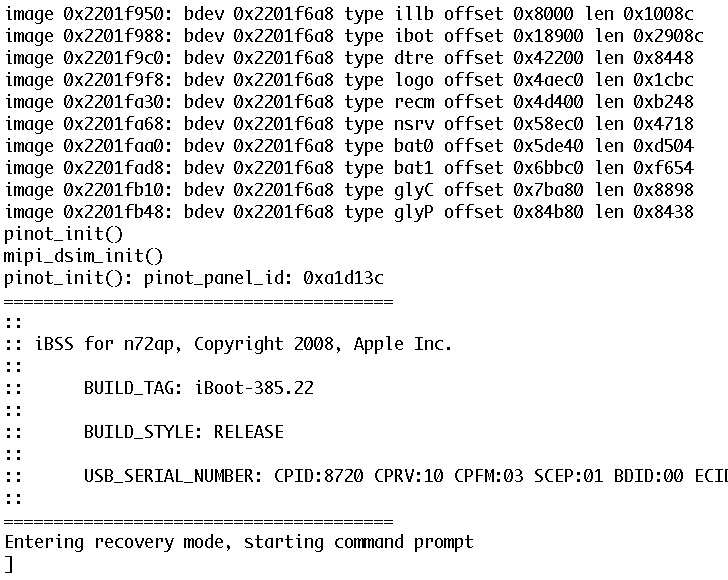
DevTeam published first screenshot about their procress of hacking (jailbreaking, pwning) new iPod Touch. New device has new hardware, that might be used in future iPhones. The DevTeam work just started, so the fun part is coming.
WinPwn 3.0 Update soon

WinPwn developer posted a note, that the new version of WinPwn will be soon. That is all, not much details. New version will probably support new firmware version 2.1.
Stop, do not update and jailbreak 2.1

It is recommended that you all hold off jailbreaking 2.1. There are many issues that dev team is working through. A jailbreak isn’t quite enough.
Many apps are not yet stable. Categories will not work because we cannot launch one app from another at this time. Cydia is not yet stable. I recommend you wait a day or two still.