 iPhoneRoot.com

News tagged ‘SIM’
OpenClip - Copy/Paste for iPhone

One of the common complaints about Apple’s iPhone–and one that did not get solved with the launch of the iPhone 3G–is the lack of a copy-paste function. An independent developer Zac White has taken matters in his own hands and founded a non-profit, open source, community project called which is offering iPhone developers a free Copy and Paste framework that will add this functionality to their applications.
New version of ZiPhone unlock is on it's way?

ZiPhone just posted some news on his blog:
"Next generation of ZiPhone is in the works.
It will be as simple as Apple would have done it.
A simple one click program.
A 5 seconds run.
Stay tuned."
Well, hopefully we'll see something soon.
GPS Kit for iPhone 3G
Garafa's GPSKit for iPhone provides you with more advanced GPS functionality and tracking for your iPhone:
- Dashboard - see real time information (speed, direction, coordinates, etc)
- Tracks - save your path, view in Google Earth or Maps
- Waypoints - Save points of interest
While GPSKit's solution is $9.99, there are other applications on the App Store that provide portions of similar functionality:
- GPS Tracker - real-time tracking service
- Speed - real time speedometer
- PathTracker - real time stats, save your path, also for runners/bikers
- Speedster GPS - speed and altitude in real time
- gpsCompass - real time stats
- Distance Meter - distance tracker
- iTrail - distance and path tracker for runners/bikers
- RunKeeper - track running/biking paths and stats
via iphone-chat
iPhone & iPod Touch Stylus


began to sell stylus for iPhone/iPod Touch. It is supposed that users operate their devices using hands. However there are many people that just cannot do that (f.e. women with long nails). For such users the iPhone Japanese Touch Pen Stylus was created.
The iPhone Japanese Touch Pen Stylus emulates your finger and allows you to gain precise control while using your phone. This sleek metal stylus is imported from Japan and features an angled spring loaded tip for easier on-screen dragging. The removable cap on the back unscrews to reveal a SIM eject tool. It's perfect for those of you with long fingernails or simply oversized stubby man fingers. The price is $14.99.
More photos:
Simplify Media for iPhone
With Simplify Media installed on your computer you can stream your home iTunes library to your mobile device wherever you may be. It will supposedly work over EDGE, 3G, or WiFi
Simplify Media for Mac/PC is a . Only the first 100,000 copies of the are free to download, after that it will be $3.99.
Texas Hold’em iPhone game [video]
iLightr - virtual cigarette lighter for iPhone

is a virtual cigarette lighter for iPhone and iPod touch that is available in the now. It's only US$0.99 and is an amazingly good simulation of a lighter. Next time you're at a concert and just gotta have an encore, don't pull out a cigarette lighter. Instead, launch iLightr!
Copy-Paste Proof of Concept
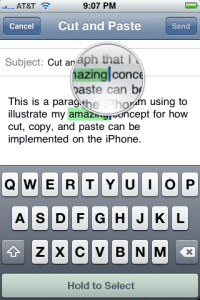
David Friedman writes in to let us know into the ‘This is how I think Apple should implement cut-and-paste’ ring. His idea is simple, intuitive, and doesn’t look to interfere with the current magnifying glass insertion point UI.
Here it is in a nutshell — when you have the magifying glass up, there’s a button you can press to toggle the various things you need for cut and paste — select, cut, copy, and paste. David recommends that the options shown would be contextual based on whether or not you have anything in your clipboard. When you’re in a text-entry field, that toggle button would appear in place of the space bar area at the bottom, while areas with text that lack text entry (like Safari) would need an unobtrusive button to appear when in the text-selection mode.
All in all, we like it.
- No convoluted finger gymnastics
- No trying to remember how many fingers you need to use for a given action
- Compatible with the current UI. In fact, it’s consistent and keeps the current text-selection metaphor of the UI intact. It just adds to it.
- Easily discoverable by all users
More screenshots:
pTerm - terminal application in AppStore
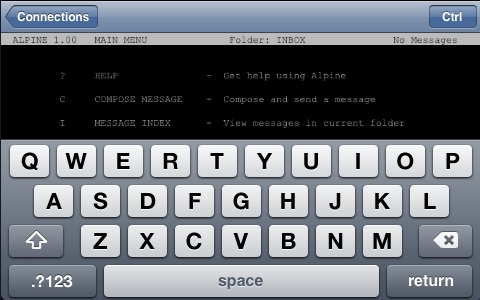
Newly arrived in the App Store is , an iPhone port of the PuTTY terminal emulator. It supports SSH and Telnet, among other things, and has a built-in Control key.
Eric Maland says that a 1.1 update is already on its way (it has been submitted to Apple and is awaiting approval). Unfortunately a handful of "major crashy bugs" (as Eric puts it) were discovered after the 1.0 release had been submitted.
Planned features for future releases include multiple simultaneous connections, custom sizes and colors, port forwarding and lots more.
And in the meantime, if you download and experience crashy behavior, Eric's message is: be patient. The fixes are done, but when they reach the Store is out of his hands.
pTerm is $4.99US in the US
More screenshots and the list of features:
Color your iPhone

: many colors are avaliable. Costs: $150 for back panel, $20 for frame, $20 for button, $10 for Sim card tray, $10 for earburds and $20 for dock. $230 for everything, but iPhone will look nice. You can play with different colors on their web site.
Installing 2.0.1. Solving problems. Avoid bricked phone.
Here is an . If you want to install please read this first:
Disable airplane mode before installing Prior to installing the iPhone OS 2.0.1 update, make sure that Airplane mode is not enabled on your iPhone. Having Airplane mode turned on can result in a non-functional phone when the update is applied. You may receive the error message:
“Information for activation cannot be obtained from the iPhone”
Fortunately, you can disable Airplane mode from the emergency screen if your iPhone is put into an inactivated state by a problematic update.
“iTunes could not update the carrier settings on your iPhone” Several users are receiving the error message “iTunes could not update the carrier settings on your iPhone. An unknown error occurred (OxE80000001).”
If this error occurs, try clicking the “Restore” button in iTunes rather than “Update.”
Problems installing:
Another hardware unlock for iPhone 3G

It is similar to the . Same idea. The slim chip-and-circuit gizmo hugs the rear of your SIM and messes with the signals that go between it and the iPhone (or, indeed, a large number of other GSM and 3G phones) in a way that unlocks the device. still requires you to cut your SIM to make room for the chip aboard it, but it looks a fairly simple operation. Costs just $21.
Hardware unlock for iPhone 3G

Usbfever announced iPhone 3G (sim-card proxy). It will cost $35 and avaliable after August 20.
Free VoiceNotes Recorder in AppStore [AppStore, Free]
It is called EccoNote. iTunes link is . It is simple. The main purpose is to recoed something and be able to playback. In the future developers promise to add additional functionality: f.e. sending recorded tracks via email. And it is free 🙂
New Cydia Installer
Today, Cydia got a nice face-lift and some nice new features. When you enter the “manage” page you will be given choices between mananging your packages and managing your sources. Manageing sources does not mean that you can add old installer sources. You still must have a valid apt source for Cydia.
It is now possible to edit which packages you do and do not want to see. Cydia comes up and asks you for your preferences at start to ask you which “role” you play:
- If you are a user and you do not want to see all the console applications, select “user”. “User” is similar to the level that most installer users are familiar with since installer did not contain a lot of development / hacking packages.
- Hacker displays the GUI apps as well as command line apps used in SSH or terminal.
- “Developer” will filter out nothing, showing you everything. Many “users” may find some of these packages annoying. This is why you now have a choice!
You can later change this selection by going into “manage” and clicking on “settings”.
In addition, you can filter on “sections” (these are Categories in Installer). You can just tap the “edit” button on top of the “sections” page. If you tap that you will see this screen that lets you enable / disable various sections. Very cool, indeed.
More screenshots:
 Leave a comment, read comments [1]