iPhoneRoot.com

News tagged ‘3G’
iPhone robot
This robot is made in Japan. The main part is a jailbroken iPhone 3G running some Ruby code. Other parts include an Arduino CPU, a TA7291P motor, and 4 AA batteries. The robot is controlled via WiFi from a nearby computer.
More pictures:
 Leave a comment
Free Translator [AppStore, Free]

This is a translator. It uses free Google Translate API. Users can choose between many languages including Chinese, Czech, Danish, Dutch, English, French, German, Hindi, Italian, Japanese, Korean, Polish, Portuguese, Romanian, Russian, Serbian, Spanish and Vietnamese.
Application is free, here is a to AppStore.
PS: It requires internet connection (WiFi, 3G, EDGE or regular GPRS).
iTalk [AppStore, Free]
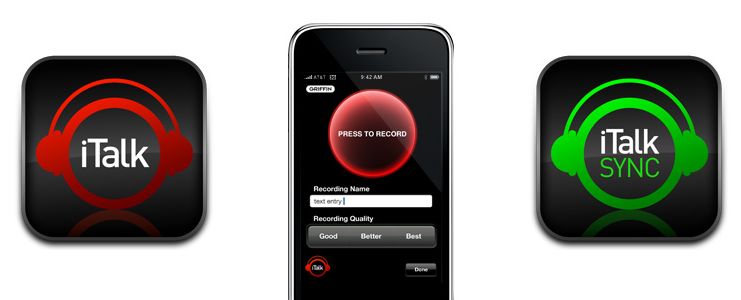
This is another free useful application for iPhone and iPod2 from . It allows users to turn iPhone, iPhone 3G or Pod 2 into a recording device. iTalk's uncomplicated user interface lets you start/stop, choose Good/Better/Best sample rates, and manage the list of your recordings, all with just one finger.
- High-quality handheld recording using your iPhone or 2nd-generation iPod touch
- Easy, convenient user interface and controls
- Drag & drop wireless file transfers to your computer
- User-selectable 11.025 kHz, 22.05 kHz, or 44.10 kHz sample rates
Avaliable for free in AppStore ().
You can sync recordings using application that should be installed on Mac or PC.
News from DevTeam
Not much for regular users. This is just one more step towards software unlock of the iPhone 3G.
High resolution version can be downloaded via .
Blackberry Storm vs iPhone 3G [Video]
Related articles:
Handshake: contact exchange app [AppStore, Free]

Handshake makes it easy to share your contact information and photos with people around you. Works across EDGE, WiFi, and 3g on the iPhone and iPod Touch.
The app is free (AppStore ), but it involves advertising. You can buy Handshake Premium (AppStore ) for $2.99, which is advertisement-free.
MID device: another iPhone killer?
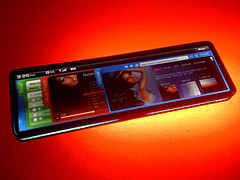
Intel showed off a prototype handheld based on Moorestown, its upcoming Mobile Internet Device (MID) platform designed to enable a new generation of ultra-thin, touchscreen devices with extensive battery life.
Moorestown will consist of a system-on-a-chip (SOC), codenamed "Lincroft," which integrates a 45nm processor, graphics, memory controller and video encode/decode onto a single part. The platform will support a range of wireless technologies including 3G, WiMAX, WiFi, GPS, Bluetooth and mobile TV.
The divice will be avaliable sometime in the 2009-2010 time. Here is a video with presentation from IDF:
The future of BossPrefs
Many users of iPhones use application called . The developer of this app is creating a new one. The new application will be called SBSettings.
The toggles drop down when you swipe along the status bar. It is very fast and can be used while in any app without exiting the app. Suppose you are in Safari but realize your 3g is not yet enabled. Just swipe the statusbar and toggle 3g, than resume in Safari where you left off. The advantage is there is no need to exit Safari and load settings or bossprefs.
The look and feel of this new app will be something like this:
via thebigboss
iPhone 3G with modified baseband
DevTeam, the team that is working on iPhone 3G unlock, publishd a screenshot. This screenshot shows, that a modified baseband is running. This is one more small step towards iPhone 3G software unlock.
The video is avaliable .
Tutorial: How to perform Jailbreak, Activation and Unlock (Windows)
UPDATE: Please, consider reading our Jailbreak & Unlock FAQ, especially if you have questions or troubles.
This is a step-by-step tutorial. If you have iPhone 3G this guide will help you jailbreak and activate the device. For iPhone 2G it will also perform the unlock.
I recommend using 2.2 firmware, because iPhone 3G . But you can use it with old v2.1, v2.0.1 and v2.0.2.
PdaNet updated to 1.33

updated to version 1.33. This tool allows you to . Here is a changelog:
This application is avaliable via for iPhones.
PdaNet updated to 1.31
updated to version 1.31.This tool allows you to . Here is a changelog:
This application is avaliable via .
an unknown error 13014

Several users have problems syncing their iPhones after updating to . The most common error message is “an unknown error 13014.”
As one reader writes:
“I just downloaded and installed iTunes 8.0.1 on my iMac running 10.5.5, and synced my non-3G iPhone. I immediately received an error message stating that “The phone ‘[my iPhone's name]‘ cannot be synced. An unknown error occurred (13014). Thinking I’d probably be able to fix it by resetting the phone, I did so.
Now, 15 minutes into the reset, the phone is syncing nicely with no major issues, except that I’m still getting prompted that it can’t be synced about every 15 seconds or so. It’s even kind enough to queue up the errors so that if I ignore them for a few minutes I can go back and just click ‘OK’ half a dozen times and then go back to whatever I was working on. No idea of the cause, outside of the iTunes upgrade.”
Users are reporting similar issues with the iPod touch.
In some cases, simply restarting the host computer and restarting the iPhone can resolve this issue. In other cases, this procedure is unsuccessful.
The other workaround is to reinstall iTunes. If this doesn't help, uninstall it and install iTunes version 8.0.
via iphoneatlas
First official iPhone 3G sold in Russia
This video is from Vladivostok, a big city in the east part of Russia. It is October 3rd there already. In Moscow and St.-Petersburg the sales will start in about 3.5 hours.
Update: the price was 33000 RUB, which is $1278 for an unlocked 16Gb iPhone.
Connect desktop or notebook to internet through iPhone 3G
Many iPhone 3G users would like to use internet on a desktop or notebook through their phone. There were several solutions: iPhoneModem, NetShare, 3Proxy.. they all used SSH and SOCKS proxy. One of the working ones was described here .
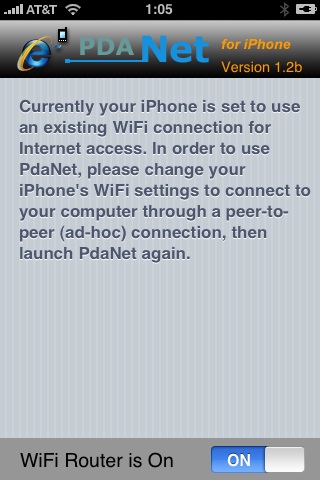
Couple days ago PdaNet (fullname is PdaNet WiFi Router) was ported to iPhone. Now our life is much much easier.