 iPhoneRoot.com

News tagged ‘baseband’
iPhone 3G unlock tutorial
Dev Team finally made it. They created software called yellowsn0w, that unlocked iPhone 3G. Now you can use any carrier you want. I successfully unlocked my US version.It works much more stable than sim proxy method.
Please, back up everything on your iPhone before you start, just in case. Everything you do is your responsibility. I had to go through all 4 steps to make my iPhone 3G work. I used only my new sim without sim proxy.
Here are the steps:
 Leave a comment, read comments [3]
iPhone 3G unlock on Dec 31

Good news! DevTeam anounced release date for iPhone 3G unlock. It is December 31, 2008. Supported firmware is 2.1, modem baseband 2.11.07 and earlier.
QuickPwn & PwnageTool for 2.2 firmware

The new tools are out, thanks to DevTeam. Here are couple notes:
If you have a 3G iPhone and want potential soft unlock in the near future do NOT use QuickPwn, and do not use the official ipsw or the iTunes update process without using PwnageTool.
Preserving the baseband will give you the maximum chance for any upcoming software unlock. To upgrade your phone to 2.2 and preserve the state of the baseband you need to create a custom .ipsw with PwnageTool. This custom .ipsw will not contain the baseband update but of course will still allow all the cool new stuff from 2.2.
The ‘late 2008’ MacBook/air/pro line of computers have an issue with DFU mode. While it’s possible to go from Pwned 2.1 -> Pwned 2.2 (using PwnageTool), you can’t yet go from stock to pwned. If in any doubt use a different machine.
Here are download links:
Bittorrent Releases
- PwnageTool 2.2.1 for Mac OSX is SHA1 Sum - 3a91f2bf4f342baaa700ae7d35959d7ade186134
- QuickPwn 2.2 for Mac OSX is SHA1 Sum - 254b8af0e19870a4660b7b11e3b6f6ae1d6bc66f
- QuickPwn 2.2 for Windows is SHA1 Sum - ffdbc561224c61ffc2713cb6a6e696b6d429c4ca
Mac PwnageTool 2.2.1
Mac QuickPwn 2.2
Windows QuickPwn 2.2
DevTeam about firmware 2.2

DevTeam says that 2.2 update SHOULD NOT be applied using iTunes if you want the chance of a soft-unlock in the near future. Use new version of PwnageTool (not avaliable yet, but will be soon).
Some fact:
- The 2.2 firmware for 3G contains a baseband update for the 3G iPhone
- The 2.2 firmware for 2G (1st gen iPhones) doesn’t contain a baseband update and the baseband is still at 04.05.04
- Pwnage technique (and therefore the Jailbreak) isn’t affected, but and do not support this release as yet, so DO NOT install 2.2 using iTunes as you will lose your
iPhone 3G unlock: new step forward
News from DevTeam, they try to unlock iPhone 3G for a long time already:
"This ability we now have to spawn background tasks means we are one step closer to the 3G soft unlock. We have a clear path to follow, and “all” that remains is the implementation." Watch the video:
This is the 5th step in the following achievements:
- Unsigned code execution on 3G baseband
- Reverting 01.45 baseband to previous versions
- Patching of static text ()
- Injection of AT routines ()
- Injection of background tasks
The next step is overriding the baseband code that enforces the carrier lock.
Related posts:
News from DevTeam
Not much for regular users. This is just one more step towards software unlock of the iPhone 3G.
High resolution version can be downloaded via .
iPhone 3G with modified baseband
DevTeam, the team that is working on iPhone 3G unlock, publishd a screenshot. This screenshot shows, that a modified baseband is running. This is one more small step towards iPhone 3G software unlock.
The video is avaliable .
iPhone firmware 2.1 this Friday
Apple announced that v2.1 firmware will be delivered this Friday. Change log is:
- lots of bugs fixed
- fewer dropped call
- big battery life improvements
- no crashes with Apps - hopefully the whole app install process is better.
- backing up to iTunes is faster
- great new performance enhancements
There is nothing said about push notification service, cut/copy/paste or turn-by-turn GPS.
As always, I strongly recommend no one update until the Dev Team releases an upated pwnage.
QuickPwn updated to 1.2.0
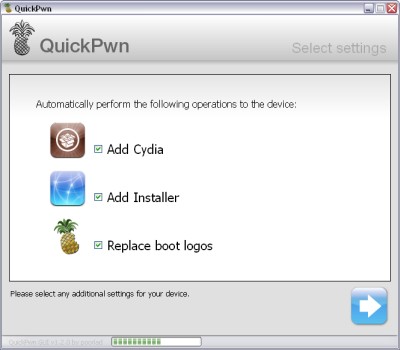
QuickPwn for Windows is updated. Support for all 2.x firmwares is added. So now you can QuickPwn and jailbreak the device if it is running 2.0, 2.0.1 or 2.0.2.
DevTeam reminds that it is still beta software, so usual rules apply, no complaints if anything goes wrong and use the tool at at your own risk!
Using QuickPwn does not update the firmware itself, this tool is designed to ‘Pwn’ (the ability to install future custom non-Apple firmwares) , ‘Jailbreak’ and install Installer and/or Cydia on a given device. If your device is running 2.0.1 and you QuickPwn it, it’ll still be running 2.0.1, although it will now be Pwned and Jailbroken. It will also activate (not unlock) devices that are being used outside of their intended territories and cannot be activated using iTunes.
If you want to update to 2.0.2 then use the normal iTunes update to get to 2.0.2 and then use QuickPwn to Pwn, Jailbreak and Activate, remember that the 2.0.2 update includes a baseband update for the 3G iPhone, so depending what your long term intentions are for the phone, update wisely, of course in the upcoming PwnageTool application you’ll be able to create a custom ipsw without the baseband update enabled.
PS: Mac OS version is on it's way.
Negative feedback on 2.0.1. Update bricking some iPhones.
Here is some negative feedback on 2.0.1.
- A small number of blog readers and have reported the update bricked their handsets or . Didn't show up during testing by many labs.
- There are several reports that updating to 2.0.1 on an iPhone in Airplane mode may result in bricked phones.
- Users who paid Vodaphone to unlock their phones for international roaming have the update breaks connections with their carriers.
- A few users occasional lag in the Contacts, SMS and e-mail apps. From our testing, typing in the Contacts app is still laggy, but SMS and e-mail is faster.
- No surprise whatsoever: Updating results in losing access to your jailbroken (i.e. hacked) apps. 2.0.1 updates iPhone 3G's baseband, you may never be able to unlock the handset again if you run this update.
- Many users are reporting 2.0.1 is slow with backup. This more likely has to do with the version of iTunes they're running; many have said iTunes 7.7.1 sped up backup and syncing.
Related posts:
Unlock for IPhone 3G - almost there
DevTeam posted a new interesting screenshot. They successfully downgraded modem firmware. This is not an unlock (yet), but it is a good illustration of the first progress made with regard to hacking the 3G baseband. They accomplished this by being able to execute their own code on the baseband that allows to circumvent security checks and flash the baseband with older, disallowed firmware. Please note this has been accomplished using software only, the iPhone 3G has not been disassembled or hardware modified in any way.
More IPhone 3G internals photos
Portelligent and Semiconductor Insights published a document describing interals of IPhone 3G. described the details. (Previous IPhone 3G internals photos can be viewed )
Commuunications (3G/GSM) are on Infineon chips. One for GSM/GPRS/EDGE, another for WCDMA/HSDPA (3G). GPS module is not SiRF as we all thought. Apple uses . The Hammerhead II integrates an assisted-GPS (A-GPS) baseband processor with a low-noise GPS RF front end and multi-path mitigation to avoid large errors in urban environments.
Leave a comment, read comments [2]