 iPhoneRoot.com

News tagged ‘Unlock & Jailbreak’
SBSettings [Cydia]
We had a post about SBSettings - the future of BossPrefs (). Couple days ago this application became avaliable in Cydia.
SBSettings doenst have an icon so after you install to access it you must slide across the statusbar (aka the top bar that displays service, time, battery, etc.)
Current version is 0.92. But the application is updated almost every day.
This application is avaliable for iPhones via .
 Leave a comment
News from DevTeam
Not much for regular users. This is just one more step towards software unlock of the iPhone 3G.
High resolution version can be downloaded via .
Qik: Live Stream Video from iPhone [AppStore, Free]
The developer, Kevin Rose, says this application will be avaliable officially via AppStore. No and hacking. The only concern.. will Apple approve it? I hope so. Watch the video:
PS: It will be free 🙂
Related posts:
Veency: remote control your iPhone [Cydia]
This application is developed by Jay Freeman, the creator of the Cydia. Veency is a free app that allows iPhone owners to remotely control their iPhone from PC or Mac desktop via a VNC client.
Here are some of the features:
- Launch applications on your iPhone
- Reply to emails, text messages, and more
- Rearrange icons
- Lock/Unlock your iPhone
- Browse through Photos and Contacts
Of course you cannot do two finger gestures with this app. All other actions can be done with the click of your mouse. The only area in which Veency fails tragically at is when opening any video recording application on the iPhone.
This application is avaliable for jailbreaked iPhones via Cydia installer.
Be sure to restart your iPhone after installing Veency and connect to the server using a Wi-Fi connection. We recommend using UltraVNC or TightVNC to connect your Windows desktop. If you're using a Mac, we recommend Chicken VNC.
Here is a video demonstration:
Remote access software or remote desktop software is software that allows you to access a remote computer.
via readwriteweb
The future of BossPrefs
Many users of iPhones use application called . The developer of this app is creating a new one. The new application will be called SBSettings.
The toggles drop down when you swipe along the status bar. It is very fast and can be used while in any app without exiting the app. Suppose you are in Safari but realize your 3g is not yet enabled. Just swipe the statusbar and toggle 3g, than resume in Safari where you left off. The advantage is there is no need to exit Safari and load settings or bossprefs.
The look and feel of this new app will be something like this:
via thebigboss
iPhone 3G with modified baseband
DevTeam, the team that is working on iPhone 3G unlock, publishd a screenshot. This screenshot shows, that a modified baseband is running. This is one more small step towards iPhone 3G software unlock.
The video is avaliable .
SwirlyMMS updated to 1.2.8

is updated to v1.2.8. Many bugs are fixed.
Avaliable in for iPhones.
Tutorial: How to perform Jailbreak, Activation and Unlock (Windows)
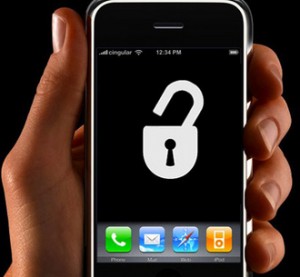
UPDATE: Please, consider reading our Jailbreak & Unlock FAQ, especially if you have questions or troubles.
This is a step-by-step tutorial. If you have iPhone 3G this guide will help you jailbreak and activate the device. For iPhone 2G it will also perform the unlock.
I recommend using 2.2 firmware, because iPhone 3G . But you can use it with old v2.1, v2.0.1 and v2.0.2.
PdaNet updated to 1.33

updated to version 1.33. This tool allows you to . Here is a changelog:
This application is avaliable via for iPhones.
First official iPhone 3G sold in Russia
This video is from Vladivostok, a big city in the east part of Russia. It is October 3rd there already. In Moscow and St.-Petersburg the sales will start in about 3.5 hours.
Update: the price was 33000 RUB, which is $1278 for an unlocked 16Gb iPhone.
Jailbreak on firmware 2.2 beta 1
appeared just a day ago. It seems that DevTeam never sleeps 🙂 They published a screenshot of jailbreaked iPhone 2G with this new firmware:
It runs Terminal.app (non-apple application) running on 2.2b1 firmware. Thay say that version 2.2 is still vulnerable to pwnage and quickpwn on everything but iPod Touch 2G.
No news about software unlock for iPhone 3G or jailbreak for iPod Touch 2G.
iPhone 3G unlocked in Hong Kong
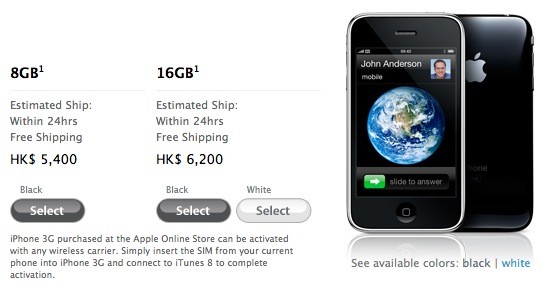
Apple is now selling its iPhone 3G unlocked via its on-line Apple Store in Hong Kong. The 8GB model is HK$5,500 (about US$694) and 16GB is HK$6,200 (about $797). It is available since July 11th with a local Hutchison Telecommunications contract, but this is the first time that Apple has sold its device unlocked in Hong Kong.
"iPhone 3G purchased at the Apple Online Store can be activated with any wireless carrier. Simply insert the SIM from your current phone into iPhone 3G and connect to iTunes 8 to complete activation."
Unfortunately for the 1 billion mainland Chinese, the terms and conditions limit sales to those in Hong Kong only.. But the gray market usually doesn't care about t&c's.
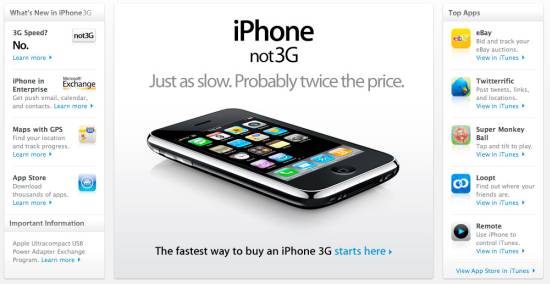
iPhone 3G in China - no 3G, no WiFi?

According to the South China Morning Post, the carrier wants Apple to supply a custom version of the iPhone which disables both W-CDMA (3G) and Wi-Fi. China Mobile doesn't yet have a 3G network in place and is afraid that customers will buy the iPhone and unlock it for use on more capable networks. This explains the lock-out for 3G, but killing the Wi-Fi is just spiteful.
Given that Apple ships an identical iPhone to every other world market, it's doubtful that China Mobile will get its way. But then, no other world market has a potential customer base of two billion people. If these functions are disabled, it will most likely be done in software.
via gadgetlab, gizmodo, cellular news
QuickPwn 2.1 for Windows is ready
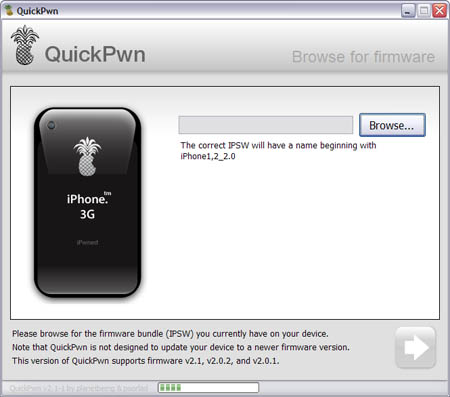
Congratulations, Windows users. The support for new firmware 2.1 is added. So here is what you can do:
- Support for FW v2.0.1, v2.0.2, v2.1.0
- Jailbreaking and Pwning iPhone 2G, iPhone 3G and iPod Touch
- Adding Cydia and Installer
- Replacing boot logos
- Unlocking iPhone 2G
Changes from QuickPwn RC3
- Support for firmware 2.1
- Auto-detection of firmware version, insistence on correct firmware bundle to prevent user epic fail.
- Use of iASign to activate to prevent bspatch epic fail.
- Removed buggy and never really tested 2.0 support
Sorry, no jailbreak for new iPod Touch and no unlock for iPhone 3G.
Here are download links:
Firmwares v2.1: ,
Related posts:
QuickPwn, PwnageTool and WinPwn

There are so many tools, some for Mac OS, others for Windows, different versions... Complicated. So let's summerize a little bit.
If you have iPhone 3G, you'll be able to install 3-rd party non AppStore applications (through separate applications called Cydia and Installer) and run these applications. If you have old iPhone, in addition to that you'll be able to unlock the device (use with any carrier).
There are two methods: quickpwn and custom firmware method. First one is for quikly pwning and jailbreaking the device without restore. You should use it if you have unlocked device or an AT&T contract.
If you are Windows user:
- Go for . The current version is 2.5.0.2 (also called 2.5 beta-2). Download . It supports both iPhone and iPhone 3G, firmwares 2.0, 2.0.1, 2.0.2. You can use either quickpwn or custom firmware method.
- There is a separate tool for Windows. The current version is RC3. Download . Do you need it? Yes, if you want to quick pwn and you do not like WinPwn (or you had problems with it).
If you're using Mac OS:
- Go for PwnageTool. The current version is 2.0.3.1. Download . Works with 2.0, 2.0.1, 2.0.2 firmwares using custom-firmware method.
- There is a version of QuickPwn tool for MAC OS. The current version is 1.0.0. Download . It works only with firmware 2.0.2. Do you need it? Yes, if you want to quick pwn.
QuickPwn is not a replacement for PwnageTool, they are different tools and provide different features, QuickPwn is for quickly pwning a device, whereas PwnageTool is designed to custom build and tailor the ipsw production process, both tools will be actively developed in the future.