 iPhoneRoot.com

News tagged ‘2.2’
Jailbreak for iPhone firmware 2.2 beta 2
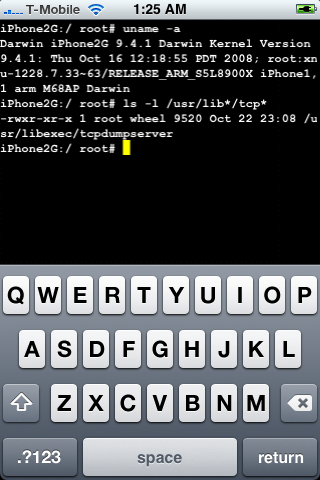
DevTeam posted a screenshot of jailbreaked and unlocked iPhone 2G with new firmware . This is cool that Apple still doesn't have anything to prevent this.
Related post:
iPhone firmware 2.2 beta 2
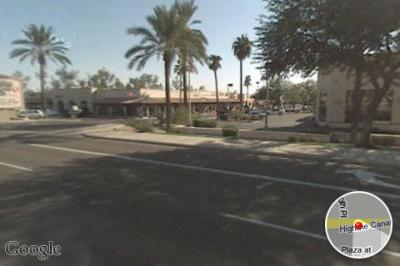
Apple has seeded iPhone 2.2 Firmware Beta 2 and has fully enabled Google Street View. Beta 1 of iPhone 2.2 had hidden APIs related to the Street View for Google Maps, but was not enabled.
The seed notes also indicated that Line-in audio accessories are now supported in the SDK.
via theiphoneblog and macrumors
Tutorial: How to perform Jailbreak, Activation and Unlock (Windows)
UPDATE: Please, consider reading our Jailbreak & Unlock FAQ, especially if you have questions or troubles.
This is a step-by-step tutorial. If you have iPhone 3G this guide will help you jailbreak and activate the device. For iPhone 2G it will also perform the unlock.
I recommend using 2.2 firmware, because iPhone 3G . But you can use it with old v2.1, v2.0.1 and v2.0.2.
Categories updated to 2.21 [Cydia]

updated to 2.21. The only change is that the app is now optional so that those of you that didn’t like having this app could uninstall it without uninstalling categories as well. Of course, if you uninstall it, the backgrounding option inside categories will be ignored.
Related:
Categories 2.20 - rapid folder opening
updated to 2.20. Here is a changelog:
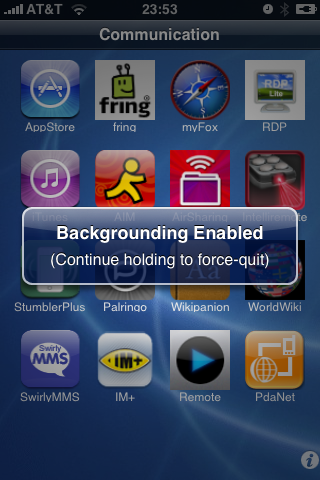
Launcher: Folders instant loading! Integrated with backgrounder for folders. There is now an option in the settings to "keep resident". When set, the folder only loads once per respring. After that, it stays running in the background (uses no CPU but uses some RAM) to provide instant loading (no load times). Note that this does use more memory so use it sparingly. I suggest that it is ok for 1 - 4 folders but I would not background 20 folders. If you do and have problems, just go back to settings and disable this option on some of the folders you don't use as often.
Sounds like we should use + . In this case folders will open very very quickly.
Avaliable in .
iPhone 2.2: Google Street View, Emoji, Auto-Correction Off
Apple a bit more than a week ago. Couple more features were hiden there.
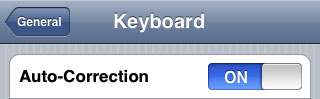
First of all Apple has addressed one common request within the iPhone's Keyboard settings, allowing users to disable the iPhone's auto-correction.
The other feature is for Japanese market - Japanese emoji icons. The lack of emoji support has been blamed as part of the reason for slow iPhone adoption in Japan.
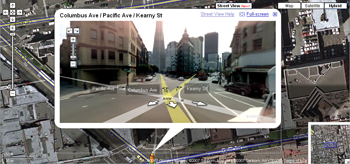
The third new feature is Street View. It allows users to view panoramic street level photographs in select cities within the Google Maps application.
Hopefully we will see more new features in this and next beta's of 2.2 firmware.
via macrumors
Related articles:
Jailbreak on firmware 2.2 beta 1
appeared just a day ago. It seems that DevTeam never sleeps 🙂 They published a screenshot of jailbreaked iPhone 2G with this new firmware:
It runs Terminal.app (non-apple application) running on 2.2b1 firmware. Thay say that version 2.2 is still vulnerable to pwnage and quickpwn on everything but iPod Touch 2G.
No news about software unlock for iPhone 3G or jailbreak for iPod Touch 2G.
Firmware 2.2 - new Safari interface
Apple just published firmware 2.2 beta 1 for developers. It is accompanied by a new beta of the iPhone SDK (build 9M2611). There are not much news about new features and improvements... but iphoneatlas already published a screenshot of new Safari interface, that is in firmware 2.2:
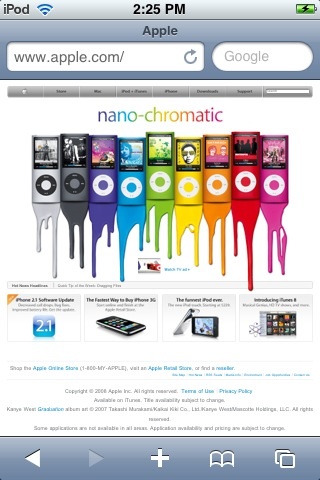
The new MobileSafari doesn't have the magnifying glass and refresh buttons at the top of the screen. There are the URL bar and search fields side-by-side instead. It looks much like the desktop version. Page refreshes are now accomplished via a tiny icon located inside the URL bar.
via iphoneatlas
QuickPwn 2.1 for Windows is ready
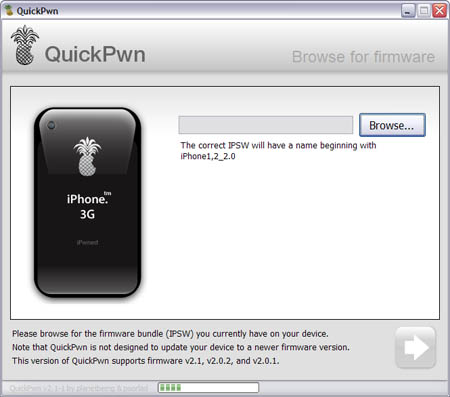
Congratulations, Windows users. The support for new firmware 2.1 is added. So here is what you can do:
- Support for FW v2.0.1, v2.0.2, v2.1.0
- Jailbreaking and Pwning iPhone 2G, iPhone 3G and iPod Touch
- Adding Cydia and Installer
- Replacing boot logos
- Unlocking iPhone 2G
Changes from QuickPwn RC3
- Support for firmware 2.1
- Auto-detection of firmware version, insistence on correct firmware bundle to prevent user epic fail.
- Use of iASign to activate to prevent bspatch epic fail.
- Removed buggy and never really tested 2.0 support
Sorry, no jailbreak for new iPod Touch and no unlock for iPhone 3G.
Here are download links:
Firmwares v2.1: ,
Related posts:
QuickPwn and PwnageTool for 2.1 firmware

Dev Team released QuickPwn and PwnageTool for firmware 2.1 (, ). It doesn't work with new iPod yet. Mac OS versions only for now.
Direct Downloads - QuickPwn
Direct Downloads - PwnageTool
 Leave a comment, read comments [2]
iRinger - create your own ringtone (free)
iRinger creates free ringtones for your iPhone from virtually any music or video file you own. Even YouTube videos! iRinger exports ringtones to iTunes, so there is no need to "jailbreak" your iPhone. You will be creating ringtones in seconds. It's that simple. Here is a video tutorial:
Feature:
- FREE
- Three Steps: Import, Preview then Export. Done.
- Convert virtually any audio format into an iPhone ringtone
- Extracts audio out of video
- Choose which section of the audio you want to hear
- Adjust ringtone length, volume, fade in, fade out and loop gap
- Export to iPhone ringtone format and import right into iTunes
- Export to iPhone using SCP/SFTP and skip using iTunes
- Use audio effects: Delay, Flanger, Boost, Reverse, etc.
- Runs on all versions of Microsoft Windows including Windows Vista
- Requires iPhone firmware 1.1.2 or newer, iTunes software 7.5 or newer
- Works with the new iPhone 3G!
Download here: . Developer's site:
Here is an advanced video tutorial, it shows how to use some advanced features:
ICQ, MSN, AOL, Yahoo, Jabber and GoogleTalk on IPhone
There was an application called Apollo IM. It worked, but didn't work good - it hanged, dropeed connections, exited for no reason. Later there was MobileChat, which version 2.23-2 was much better than Apollo. It did work. It leasе I used it with ICQ many times. However it didn't have history and there were some problems with offline cyrillic messages.
Now there is . It is quite popular, because it supports many phones (not just smartphones). Now it is avaliable for IPhone. The interface is good. Users can chat, send pictures, there is history. And history is saved even when you restart an application. There is even a traffic meter.