iPhoneRoot.com       

How to detect iPhone 3GS bootrom version



How to detect iPhone 3GS bootrom version (jail)

iPhone 3GS jailbreak can be either tethered or untethered. Tethered jailbreak means that each time you restart your device you will need to connect it to a computer and run redsn0w. If you have iPhone 3GS with an old bootrom version 359.3, the jailbreak is untethered. If your device has bootrom version 359.3.2 and higher, iOS 5/4.3.5 jailbreak will be tethered.

Here's how you can detect if your iPhone 3GS has new or old bootrom version.

Method 1.

Get your iPhone 3GS serial number. Read it on the box or using Settings - General - About.

Look for 3-rd digit. It shows the your when the iPhone was built (9=2009, 0=2010). If it's NOT 9, you have new bootrom.

If the 3-rd digit is 9, you have a chance. Now look for 4-th and 5-th digits, they show the week number. First iPhone 3GS models with new bootrom were manufactured on 40-th week of 2009. After 45-th week all models had new bootrom. Before 40-th week - old bootrom. Between 40 and 45 - cannot say for sure, you might have either old or new bootrom, just use method 2.

So:

  1. Look for your (3-rd digit): if it's 9 - continue, if not 9 - new bootrom.
  2. Look for week (4 and 5 digits): if 39 and below (f.e. xx939xxxxxx) - old bootrom. If 45 or higher (f.e. xx945xxxxxx) - new bootrom. If between 40 and 45 - cannot say for sure.

Examples:

  1. 85938123A416 - old bootrom, because year (3-rd digit) is 9 and week is 38 (<40).
  2. 85951123A416 - new bootrom, because year digit 9, but the week is 51 (>45).
  3. 85038123A416 - new bootrom, because year digitis 0.
  4. 85138123A416 - new bootrom, because year digit is 1.
  5. 85943123A416 - cannot  say for sure, becasue year is 9 and week is 43.

Method 2

Turn off your iPhone. Download iDetector from here. Run it. Click big "Is My Bootrom Old Or New" button.
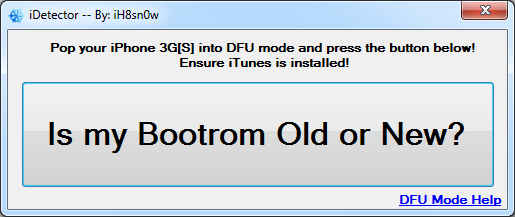
How to detect iPhone 3GS bootrom version (idetector)

Now you have to put your iPhone into DFU mode:

  1. Hold down Power button for 3 seconds.
  2. Without releasing Power button, hold down both the Home button and the Power button for 10 seconds.
  3. Release the Power button and continue holding the Home button until RedSn0w detects the device (~15 seconds).

iDetector will detect your bootrom version.

Tutorials for iOS 5 jailbreak are available here.


Follow us on Twitter:     


| |


Leave a comment, read comments [37]

37 Responses to 'How to detect iPhone 3GS bootrom version'

Subscribe to comments with RSS

  1. Спасибо! Вы облегчили жизнь!!! (А где смайлы?:)

    [Reply]

    admin Reply:

    :)

    [Reply]

    aaapc

    10 Nov 11 at 10:00 am

  2. У мя 5k000xxxxxx
    и старый бутрум)

    [Reply]

    admin Reply:

    странный серийник.

    [Reply]

    Dimka

    20 Nov 11 at 11:15 pm

  3. не надо дублировать комменты - в бан отправлю!

    [Reply]

    admin

    23 Nov 11 at 12:35 am

  4. c/n 84050v39xxx
    IOS 4.3.1
    modem 05.16.02
    Залочен под АТ&Т. Как с этим жить?

    [Reply]

    admin Reply:

    сделать джейлбрейк с помощью последнего редсноу и обновить модем до 06.15

    [Reply]

    ТИМ

    12 Dec 11 at 9:51 pm

  5. 88938jlw3nr это я так понимаю старый??
    если да то я могу смело перезагружать свой айфон??
    зарание спс)

    [Reply]

    admin Reply:

    да, старый.

    [Reply]

    seven

    18 Dec 11 at 8:06 pm

  6. у меня сер. номер: 5K0346013NQ
    проверил iDetector-м он говорит что старий бутром,
    кому мне верить??? ))

    [Reply]

    admin Reply:

    где вы смотрите серийник? номер не очень похож на серийный...

    [Reply]

    Pavlo Reply:

    Settings - General - About s/n 5K0346013NQ,
    а коробки у меня нет(

    [Reply]

    admin Reply:

    да, правильно смотрите..
    я бы больше верил iDetector.. можно попробовать вручную посмотреть как тут описано: http://www.redmondpie.com/how-to-check-iphone-3gs-bootrom-iboot-version/

    [Reply]

    Pavlo Reply:

    огромное спасибо!

    [Reply]

    Pavlo

    9 Jan 12 at 1:19 pm

  7. серийник: 88141ZZCEDG - КАК ПОНИМАТЬ??

    [Reply]

    admin Reply:

    что понимать?

    [Reply]

    Splash14 Reply:

    какой бутром..в принципе, по цифрам, новый..значит, отвязанный джейл сделать не получится?..или как?

    [Reply]

    Splash14 Reply:

    ..а если перепрошиться до 5.0.1 - тогда будет непринципиально, какой бутром? и можно будет сделать отвязанный джейл в этом случае, да?

    [Reply]

    admin Reply:

    да

    [Reply]

    admin Reply:

    сейчас доступен отвязанный джейлбрейк для всех устройств.

    [Reply]

    Splash14

    12 Jan 12 at 8:04 pm

  8. подскажите старый или новый бутром QR13777....?

    [Reply]

    admin Reply:

    новый

    [Reply]

    Doberman

    14 Jan 12 at 4:41 pm

  9. У админа дикое терпение на такие вопросы отвечать ;) как грится - респект и уважуха!

    [Reply]

    admin Reply:

    спасиб :)

    [Reply]

    DZ

    7 Feb 12 at 10:00 pm

  10. А как определить версию бутром на 88201DC6EDG?

    [Reply]

    admin Reply:

    "Для определения версии бутрома нам для начала понадобится 3-я цифра. Она отвеает на год выпуска (9=2009, 0=2010). Если у вас не 9, то бутром новый."

    [Reply]

    yamakovs Reply:

    Благодарствую.

    [Reply]

    inhuh Reply:

    у меня показывает новый брут((( неужели никак невозможно отвязать джйлбрек????

    [Reply]

    admin Reply:

    сейчас доступен отвязанный джейлбрейк для всех версий бутрома. http://iphoneroot.com/tutorials-for-ios-501-jailbreak/

    [Reply]

    yamakovs

    26 Feb 12 at 12:40 am

  11. 88927L9V3NR - судя по первому способу старый.запускал прогой проверял - новый. какому верить?

    [Reply]

    admin Reply:

    я бы больше верил iDetector.. можно попробовать вручную посмотреть как тут описано: http://www.redmondpie.com/how-to-check-iphone-3gs-bootrom-iboot-version/

    [Reply]

    skillz

    3 Mar 12 at 4:30 am

  12. 5k104avc3np
    модем 06.15.00
    какой бутром у меня?)) я не понимаю, хочу ios 5 поставить это реально с моим телефоном?

    [Reply]

    admin Reply:

    новый бутром

    [Reply]

    weqe

    9 Mar 12 at 11:02 pm

  13. Сделал все по инструкции Спобоб 2.Теперь
    не могу включить IPhone???

    [Reply]

    Alex

    30 Mar 12 at 10:42 am

  14. Все ок.Завелся.

    [Reply]

    Alex

    30 Mar 12 at 10:59 am

  15. 85943G8H3NP
    МОДЕМ 05.16.05
    КАКОЙ У МЕНЯ БУТРОМ

    [Reply]

    admin Reply:

    что в руководстве вам не понятно? скажите и я его обновлю так, чтобы было ясно.

    [Reply]

    serohan

    29 Apr 12 at 5:07 pm

Leave a Reply


You can login with iPhoneRoot account here.