Step-by-step Tutorial: How to Tether Jailbreak iPad 1 Using RedSn0w 0.9.8b7b (Windows) [iOS 4.3.5]
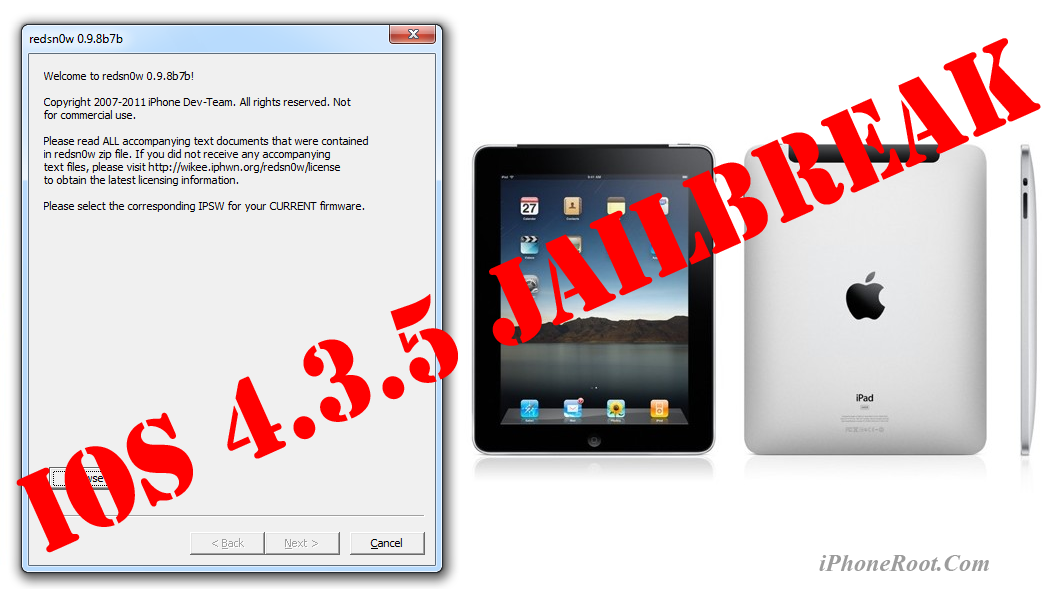
This is step-by-step instructions on how to perform tethered jailbreak of your iPad on iOS 4.3.5 firmware using RedSn0w 0.9.8b7b for Windows.
Tethered jailbreak means that each time you restart your device you will need to connect it to a computer and run redsn0w.
If you have other device, here are links to our RedSn0w 0.9.8b7b iOS 4.3.5 jailbreak tutorials:
- Mac OS: iPhone 4, iPhone 3GS, iPad 1, iPod Touch 3G, iPod Touch 4G
- Windows: iPhone 4, iPhone 3GS, iPad 1, iPod Touch 3G, iPod Touch 4G
UPDATE: Please, consider reading our Jailbreak & Unlock FAQ, especially if you have questions or troubles.
Important information.
Please think first, before you do something.
If you have iOS 4.3.3 firmware - do an untethered jailbreak using one of our tutorials.
Step One
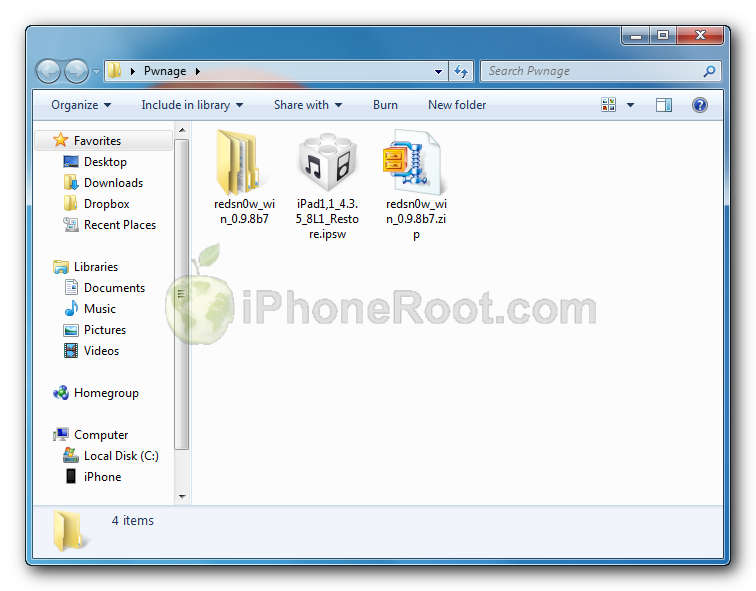
Create a folder on your desktop called Pwnage
Download RedSn0w version 0.9.8b7b or higher from here. Save it in the Pwnage folder. Likewise, download iPad firmware iOS 4.3.5:
- iOS 4.3.5:
Extract the redsn0w executable from the RedSn0w zip file into the same folder.
Step Two
Connect your iPad to the computer and launch iTunes.

![Step by step Tutorial: How to Tether Jailbreak iPad 1 Using RedSn0w 0.9.8b7b (Windows) [iOS 4.3.5] Step by step Tutorial: How to Tether Jailbreak iPad 1 Using RedSn0w 0.9.8b7b (Windows) [iOS 4.3.5] (redsn0w 096b5 2)](http://iphoneroot.com/wp-content/uploads/2010/11/redsn0w-096b5-2.png)
Select your iPad from the list of devices on the left. Create a backup by right-clicking on iPad name in Devices (iTunes left pane) and choosing Back Up.
If you are already on iOS 4.3.5 you can now skip to step three.
Now hold down Option (Mac) or Shift (Windows) key and click the Restore button.
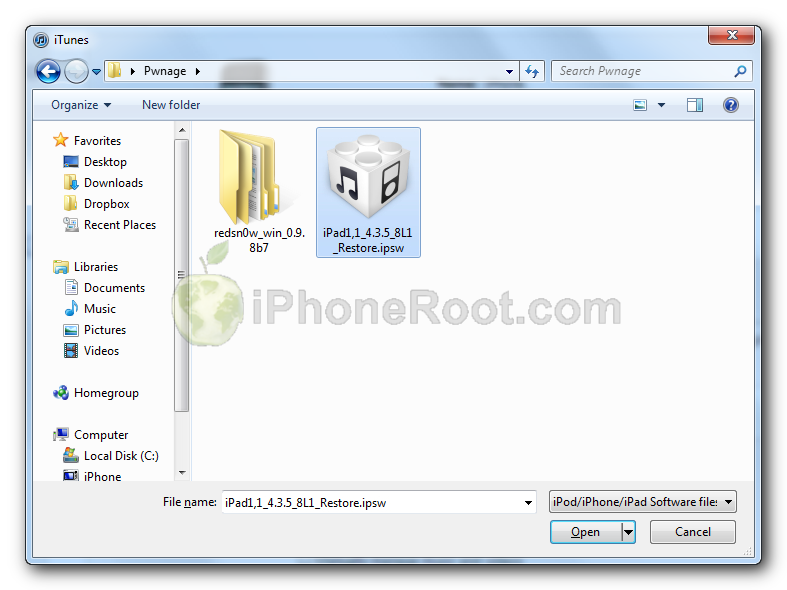
Navigate to the Pwnage folder on your desktop and select the 4.3.5 firmware ipsw. Click the Open button to continue.
Step Three
Once iTunes has finished updating your iPad to the desired firmware open the Pwnage folder on your desktop and launch the redsn0w application from the redsn0w folder we extracted earlier.
On Windows Vista or Windows 7 right click the executable and set it to run as administrator in Windows Vista/XP compatibility mode.
![Step by step Tutorial: How to Tether Jailbreak iPad 1 Using RedSn0w 0.9.8b7b (Windows) [iOS 4.3.5] Step by step Tutorial: How to Tether Jailbreak iPad 1 Using RedSn0w 0.9.8b7b (Windows) [iOS 4.3.5] (redsn0w 096b5 5)](http://iphoneroot.com/wp-content/uploads/2010/11/redsn0w-096b5-5.png)
Step Four
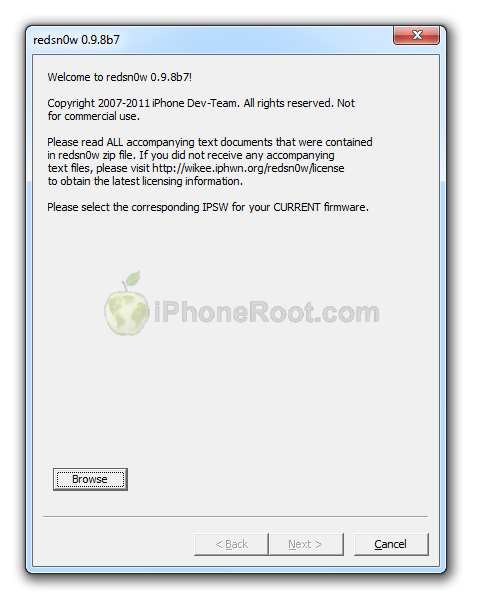
Once RedSn0w opens click the Browse button
![Step by step Tutorial: How to Tether Jailbreak iPad 1 Using RedSn0w 0.9.8b7b (Windows) [iOS 4.3.5] Step by step Tutorial: How to Tether Jailbreak iPad 1 Using RedSn0w 0.9.8b7b (Windows) [iOS 4.3.5] (redsn0w 098b7)](http://iphoneroot.com/wp-content/uploads/2011/08/redsn0w-098b7.png)
Step Five
Select the 4.3.5 firmware ipsw we placed in the Pwnage folder on our desktop then click Open.
Step Six
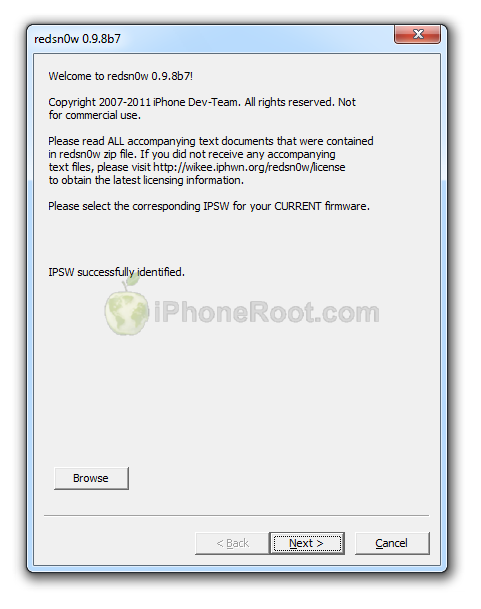
Once the firmware has been verified click the Next button to continue.
![Step by step Tutorial: How to Tether Jailbreak iPad 1 Using RedSn0w 0.9.8b7b (Windows) [iOS 4.3.5] Step by step Tutorial: How to Tether Jailbreak iPad 1 Using RedSn0w 0.9.8b7b (Windows) [iOS 4.3.5] (iphone jail435 4a)](http://iphoneroot.com/wp-content/uploads/2011/08/iphone-jail435-4a.png)
Step Seven
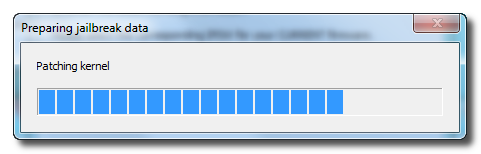
RedSn0w will now prepare the jailbreak data
![Step by step Tutorial: How to Tether Jailbreak iPad 1 Using RedSn0w 0.9.8b7b (Windows) [iOS 4.3.5] Step by step Tutorial: How to Tether Jailbreak iPad 1 Using RedSn0w 0.9.8b7b (Windows) [iOS 4.3.5] (redsn0w 096b5 9)](http://iphoneroot.com/wp-content/uploads/2010/11/redsn0w-096b5-9.png)
Step Eight
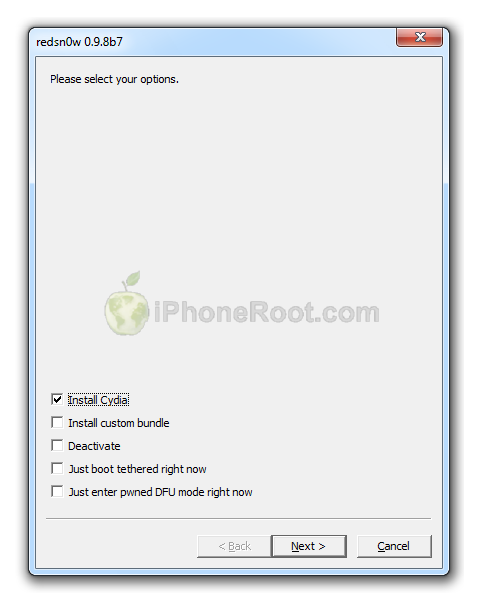
From this window you can select the jailbreak options you would like.
![Step by step Tutorial: How to Tether Jailbreak iPad 1 Using RedSn0w 0.9.8b7b (Windows) [iOS 4.3.5] Step by step Tutorial: How to Tether Jailbreak iPad 1 Using RedSn0w 0.9.8b7b (Windows) [iOS 4.3.5] (iphone jail435 5a)](http://iphoneroot.com/wp-content/uploads/2011/08/iphone-jail435-5a.png)
Make sure Cydia is selected.
Click the Next button to continue
Step Nine
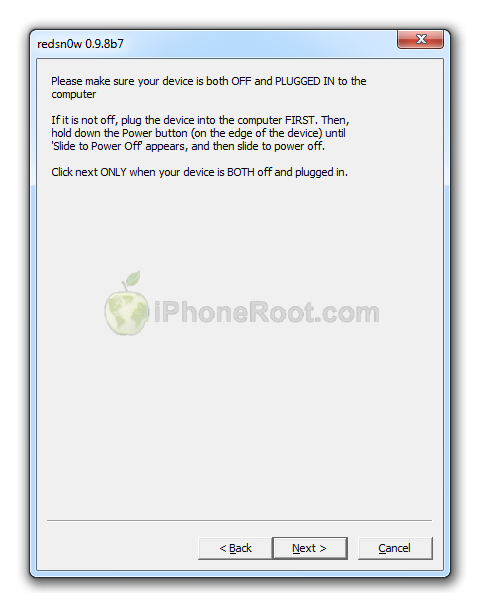
Please plug your iPad into the computer and make sure its OFF then click the Next button
![Step by step Tutorial: How to Tether Jailbreak iPad 1 Using RedSn0w 0.9.8b7b (Windows) [iOS 4.3.5] Step by step Tutorial: How to Tether Jailbreak iPad 1 Using RedSn0w 0.9.8b7b (Windows) [iOS 4.3.5] (iphone jail435 6a)](http://iphoneroot.com/wp-content/uploads/2011/08/iphone-jail435-6a.png)
Step Ten
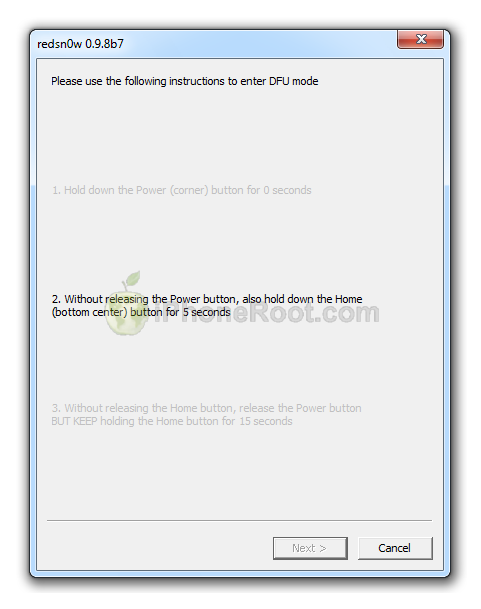
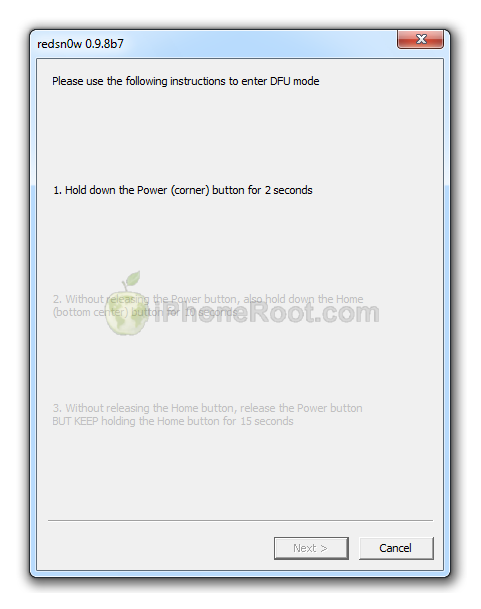
RedSn0w will now guide you through the steps to get into DFU mode.
1. Hold down Power button for 2 seconds.
2. Without releasing Power button, hold down both the Home button and the Power button for 10 seconds.
3. Release the Power button and continue holding the Home button until RedSn0w detects the device.
If you have problems try again. Here is a video showing this Step 10:
Step Eleven
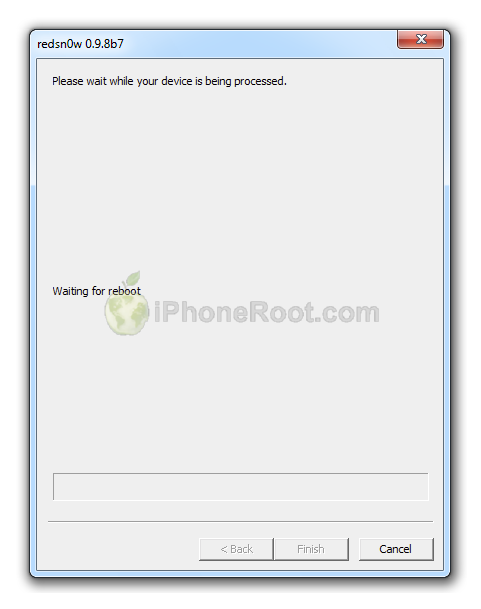
iPad will reboot
![Step by step Tutorial: How to Tether Jailbreak iPad 1 Using RedSn0w 0.9.8b7b (Windows) [iOS 4.3.5] Step by step Tutorial: How to Tether Jailbreak iPad 1 Using RedSn0w 0.9.8b7b (Windows) [iOS 4.3.5] (iphone jail435 10a)](http://iphoneroot.com/wp-content/uploads/2011/08/iphone-jail435-10a.png)
Step Twelve
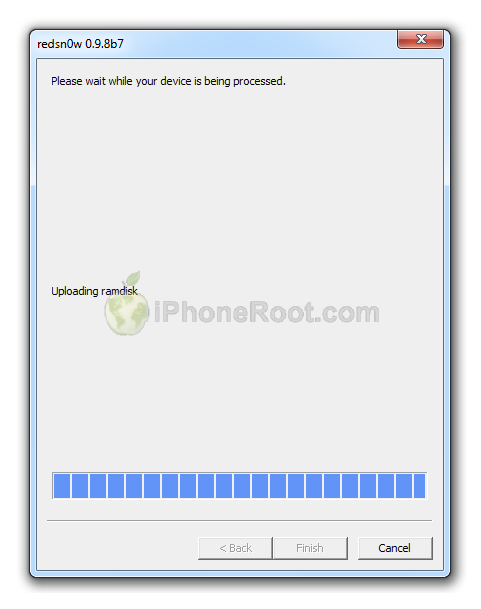
RedSn0w will then begin uploading the new RAM Disk and Kernel.
![Step by step Tutorial: How to Tether Jailbreak iPad 1 Using RedSn0w 0.9.8b7b (Windows) [iOS 4.3.5] Step by step Tutorial: How to Tether Jailbreak iPad 1 Using RedSn0w 0.9.8b7b (Windows) [iOS 4.3.5] (iphone jail435 11a)](http://iphoneroot.com/wp-content/uploads/2011/08/iphone-jail435-11a.png)
Step Thirteen
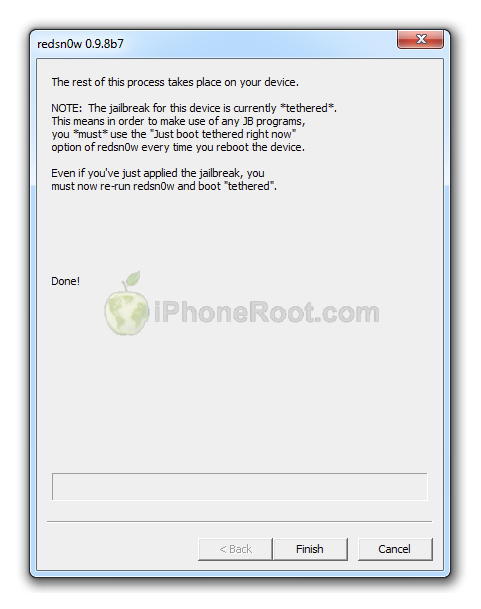
Once this is complete you will be notified that RedSn0w is done. Click the Finish button.
![Step by step Tutorial: How to Tether Jailbreak iPad 1 Using RedSn0w 0.9.8b7b (Windows) [iOS 4.3.5] Step by step Tutorial: How to Tether Jailbreak iPad 1 Using RedSn0w 0.9.8b7b (Windows) [iOS 4.3.5] (iphone jail435 12a)](http://iphoneroot.com/wp-content/uploads/2011/08/iphone-jail435-12a.png)
Once RedSn0w has finished you will need to boot tethered your iPad. You will need to do it everytime you restart.
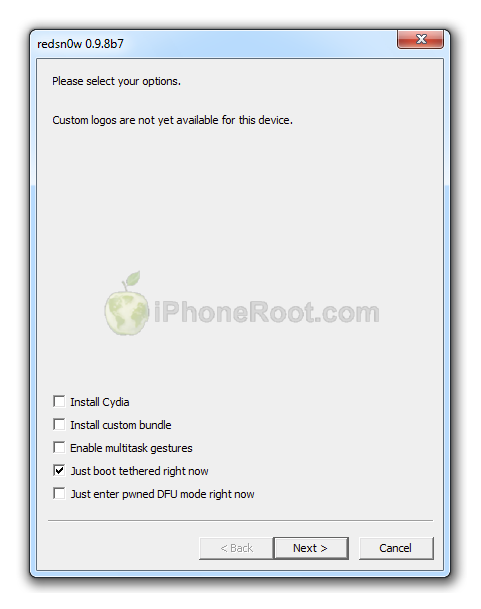
Rerun RedSn0w and this time select Just boot tethered right now from the list of options instead of installing Cydia.
![Step by step Tutorial: How to Tether Jailbreak iPad 1 Using RedSn0w 0.9.8b7b (Windows) [iOS 4.3.5] Step by step Tutorial: How to Tether Jailbreak iPad 1 Using RedSn0w 0.9.8b7b (Windows) [iOS 4.3.5] (iphone jail435 13a)](http://iphoneroot.com/wp-content/uploads/2011/08/iphone-jail435-13a.png)
When your iPad finishes rebooting (5 minutes or so) it will be jailbroken with Cydia on the SpringBoard.
Step Fourteen
Run Cydia. Let it do all the necessary updates.
To have access to the root file system of your iPad (via file managers like iFunBox or iPhone Explorer) install application called afc2add in Cydia.
Step Fifteen
Do not forget to change your default password if you've installed openssh.
[via iclarified]
Follow us on :


![Step by step Tutorial: How to Tether Jailbreak iPad 1 Using RedSn0w 0.9.8b7b (Windows) [iOS 4.3.5] Step by step Tutorial: How to Tether Jailbreak iPad 1 Using RedSn0w 0.9.8b7b (Windows) [iOS 4.3.5] (redsn0w 098 ipad 500x283)](http://iphoneroot.com/wp-content/uploads/2011/09/redsn0w-098-ipad-500x283.png)
![Step by step Tutorial: How to Tether Jailbreak iPad 1 Using RedSn0w 0.9.8b7b (Windows) [iOS 4.3.5] Step by step Tutorial: How to Tether Jailbreak iPad 1 Using RedSn0w 0.9.8b7b (Windows) [iOS 4.3.5] (redsn0w 098 ipad 1 500x390)](http://iphoneroot.com/wp-content/uploads/2011/09/redsn0w-098-ipad-1-500x390.png)
![Step by step Tutorial: How to Tether Jailbreak iPad 1 Using RedSn0w 0.9.8b7b (Windows) [iOS 4.3.5] Step by step Tutorial: How to Tether Jailbreak iPad 1 Using RedSn0w 0.9.8b7b (Windows) [iOS 4.3.5] (jailbreakme ipad 2 290x400)](http://iphoneroot.com/wp-content/uploads/2011/07/jailbreakme-ipad-2-290x400.png)
![Step by step Tutorial: How to Tether Jailbreak iPad 1 Using RedSn0w 0.9.8b7b (Windows) [iOS 4.3.5] Step by step Tutorial: How to Tether Jailbreak iPad 1 Using RedSn0w 0.9.8b7b (Windows) [iOS 4.3.5] (itunes ipad 500x257)](http://iphoneroot.com/wp-content/uploads/2011/07/itunes-ipad-500x257.png)
![Step by step Tutorial: How to Tether Jailbreak iPad 1 Using RedSn0w 0.9.8b7b (Windows) [iOS 4.3.5] Step by step Tutorial: How to Tether Jailbreak iPad 1 Using RedSn0w 0.9.8b7b (Windows) [iOS 4.3.5] (redsn0w 098 ipad 2 500x374)](http://iphoneroot.com/wp-content/uploads/2011/09/redsn0w-098-ipad-2-500x374.png)
![Step by step Tutorial: How to Tether Jailbreak iPad 1 Using RedSn0w 0.9.8b7b (Windows) [iOS 4.3.5] Step by step Tutorial: How to Tether Jailbreak iPad 1 Using RedSn0w 0.9.8b7b (Windows) [iOS 4.3.5] (iphone jail435 7a 315x400)](http://iphoneroot.com/wp-content/uploads/2011/08/iphone-jail435-7a-315x400.png)
![Step by step Tutorial: How to Tether Jailbreak iPad 1 Using RedSn0w 0.9.8b7b (Windows) [iOS 4.3.5] Step by step Tutorial: How to Tether Jailbreak iPad 1 Using RedSn0w 0.9.8b7b (Windows) [iOS 4.3.5] (iphone jail435 8a 315x400)](http://iphoneroot.com/wp-content/uploads/2011/08/iphone-jail435-8a-315x400.png)
![Step by step Tutorial: How to Tether Jailbreak iPad 1 Using RedSn0w 0.9.8b7b (Windows) [iOS 4.3.5] Step by step Tutorial: How to Tether Jailbreak iPad 1 Using RedSn0w 0.9.8b7b (Windows) [iOS 4.3.5] (iphone jail435 9a 315x400)](http://iphoneroot.com/wp-content/uploads/2011/08/iphone-jail435-9a-315x400.png)
Leave a comment, read comments [7]
Не работает указанный метод для перехода в режим DFU, то что пишет редсноу так же отличается от написанной тут, но и по той инструкции не хочет ничего делать((( не могу разобраться, 4.3.5
[Reply]
admin Reply:
October 3rd, 2011 at 9:56 pm
в приложении (проверил только что) схема 2+10+15, у меня аналогично. расхождений не вижу.
на скриншотах видно те же 2+10+15. я же их не сам рисовал
[Reply]
Георгий
3 Oct 11 at 9:31 pm
Помогите пожалуйста!!! Вот я всё правильно делаю… идёт jailbreak … но постоянно зависает на limera1n . подскажите что делать
[Reply]
Антон
4 Oct 11 at 6:27 pm
как сделать ждейлбрейк 4.3.5. не привязанный??? скажите пожалуйста!!!
[Reply]
admin Reply:
October 25th, 2011 at 9:22 pm
никак
[Reply]
Маргарита
24 Oct 11 at 9:49 pm
можно ли сделать не привязанный джейл с помощью redsnow 0.9.10b8
[Reply]
admin Reply:
May 16th, 2012 at 4:23 pm
для 4.3.5 нельзя
[Reply]
krutyshka122
11 May 12 at 10:53 pm