Tutorial: compile and run Java application on the IPhone
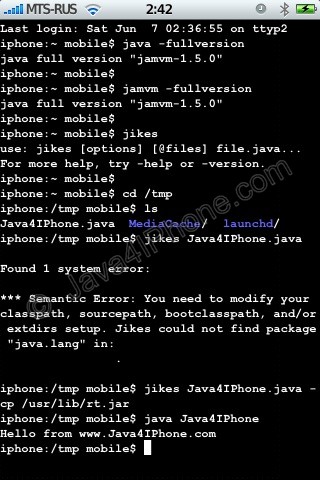
This is a tutorial, that shows step by step how to use installed Java on the IPhone. Just in case you do not have Java installed on your IPhone there is a tutorial how to do it.
What we need is a working IPhone with Java Installed. I used latest firmware 1.1.4, unlocked, jailbreaked and customized by .
Step 1: Create simple Java application, compile and run.
- Create file Java4IPhone.java and put simple Java hello-world code there. I used the following code:

- Upload to IPhone. I used /tmp directory. For uploading I used .
- Run Terminal.
- Use command java -fullversion or jamvm -fullversion to see if java is avaliable.
- Use command jikes to invoke java compiler.
- Go to /tmp directory, using command cd /tmp
- Compile. We need to specify classpath to basic java packages. If we do not do that, jikes will produce an error (see screenshot). So use the following command: jikes Java4IPhone.java -cp /usr/lib/rt.jar
- After compiling Java4IPhone.class file should appear in the same directory. To run use commandjava Java4IPhone
- Take a look at the screenshots. Hopefully you’ll have something similar.
Step 2: Have fun!
Related posts
Latest posts
6 Responses to 'Tutorial: compile and run Java application on the IPhone'
Leave a Reply
You must be logged in to post a comment.
iPhoneRoot.com


how would you compile using other packages? I’m trying to compile processing, so I need to use the “core.jar”
neufuture
9 Dec 08 at 8:14 pm
how can i compile java UI Applications with jikes?
And where can i get documents of the lib jocstrap.jar?
Thanks!
WithRat
24 Jun 09 at 11:28 am
I got these when i tried to compile file JavaSysInfo.java:
E:javapro>javac JavaSysInfo.java
JavaSysInfo.java:31: can not file symbol
symbol: method fullScreenApplicationContentRect()
location: class obc.UIHardware
CGRect rect = UIHardware.fullScreenApplicationContentRect();
^
JavaSysInfo.java:34: can not find symbol
symbol: method defaultSize()
location: class obc.UINavigationBar
CGSize sizenavbar = UINavigationBar.defaultSize();
^
2 errors
Is it that the jocstrap(jocstrap_1.0.2549-8_iphoneos-arm.deb) I got does not fit the source files?
WithRat
24 Jun 09 at 11:36 am
I hope you can help me, well i´ve got every think installed and running but points 7 & 8 are no too clear for my, my file is a .jar one, so i shud´nt compile it, do i? i have tried and nothing, also ia tried to run it by java (filename) but thrn again nothing, im on a 3.1.2 jailbreak os, help me pleas i just want tu run java apps on my Iphone
Ruben
17 Jan 10 at 10:22 pm
ok, i did it,
but… a igot an other prob, when i exec the file becomes a Main-Class on Manifest error, it is a app for a symbian mobile, so, How can i fix this, does anybody knows it? help my pls
Ruben
18 Jan 10 at 12:18 am
argh, when will Apple decide to finally accept Java, so we won’t have to use these kind of complicated (and borderline) techniques
?
Anyway, to compile and run Java application (with UI, WithRat
) on iPhone, I’ve tried something called iSpectrum.
It complies with the iPhone SDK agreement, since you no longer need to install a JVM, but compiles your Java app to native code. So there is no need to jailbreak your phone
.
And you develop in Eclipse, with a plugin of their own, and you can even debug your code right from Eclipse Java editor!
Plus, this is free for open source projects
.
Check it out at
meelooz
19 Feb 10 at 10:55 am