 iPhoneRoot.com

News from category ‘Cydia’
Cydia search on a desktop

Modmyi.com has made an online directory that will search the cydia repositories. It will also show you the current versions. This is only a search directory that will not let you download anything for that you need to open cydia in your iPhone or iTouch. To start searching click
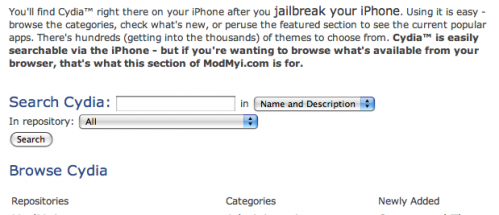
via spazio
 Leave a comment, read comments [2]
iPhone file transfer using the Bluetooth
This is the first and exclusive video about the iBluetooth Project by MeDevil. It shows the iPhone Bluetooth Unlock and the first file transfer from an iMac and a SonyEricsson cellphone. iBluetooth application is not yet finished. As soon as will be complete, it will be hosted in Cydia.
via spazio
Leave a comment, read comments [1]
Get Emoji Icons for free
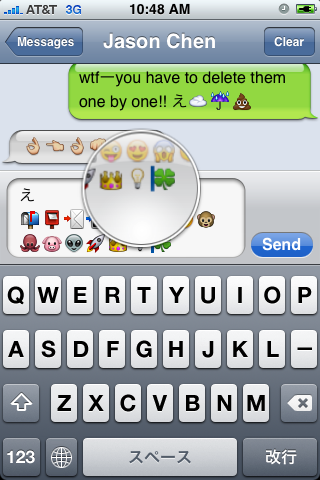
First of all these icons can be viewed on any iPhone with 2.2 firmware. But to be able to send these icons users need to perform additional actions. There are 4 ways to turn them on and 2 of them are free:
Solution N1 for $5.99:
In AppStore buy and install . Goto Settings -> Touch Dial -> Enable Smiley icon ON. Launch Touch Dial. Go to Settings -> General -> Keyboard -> International Keyboards -> Japanese and enable "Emoji."
Solution N2 for $0.99:
In AppStore buy and install . Play with the app for a minute to activate, click on a story, etc. Go to Settings -> General -> Keyboard -> International Keyboards -> Japanese and enable "Emoji."
Solution N3 for Free:
your iPhone. Run Cydia and install Emoji application (iSpazio repository). Go to Settings -> General -> Keyboard -> International Keyboards -> Japanese and enable "Emoji."
This application adds boolean ‘true’ key KeyboardEmojiEverywhere edits in /User/Library/Preferences/com.apple.Preferences.plist. You can do it manually if you want.
Solution N3 for Free:
Step 1. Download the vcard.vcf .
Step 2. Import it to your address book program. If you are using Windows, you may want to do it on iPhone directly. Send the vcard.vcf file to yourself. Open in on iPhone’s Email.app, click the vcf file and import all the contacts.
Step 3. Go into “Settings” > “General” > “Keyboard” > “Japanese Keyboard”. Enable the QWERTY keyboard.
Step 4. In notes or any other program you want. Type “emojia”, “emojii” or “emojiu” to select those 🙂 icons.
I like Solution N3. It is free and simple. You do not need to play with contacts and etc. But you need to jailbreak an iPhone.
hClipboard - one more copy/paste solution [Cydia]
This is one more solution to add copy/paste functionality to iPhone. Couple days ago we wrote about . This one is called . Avaliable via (bigboss repository) for iPhones.
Here is a quick tutorial how to use it:
After installing just enable it in Settings → General → Keyboard → International.
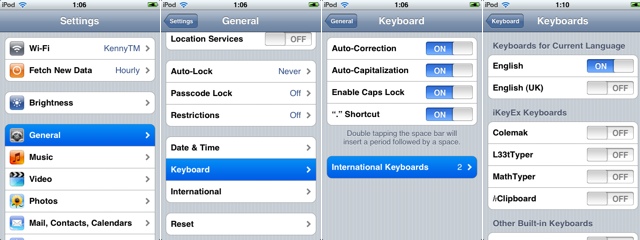
Copy:
When the keyboard appears, switch to ℏClipboard by clicking the International button (the Globe) repeatedly. Then hit the Copy button. The entire content of the text field should now appear in the top of the clipboard.
To select portion of a text:
ImaSafari: show or hide images in webpages [Cydia]
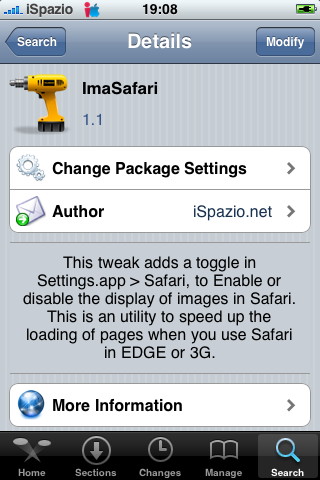
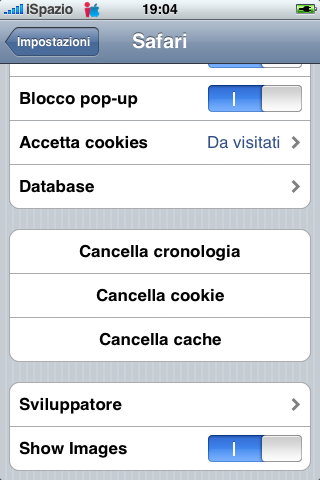
ImaSafari allows iPhone users to turn off image downloading in Safari browser. This is very useful for GRPS, EGDE and 3G connectins. First of all webpages will be downloaded faster. Second - you will save money if you pay for inernet traffic.
This utility is avaliable for free via (for iPhones only).
To turn images on or off just install this software and go to Settings - Safari.
via spazio
Clippy: Copy/paste on iPhone [Cydia]
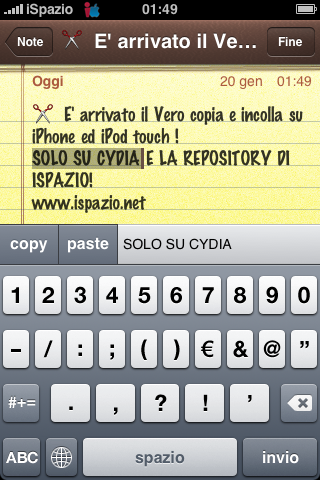
Clippy adds copy-paste functionality to iPhone and iPod Touch. It is avaliable in (iSpazio.net repository) for iPhones. The only limitation is you cannot select text in Safari and copy it to clipboard.
iPod Touch 2G is jailbroken
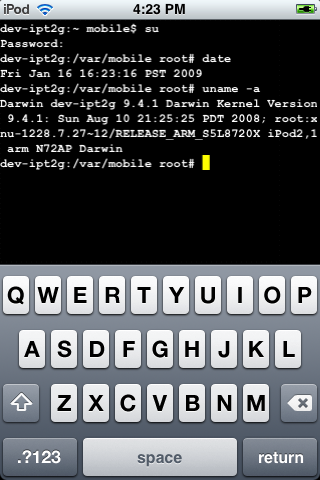
This is a screenshot of a jailbroken iPod Touch 2G. This means that users will be able to install unofficial useful software.
Screenshot is good, but video is better. Here are couple videos:
iPhone 3G unlock tutorial
Dev Team finally made it. They created software called yellowsn0w, that unlocked iPhone 3G. Now you can use any carrier you want. I successfully unlocked my US version.It works much more stable than sim proxy method.
Please, back up everything on your iPhone before you start, just in case. Everything you do is your responsibility. I had to go through all 4 steps to make my iPhone 3G work. I used only my new sim without sim proxy.
Here are the steps:
Leave a comment, read comments [3]
Flash for iPhone is now avaliable
It is called . This Safari plugin is avaliable in for iPhones. Just add Cydia repository d.imobilecinema.com. Still in beta, but works! Watch the video:
New autocorrection toggle [Cydia]
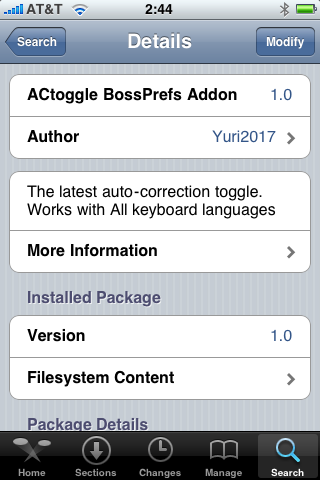
Many users want to turn iPhone's autocorrection off. There is a good solution we wrote about: . The bad thing is that it works only with english keyboard. If you want to disable autocorrection for Russian, Spanish, German or some other keyboard try ACtoggle.
Unfortunately, it didn't work for my russian keyboard - after turning off KB-autocorrect russian keyboard just disappeared. Hopefully this will be fixed in future versions.
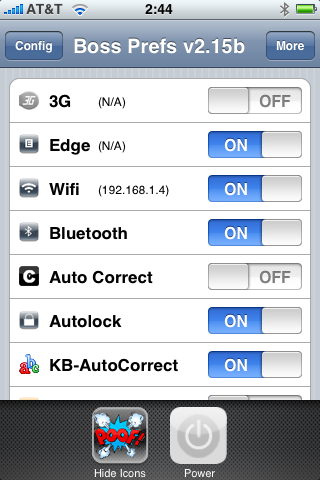
Leave a comment, read comments [2]
SwirlyMMS updated to 1.2.9 [Cydia]

, application to send and receive mms, is updated to v1.2.9. Several bugs are fixed. See the changelog below.
Avaliable in for iPhones.
SBSettings [Cydia]
We had a post about SBSettings - the future of BossPrefs (). Couple days ago this application became avaliable in Cydia.
SBSettings doenst have an icon so after you install to access it you must slide across the statusbar (aka the top bar that displays service, time, battery, etc.)
Current version is 0.92. But the application is updated almost every day.
This application is avaliable for iPhones via .
Cydia and Installer Sources (firmware 2.x)

Sources
app.ifonetec.com: http://app.ifonetec.com/cydia/
cake.mapleidea.com: http://cake.mapleidea.com/cydia/
BigBoss & Planet-iPhones: http://apt.bigboss.us.com/repofiles/cydia/
Hack&Dev.org: http://iphone.hackndev.org/apt/
Hackers.nl: http://apt.hackers.nl/
iClarified: http://cydia.iclarified.com/
iPhone-notes.de Repo: http://apt.iphone-storage.de/
ispaziorepo.com: http://ispaziorepo.com/cydia/apt/
ModMyiFone.com: http://apt.modmyifone.com/
Qik: Live Stream Video from iPhone [AppStore, Free]
The developer, Kevin Rose, says this application will be avaliable officially via AppStore. No and hacking. The only concern.. will Apple approve it? I hope so. Watch the video:
PS: It will be free 🙂
Related posts:
Veency: remote control your iPhone [Cydia]
This application is developed by Jay Freeman, the creator of the Cydia. Veency is a free app that allows iPhone owners to remotely control their iPhone from PC or Mac desktop via a VNC client.
Here are some of the features:
- Launch applications on your iPhone
- Reply to emails, text messages, and more
- Rearrange icons
- Lock/Unlock your iPhone
- Browse through Photos and Contacts
Of course you cannot do two finger gestures with this app. All other actions can be done with the click of your mouse. The only area in which Veency fails tragically at is when opening any video recording application on the iPhone.
This application is avaliable for jailbreaked iPhones via Cydia installer.
Be sure to restart your iPhone after installing Veency and connect to the server using a Wi-Fi connection. We recommend using UltraVNC or TightVNC to connect your Windows desktop. If you're using a Mac, we recommend Chicken VNC.
Here is a video demonstration:
Remote access software or remote desktop software is software that allows you to access a remote computer.
via readwriteweb