 iPhoneRoot.com

News tagged ‘API’
iPhone firmware 2.2 beta 2
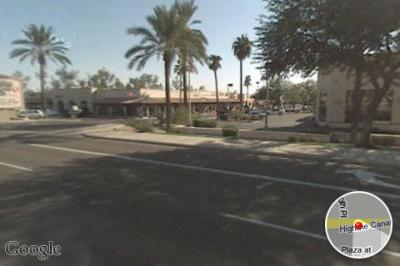
Apple has seeded iPhone 2.2 Firmware Beta 2 and has fully enabled Google Street View. Beta 1 of iPhone 2.2 had hidden APIs related to the Street View for Google Maps, but was not enabled.
The seed notes also indicated that Line-in audio accessories are now supported in the SDK.
via theiphoneblog and macrumors
Categories 2.20 - rapid folder opening

updated to 2.20. Here is a changelog:
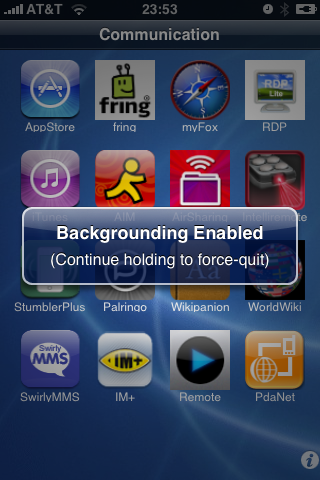
Launcher: Folders instant loading! Integrated with backgrounder for folders. There is now an option in the settings to "keep resident". When set, the folder only loads once per respring. After that, it stays running in the background (uses no CPU but uses some RAM) to provide instant loading (no load times). Note that this does use more memory so use it sparingly. I suggest that it is ok for 1 - 4 folders but I would not background 20 folders. If you do and have problems, just go back to settings and disable this option on some of the folders you don't use as often.
Sounds like we should use + . In this case folders will open very very quickly.
Avaliable in .
G-Map for iPhone
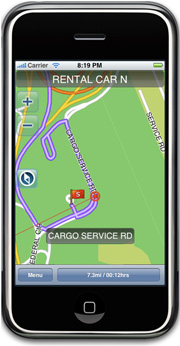
is announced recently. Hopefully it will show up in AppStore soon. Among the features are:
- Stand-alone electronic map that needs no internet connection
- Large-capacity map data enables easy search of desired location and route
- Real 3D View of intricate major intersections and highway junctions
- Smart location search powered by a search engine
- POI
- Detailed information on restaurants, hotels, and leisure destinations provided with Premium POI
- Search by phone number and latitude/longitude
For now developers say that the covered area is: Buffalo, NY/ Cincinnati, OH/ Cleveland, OH/ Columbus, OH/ Nashville, TN/ Pittsburgh, PA/ Rochester, NY/ Boston, MA/ Hartford, CT/ Middlesex, NJ/ Nassau-Suffolk, NY/ New York, NY/ Providence, RI/ Wilmington, DE.

 Leave a comment, read comments [1]
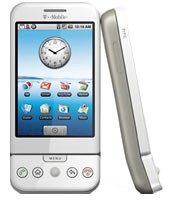
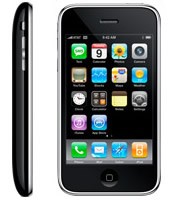
iPhone 3G and G1 specs
The specs are taken from and .
 |
 |
|
| CPU | Qualcomm® MSM7201A™, 528 MHz | Samsung ARM11 |
| Memory | ROM: 256 MB, RAM: 192 MB | 8-16 Gb |
| Dimentions | 117.7 mm x 55.7 mm x 17.1 mm | 115.5 mm x 62.1 mm x 12.3 mm |
| Weight | 158 grams | 133 grams |
| Display | 3.2-inch 320 x 480 | 3.5-inch 320 x 480 |
| Communications | HSDPA/WCDMA 1700, 2100 MHz (3G)
GSM/EDGE 850, 900, 1800, 1900 MHz Wi-Fi 802.11b/g Bluetooth 2.0 + EDR GPS |
UMTS/HSDPA 850, 1900, 2100 MHz (3G)
GSM/EDGE 850, 900, 1800, 1900 MHz Wi-Fi 802.11b/g Bluetooth 2.0 + EDR Assisted GPS |
| Control | Trackball with Enter button
QWERTY keyboard |
MultiTouch |
| Camera | 3.2 megapixel | 2.0 megapixel |
| Сonnectors | HTC ExtUSB™(mini-USB 2.0 and audio jack in one)
microSD™ |
3.5-mm stereo minijack |
| Battery | Talk time:
350 min (3G) 400 min (GSM) Standby time: up to 400 hours |
Talk time:
300 min (3G) 600 min (GSM) Standby time: up to 300 hours |
via habrahabr
QuickPwn and PwnageTool for 2.1 firmware

Dev Team released QuickPwn and PwnageTool for firmware 2.1 (, ). It doesn't work with new iPod yet. Mac OS versions only for now.
Direct Downloads - QuickPwn
Direct Downloads - PwnageTool
Leave a comment, read comments [2]
QuickPwn, PwnageTool and WinPwn

There are so many tools, some for Mac OS, others for Windows, different versions... Complicated. So let's summerize a little bit.
If you have iPhone 3G, you'll be able to install 3-rd party non AppStore applications (through separate applications called Cydia and Installer) and run these applications. If you have old iPhone, in addition to that you'll be able to unlock the device (use with any carrier).
There are two methods: quickpwn and custom firmware method. First one is for quikly pwning and jailbreaking the device without restore. You should use it if you have unlocked device or an AT&T contract.
If you are Windows user:
- Go for . The current version is 2.5.0.2 (also called 2.5 beta-2). Download . It supports both iPhone and iPhone 3G, firmwares 2.0, 2.0.1, 2.0.2. You can use either quickpwn or custom firmware method.
- There is a separate tool for Windows. The current version is RC3. Download . Do you need it? Yes, if you want to quick pwn and you do not like WinPwn (or you had problems with it).
If you're using Mac OS:
- Go for PwnageTool. The current version is 2.0.3.1. Download . Works with 2.0, 2.0.1, 2.0.2 firmwares using custom-firmware method.
- There is a version of QuickPwn tool for MAC OS. The current version is 1.0.0. Download . It works only with firmware 2.0.2. Do you need it? Yes, if you want to quick pwn.
QuickPwn is not a replacement for PwnageTool, they are different tools and provide different features, QuickPwn is for quickly pwning a device, whereas PwnageTool is designed to custom build and tailor the ipsw production process, both tools will be actively developed in the future.
WinPwn 2.5.0.2
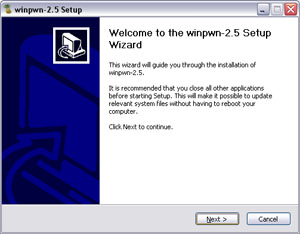
This is the most famous Windows-based utility to jailbreak and unlock Apple's iPhone and iTouch.
Release notes:
- The new nice interface
- Very very very easy to use
- Support for firmwares 2.0/2.0.1/2.0.2
- Root partition resize support
- Installer support
- Basic / Expert modes
- Wizard style interface
- Automatic updater
- Support for WinXP and Vista 32/64bit.
Notes:
- Why is it beta? It's just the saying.. Use at your own risk
- You MUST do a full uninstall of winpwn before installing the new version
- Make sure you have the latest version of iTunes (7.7 and above)
Bug fixes
- Crash when building ipsw
- Quickpwn crash bug fix
Download WinPwn 2.5.0.2:
Apple's market capitalization is $159.37 billion

Digital Daily notes that Apple's market capitalization at $159.37 billion is now worth more than Google's which is at $157.56 billion. Apple's market cap first exceeded $100 billion in May of 2007. Apple was included into the S&P 100 index at that time. For interest, MacDailyNews compiled a list of the market values of other notable companies:
- Microsoft (MSFT) - $255,648,204,000
- IBM (IBM) - $169,964,678,000
- Apple (AAPL) - $157,012,662,240
- Google (GOOG) - $156,392,862,560
- Cisco (CSCO) - $142,125,692,160
- Intel (INTC) - $135,658,860,000
- Hewlett-Packard (HPQ) - $111,866,423,760
- Nokia (NOK) - $97,746,699,520
- Research In Motion (RIMM) - $71,143,935,000
- Disney (DIS) - $59,257,501,500
- Dell (DELL) - $50,483,256,060
via macrumors
iPhone on Flickr
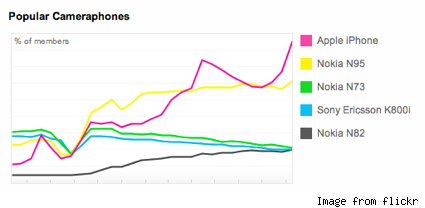
Despite the complaints about the measly 2-megapixel camera built into the iPhone, it appears that ease-of-use trumps resolution. The iPhone remains the leader in camera phone usage on .
WinPwn 2.0.0.4 with support of 2.0.1 firmware
released just a day ago. And now WinPwn - iPhone jailbreaker and unlocker for windows is avaliable. The main new feature - it supports firmware 2.0.1.
Download 2.0.0.4: [] []
Download firmwares: iPhone , , , iPhone 3G ,
2.0.0.4 features:
- Support for both 1.1.4, 2.0, 2.0.1
- Root partition resize support
- Installer support
- Support for WinXP and Vista 32/64bit.
Notes are as usual:
- You MUST do a full uninstall of winpwn before installing the new version
- Make sure you have the latest version of iTunes (from 7.7)
- WinPwn uses 300MB of ram at peak due to the ipsw being extracted in memory
- You must first click browse and load an IPSW to use WinPwn (i thought this was clear)
- For 2.0 only the *5A347_Restore.ipsw files are valid. The 345 image will not work
- If you see Failed to load image catalog/payload catalog, this is fine and won’t cause problems
- If you already have service with AT&T do not activate or install Youtube Fix
- As usual jailbreak for iPhone and iPhone 3G, unlock only for iPhone.
- It is recommended to use at least 550mb partition size to accommodate a space issue that causes some folks errors such as “the ipsw failed to create”.
How to:
PwnageTool 2.0.2 is avaliable

PwnageTool 2.0.2 is out. It will support new firmware 2.0.1. It will jailbreak and unlock the old iPhone and jailbreak new iPhone 3G. Here are the download links:
Installer 4 Beta is included, it is added in any mode by default. The main installer package management interface within PwnageTool isn’t enabled yet, and will report that installer.app isn’t available, but the actual Installer.app package is added as a default option in both modes.
The latest Cydia is also enabled by default. We recommend to use Cydia, not Installer.
0.19% of the network are iPhone users
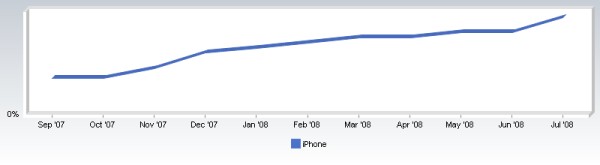
Net Applications published some web statistics. The number of iPhones according to it grows rapidly.
iPhone has 0,19% and is the most popular smartphone in this list. In June this number was 0,16%. Here is the charts and some other numbers:
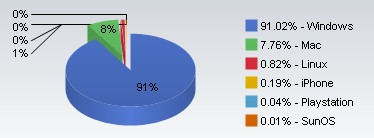
| Windows | 91.02% |
| Mac | 7.76% |
| Linux | 0.82% |
| iPhone | 0.19% |
| Playstation | 0.04% |
| SunOS | 0.01% |
| Nintendo Wii | 0.01% |
Firmware 2.1 beta2 is out
Just a week after the first iPhone 2.1 beta seed, Apple has released another 2.1 firmware release to developers. The new version appears to include several bug fixes.
"This is the second beta of the iPhone SDK targeting iPhone OS 2.1, including bug fixes to iPhone OS as well as an early implementation of the Apple Push Notification Service API. This API is not yet integrated with a live push server."
Related posts:
WinPwn updated to 2.0.0.3
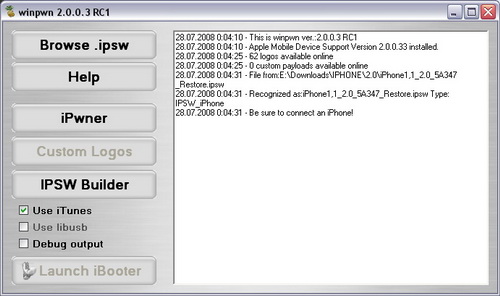
New version 2.0.0.3 of released.
2.0.0.3 fixes the Ipwner crash problem and 16xx errors. It will also fix the iPod ipswBuilder failure bug.
Notes:
- Support for WinXP and Vista 32/64bit. Note Windows 2003/2008 server (Yes SERVER) are not supported neither is Windows 95 or Windows 3.11
- You MUST do a full uninstall of winpwn before installing the new version
- Make sure you have the latest version of iTunes ( Currently 7.7)
- WinPwn uses 300MB of ram at peak due to the ipsw being extracted in memory
- You must first click browse and load an IPSW to use WinPwn (i thought this was clear)
- For 2.0 only the *5A347_Restore.ipsw files are valid. The 345 image will not work
- If you see Failed to load image catalog/payload catalog, this is fine and won't cause problems
- If you already have service with AT&T do not activate or install Youtube Fix
Fixes:
- Cydia/XP/Writing root FS bug.
- Failed to remove ipsw directory after a ipswBuild failure.
- iPwner now only accepts custom ipsws.
- Remove 345 ipsw support. WinPwn only supports 347 2.0 ipsw's.
- Various other fixes.
Download 2.0.0.3:
Leave a comment, read comments [1]
WinPwn 2.0 released
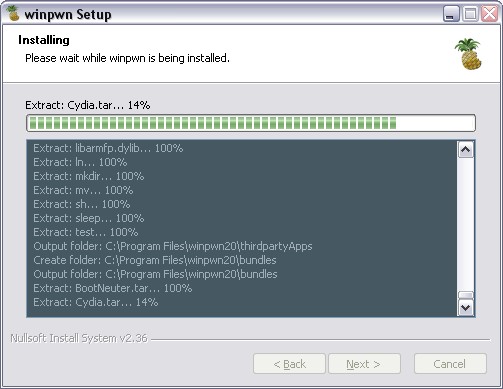
You can download it from or .
Featues:
- Support for both 1.1.4 and 2.0
- Custom Image Support
- Custom Payload Support
- 3g iPhone support
How to:
- First create a custom IPSW using the IPSW Builder (original is ).
- Click "Ipwner" and browse for the custom IPSW that you just created. This will pwn itunes and allow you to flash
- Custom IPSW files via DFU mode
- Once you have pwned Itunes, put your phone into DFU mode. If you don't know how to do this click .
- Once you are in DFU mode Itunes will pop up and then you can hold shift and click restore and browse to your custom IPSW file.
Important Notes
Remove Winpwn 1.0 completely if you have it installed. Installing over the top of WinPwn 1.0 will cause problems.
Make sure you have the latest version of iTunes ( Currently 7.7)
If you already have service with AT&T do not activate or install Youtube Fix
UPDATE: there is a new version avaliable:
Leave a comment, read comments [1]