 iPhoneRoot.com

News tagged ‘айпод’
Clippy: Copy/paste on iPhone [Cydia]

Clippy adds copy-paste functionality to iPhone and iPod Touch. It is avaliable in (iSpazio.net repository) for iPhones. The only limitation is you cannot select text in Safari and copy it to clipboard.
iPod Touch 2G is jailbroken
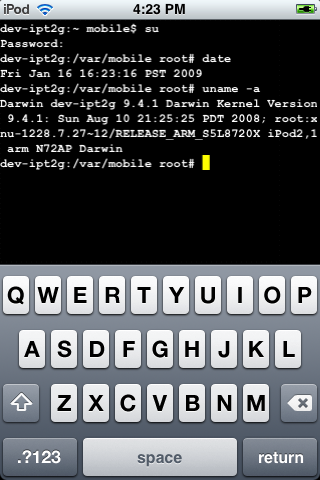
This is a screenshot of a jailbroken iPod Touch 2G. This means that users will be able to install unofficial useful software.
Screenshot is good, but video is better. Here are couple videos:
SimCity for iPhone [AppStore]

Many gamers know SimCity. Now this game is made for iPhone and iPod Touch.

It is avaliable via AppStore for $9.99 ().
Features:
- Touch, tap, drag and flick to create a thriving metropolis!
- Zoom in and out of your vibrant cityscapes by pinching
- Eight tool categories give you the ability to plan, zone, build, bulldoze, and manage your city
- Tutorial, starter cities and 3 difficulty modes for fun and challenging gameplay
- Take charge of the city budget and decide where best to spend taxpayers' hard-earned Simoleons
- Public works management including Water, Power, Garbage and Recycling
- Public and private transportation with roads and rail
- Test your city infrastructure with disasters – UFOs, Fires, Tornados, Earthquakes and Toxic Clouds
Here is a video:
7 Cities TD - Tower Defence game [AppStore]

7 Cities TD is a Tower Defense game staged to the backdrop of the beautiful Amazon region. You are The Defender, tasked with building towers along the Amazon rivers to protect the ancient Golden Cities, and stop the pirates and their evil minions.

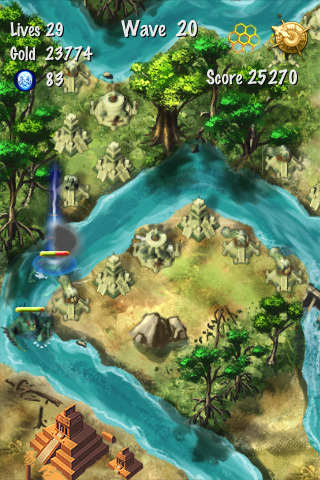
The game looks really nice. However it costs $4.99 (AppStore ).
Features:
- 7 unique hand-drawn maps ranging in difficulty and design
- 2 game modes: Campaign and Survival
- 7 towers: each with an unique look and abilities
- Upgrade your towers and level them up
- 12 individual tower skills that can be unlocked and acquired as towers gain experience and reach higher levels
- A wide variety of enemies: from small scout ships to gigantic creatures of the deep seas
- High-quality 2D graphics, animations, fully dynamic particle systems featuring fire, smoke, ice, and fireworks!
- Original music and sound effects (or you can listen to your own iPod music while playing)
- Camera pan & zoom
- Save & load any time
- Online high score submission & ranking (http://neptune-studios.com/7/highscores/)
- Pirates!
Watch 3 videos:
 Leave a comment, read comments [2]
Cardboard iPhone Dock
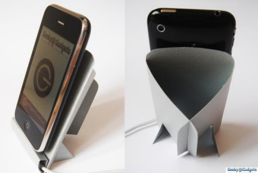
We wrote anout and . Here is one more self made iPhone dock:
Here is which will help you to make one.
via geeky-gadgets
Leave a comment, read comments [1]
iPod and iPhone benchmark results
Here are the results for all 4 devices using benchmark from AppStore ():
1 place – iPod touch 2G, firmware 2.2 – 145,20
2 place – iPhone 3G. firmware 2.2 – 104,23
3 place – iPhone, firmware 2.2 – 99,422
4 place – iPod touch 1G, firmware 2.2 – 99,039
This is because the second-generation iPod touch’s processor runs at 532 MHz, while the iPhone 3G’s processor runs at 412 MHz.
Cooliris for iPhone [AppStore, Free]

Cooliris, the popular browser extension that revolutionizes the way you view media. Now it is available as an application for iPhone and iPod Touch. Cooliris makes finding news and search results a breeze by displaying them as an endlessly streaming 3D Wall, complementing the touch screen perfectly.
This application is free, avaliable via AppStore ().
Features
- 3D Wall makes finding and viewing content easy, and fun
- Discover provides you with news on-the-go: stay on top of the latest current events
- Get the full story: Read more inline without having to jump to the web browser
How to use:
- 1-Finger Swipe - Scroll the wall a screen length
- Pinch / Expand Wall - Zoom in/out
- Single Tap - Select Media or go full screen
- Tilt Wall - Scroll the wall by tilting the device left or right
- Press Title Bar Menu Button - Select the item to go one deeper
- Press Cooliris Logo - Go home
- Finger Swipe Submenu - Slide the sub-menu items to see more
- Click the Envelope - Share media via the default Mail Client
- Click the Metadata - Opens the containing page web page
- Click the 'i' Info icon - Shows/Hides the metadata panel

Watch the video:
iTalk [AppStore, Free]
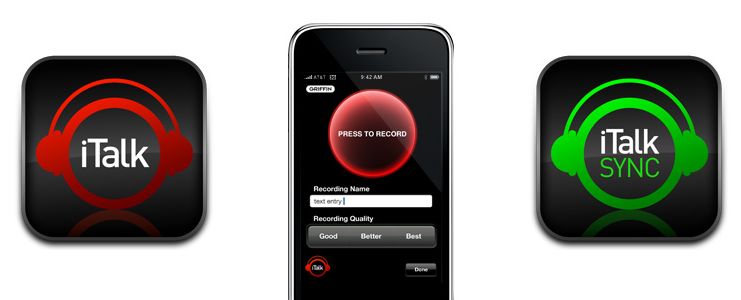
This is another free useful application for iPhone and iPod2 from . It allows users to turn iPhone, iPhone 3G or Pod 2 into a recording device. iTalk's uncomplicated user interface lets you start/stop, choose Good/Better/Best sample rates, and manage the list of your recordings, all with just one finger.
- High-quality handheld recording using your iPhone or 2nd-generation iPod touch
- Easy, convenient user interface and controls
- Drag & drop wireless file transfers to your computer
- User-selectable 11.025 kHz, 22.05 kHz, or 44.10 kHz sample rates
Avaliable for free in AppStore ().
You can sync recordings using application that should be installed on Mac or PC.
Handshake: contact exchange app [AppStore, Free]

Handshake makes it easy to share your contact information and photos with people around you. Works across EDGE, WiFi, and 3g on the iPhone and iPod Touch.
The app is free (AppStore ), but it involves advertising. You can buy Handshake Premium (AppStore ) for $2.99, which is advertisement-free.
Record: one more free recoder [AppStore, Free]

Another nice application became free today. The price dropped from $1.99 to $0. The app is called Record (AppStore ). This is audio and voice recorder for iPhone.
Features:
- Launch and shake to start recording, or if you prefer, use the button on the lower right toolbar.
- Pause and resume recordings.
- Search recording titles.
- Organise recordings into folders.
- Setup smart folders based on keywords, or the location you recorded.
- Email recordings from your iPhone (15 minute recordings or shorter).
- Rename and reorder recordings.
- Seek and pause during playback.
- Compressed IMA4 AIFF format.
- Records when iPhone is locked.
NOTE: iPod Touch 2nd Gen users will need an Apple headset with microphone to use Record.
Jelly Car: cool game for free [AppStore, Free]

JellyCar is a driving/platforming game for both iPhone and iPod touch. The game is about driving a squishy car through squishy worlds, trying to reach the exit. JellyCar features soft body physics for all of the objects in the world. Also your car can transform for a limited time to aid progression through the level.
Features:
- Soft-body physics!
- Simple touch and tilt controls
- 12 levels to play
- original music by Matt McCarthy
- full sound effects
- option to listen ti iPod music while playing the game.
Really cool game for free in AppStore ().
GPS for old iPhone
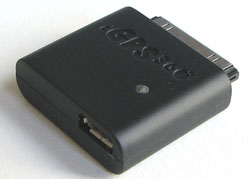
The iGPS360 is a $75 device that brings full GPS to your jailbroken iPhone or iPod touch. Available for preorder now. Check site if you're interested.
via gizmodo
WordPress for iPhone [AppStore, Free]

This is the first open source app that lets you write posts, upload photos, and edit your WordPress blog from your iPhone or iPod Touch. Avaliable via AppStore for free ().
PocketDyno Free [AppStore]
While browsing cool applications I've found PocketDyno (). This application measures the performance of the vehicle. It uses internal accelerometer, not GPS. So iPod and old iPhone users can try this application.
With PocketDyno you can measure:
- Estimated horsepower
- 0 to 60 mph and/or 0 to 100 kmh time
- Max G's, velocity, distance, etc
- Imperial or metric results based on locale
I'll definitely try this app today.
Related posts:
an unknown error 13014

Several users have problems syncing their iPhones after updating to . The most common error message is “an unknown error 13014.”
As one reader writes:
“I just downloaded and installed iTunes 8.0.1 on my iMac running 10.5.5, and synced my non-3G iPhone. I immediately received an error message stating that “The phone ‘[my iPhone's name]‘ cannot be synced. An unknown error occurred (13014). Thinking I’d probably be able to fix it by resetting the phone, I did so.
Now, 15 minutes into the reset, the phone is syncing nicely with no major issues, except that I’m still getting prompted that it can’t be synced about every 15 seconds or so. It’s even kind enough to queue up the errors so that if I ignore them for a few minutes I can go back and just click ‘OK’ half a dozen times and then go back to whatever I was working on. No idea of the cause, outside of the iTunes upgrade.”
Users are reporting similar issues with the iPod touch.
In some cases, simply restarting the host computer and restarting the iPhone can resolve this issue. In other cases, this procedure is unsuccessful.
The other workaround is to reinstall iTunes. If this doesn't help, uninstall it and install iTunes version 8.0.
via iphoneatlas