 iPhoneRoot.com

News tagged ‘test’
Firmware 3.0 Safari benchmarks
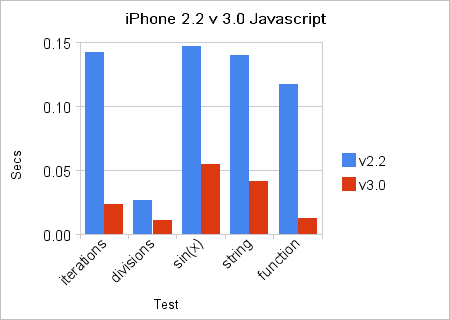
While still in beta, the Firmware 3.0 includes a new version of Safari that integrates the latest WebKit. It uses SquirrelFish Extreme ("Nitro") as an engine for JavaScript. The benchmarkes shows that the new firmware is 3 to 10 times faster, depending on the type of action.
Two thirds iPhones have latest 2.2.1 firmware
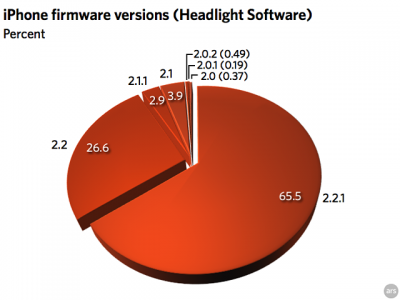
The data, covering one week and provided by Headlight Software, showed no one on 1.x, less than 2% total on 2.0.x, less than 7% on 2.1.x, 26.61% on 2.2, and a whopping 65.49% on the current firmware, 2.2.1 released January 27.
So two-thirds on the latest/greatest firmware, just over a quarter on the previous release. This meants iPhone users try to keep their firmware up to date.
via theiphoneblog
Our sponsor: http://3d-land.net/3D_category/sofas/
Tap Tap Revenge 2 soon
Tap Tap Revenge developers anounced new version of this popular application:
"The wait’s almost over! The code’s been written, the music’s been added, and our thumbs are numb from all the ‘testing’. Tap Tap Revenge 2 is signed, sealed… and soon to be delivered. Sometime next week if all goes well."
Mobile World Congress: SonyEricsson Idou
The latest news акщь Mobile World Congress. A new smartphone called the SonyEricsson Idou, equipped with display 3.5 "touchscreen with 640 × 320 pixels with 16:9 ratio, a 12.1 MP camera with xenon flash and the operating system Symbian Open Source! One more iPhone killer? We'll see.
Test your hearing with iPhone

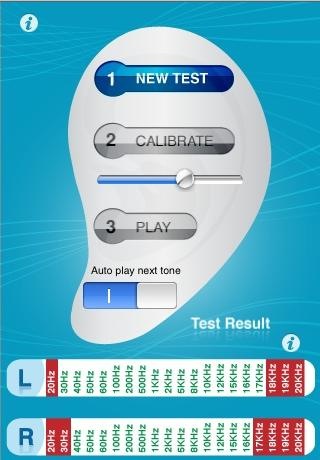
An effective hearing test that measures your threshold of hearing for sounds of different frequencies.
Find out just how far your ears can hear ranging frequencies.
Most of the people should be able to hear up to around 15kHz. From around 17kHz upwards, we get into a range that only the under 20's can hear.
- With this version, you will test your frequency threshold, using static volume tones.
- Using the iPhone headphones, you will be asked to adjust the iPhone volume, for clear and effective playback tones.
- Your left and right ear will be tested alternately with every frequency, from the above frequency ranges.
- After the test has been completed, you will get a report of your hearing frequency response.
App is $0.99 in AppStore ().
Saved from a ticket by an iPhone

TUAW reader Paul tells a nice story, how his iPhone helped him to avoid getting the ticket. He was driving on a Midwestern road covered with blowing snow. He slowed down for a car stopped on the side of the road, but the car behind him hit his rear bumper, doing damage to both cars.
The officer who arrived to investigate asked Paul for his insurance card. Of course, that was when Paul realized it had expired the month before, and he didn't have the latest card in his wallet. The officer said it would be $200 for not being able to prove insurance coverage, and since Paul didn't have the cash it meant putting his license up for bond.
While the officer was doing the paperwork, Paul used his iPhone to log into his Geico Insurance account via the web. He was able to request a PDF copy of his card, which was emailed to his iPhone; then he displayed it to the officer. Happily, the deputy accepted the card as proof of insurance and did not issue the citation.
Most police agencies wouldn't be so open to the idea of looking at a downloaded document, but in this case, at least, it is yet another reason to love the iPhone.
via tuaw
SimCity for iPhone [AppStore]

Many gamers know SimCity. Now this game is made for iPhone and iPod Touch.

It is avaliable via AppStore for $9.99 ().
Features:
- Touch, tap, drag and flick to create a thriving metropolis!
- Zoom in and out of your vibrant cityscapes by pinching
- Eight tool categories give you the ability to plan, zone, build, bulldoze, and manage your city
- Tutorial, starter cities and 3 difficulty modes for fun and challenging gameplay
- Take charge of the city budget and decide where best to spend taxpayers' hard-earned Simoleons
- Public works management including Water, Power, Garbage and Recycling
- Public and private transportation with roads and rail
- Test your city infrastructure with disasters – UFOs, Fires, Tornados, Earthquakes and Toxic Clouds
Here is a video:
DevTeam about firmware 2.2

DevTeam says that 2.2 update SHOULD NOT be applied using iTunes if you want the chance of a soft-unlock in the near future. Use new version of PwnageTool (not avaliable yet, but will be soon).
Some fact:
- The 2.2 firmware for 3G contains a baseband update for the 3G iPhone
- The 2.2 firmware for 2G (1st gen iPhones) doesn’t contain a baseband update and the baseband is still at 04.05.04
- Pwnage technique (and therefore the Jailbreak) isn’t affected, but and do not support this release as yet, so DO NOT install 2.2 using iTunes as you will lose your
VoxBot - make your iPhone talk [AppStore, Free]

VoxBot is a retro speech synthesis robot. Type in any text and VoxBot will say it out loud. App is free for a limited time. Normal price is $1.99. Here is AppStore .
Features:
- It talks!
- Full screen retro oscilloscope display when VoxBot talks
- Easily create, test and edit phrases for VoxBot to say
- Store phrases for quick VoxBot wisdom in the phrase list
Cooliris for iPhone [AppStore, Free]

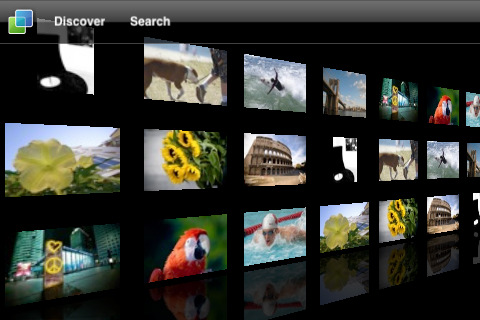
Cooliris, the popular browser extension that revolutionizes the way you view media. Now it is available as an application for iPhone and iPod Touch. Cooliris makes finding news and search results a breeze by displaying them as an endlessly streaming 3D Wall, complementing the touch screen perfectly.
This application is free, avaliable via AppStore ().
Features
- 3D Wall makes finding and viewing content easy, and fun
- Discover provides you with news on-the-go: stay on top of the latest current events
- Get the full story: Read more inline without having to jump to the web browser
How to use:
- 1-Finger Swipe - Scroll the wall a screen length
- Pinch / Expand Wall - Zoom in/out
- Single Tap - Select Media or go full screen
- Tilt Wall - Scroll the wall by tilting the device left or right
- Press Title Bar Menu Button - Select the item to go one deeper
- Press Cooliris Logo - Go home
- Finger Swipe Submenu - Slide the sub-menu items to see more
- Click the Envelope - Share media via the default Mail Client
- Click the Metadata - Opens the containing page web page
- Click the 'i' Info icon - Shows/Hides the metadata panel
Watch the video:
AT&T iPhone vs. T-Mobile (Android) G1 Internet Speed Test
 Leave a comment, read comments [1]
Apple’s iPhone signal strength is fake?
Firmware version 2.1. It is supposed to display “more accurate” signal strength. Well... it appears that “more accurate” may mean “unreasonably generous.”
Users can actually see the results of iPhones dB meter. Dial *3001#12345#* then press “Call”. A dB reading below 50 generally indicates good strength.
Here's what I've got:
iPhone Atlas reader Michael did some testing, and found that widely varying dB readings resulted in the same five-bar signal indicator on his iPhone. He writes:
iPhone’s security issue: fix it

You probably know about latest . The good news is that there is a solution to fix it.
Jonathan Zdziarski has deviced a way to disable this writing to disk, so that screenshots cannot be recovered. On a jailbroken iPhone, you can disable these screenshots with the following commands in MobileTerminal or through SSH connection to iPhone:
# rm -rf /var/mobile/Library/Caches/Snapshots
# ln -s /dev/null /var/mobile/Library/Caches/Snapshots
Screenshots themselves actually get written to /var/mobile/Library/Caches/Snapshots. So these commands delete this folder and symlink it to /dev/null, so the screenshots don’t get written to disk.
The side effect to this is that when resuming an application, you’ll get the default screen in the zoom-in effect. Once the application resumes, however, you’ll have your application screen back. For example, your mail application will always zoom to the front as if you had an empty inbox, but will quickly correct itself once the application resumes.
“To return to the default behavior, just delete the symlink and the directory will get recreated. Mind you, this has no effect on the many other pieces of data stored on the iPhone, and therefore your iPhone will always be at risk for leaking private data, especially to seasoned forensic examiners. Use at your own risk.”
via iphoneatlas
QuickPwn 2.1 for Windows is ready
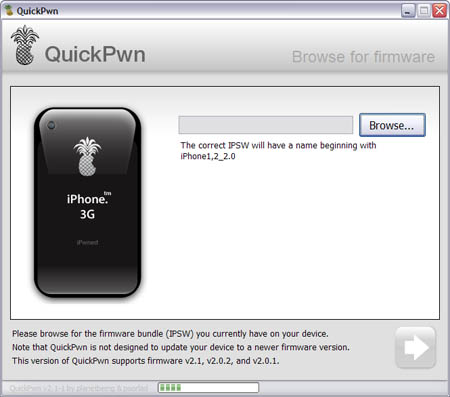
Congratulations, Windows users. The support for new firmware 2.1 is added. So here is what you can do:
- Support for FW v2.0.1, v2.0.2, v2.1.0
- Jailbreaking and Pwning iPhone 2G, iPhone 3G and iPod Touch
- Adding Cydia and Installer
- Replacing boot logos
- Unlocking iPhone 2G
Changes from QuickPwn RC3
- Support for firmware 2.1
- Auto-detection of firmware version, insistence on correct firmware bundle to prevent user epic fail.
- Use of iASign to activate to prevent bspatch epic fail.
- Removed buggy and never really tested 2.0 support
Sorry, no jailbreak for new iPod Touch and no unlock for iPhone 3G.
Here are download links:
Firmwares v2.1: ,
Related posts:
CopierciN - copy/paste for iPhone
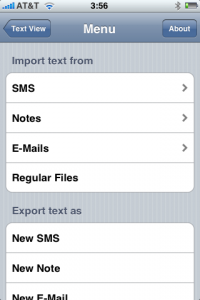
CopierciN is a cool app that implements some copy / paste functionality. It’s in the beta stages but has potential. It lets you import and export between apps like notes, sms, email. Avaliable via Cydia Installer for 2.x firmares.
CopieriN is a basic text editor which, hopefully, bring some kind of copy/paste mechanism to iPhone (to jailbroken ones only, unfortunately). It does not add copy/paste functionality directly to other applications but it provides a mechanism to import text from and export text to SMS, Notes, Mail applications (more to come in the future) and files in the filesystem.
Usage: It basically has two parts: Text Editor and Importer/Exporter. Within the text editor, you can select a piece of text using your finger, cut or copy it, and paste it to a selected location.