 iPhoneRoot.com

News from category ‘Video’
What if we combine the iPhone 5 with the Galaxy S III?
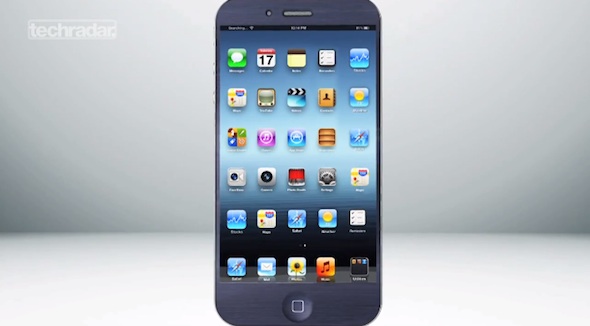
Samsung’s Galaxy S III and Apple’s next-generation iPhone 5 are probably the best two and most highly-anticipated smartphones releases of 2012. The S III just recently starting hitting retail stores, and Apple is expected to unveil its next iPhone later this fall, in October.
Choosing between the two is indeed a tough choice for many consumers. Both handsets will obviously have their benefits. But what if you didn't have to choose? What if you could have the best of both worlds? Techradar brought us another interesting concept called iSung Galaxy V.
It is a mashup of an iPhone 5, based on recent rumors, and Samsung’s Galaxy S III. The handset features big screen, iOS, cameras, NFC, Samsung’s Ultra-Shutter tech, and even a memory card slot.
Take a look at the video:
What it’s like working for Apple?
Everybody wants to work at Apple. Here is a quite interesting Apple HR’s employee recruiting video from YouTube.
Google Search Vs Siri In 1600-queries Test
Gene Munster, analyst from Piper Jaffray, today published a research note containing the results of Google search vs. Siri 1600-question test. In the study, both Siri and Google were presented with 800 queries in each of two different environments, a busy street and a quiet room. This is not exactly a comparison of how well two services stack up against each other, because queries for Google search were typed in, but the results allow to find out what potential Siri has as an everyday search service and alternative to Google search.
 Leave a comment, read comments [1]
Google Drive and Chrome Browser Coming To iOS
Today Google announced that it is launching a version of Google Chrome browser for the iPad and iPhone. The company says this version will be available on the App Store later in the day. Last month analyst from Macquarie Ben Schacter predicted that Google Chrome browser was coming to iOS.
Brightcove’s API Makes It Easier To Create Dual-Screen Apple TV And iOS apps
Today Brightcove App Cloud Core, a free edition of its app platform allowing developers to create iOS apps using JavaScript and HTML5. One of the main new features of the platform is the ability for developers to create dual-screen iOS app to transfer content to the Apple TV via AirPlay.
How To Start Using Passbook On iOS 6
Earlier this month at Worldwide Developers Conference, Scott Forstall, Apple’s Vice President of iOS, unveiled a new “Passbook” app that allows users to track different types of stubs, including movie tickets, coupons, loyalty cards and boarding passes.
Passbook app is included in the iOS 6 beta currently available to developers, but it is missing virtual passes to put inside. Currently it is just a sitting page without functionality. But Passbook will likely swing into full action as the company adds more functionality heading this fall. Those of you who want to start using this app, can do this in iOS 6 with a few simple steps.
Apple Posts New iPad 'Do It All' TV Ad [Video]
Apple has posted a new ad about the new retina display iPad. The video is called 'Do It All'.
Whatever you do on iPad, do it all more beautifully than ever with the stunning Retina display.
Microsoft Announces Its New Tablet Called Surface
Microsoft has unveiled its new tablet that will compete with iPad, Google’s Android and tablets from other manufacturers.
The is a 10.6-inch tablet running Windows 8 and will come in two models. One will be powered by OS Windows RT and ARM processor. It will ship in 64GB or 32GB versions.
iOS 6 Maps Hacked To Work On iPhone 4
As we reported earlier this week, some iOS 6 features will not be compatible with all iDevices. Among these features are new turn-by-turn navigation and Flyover that are not supported on the iPhone 4 and older devices.
But according to videos posted by Russian site iGuides, Flyover and 3D maps can properly work on a jailbroken iPhone 4. After digging in the firmware, an iOS developer Anton Titkov has managed to get these feature working on the iPhone 4 and has even posted instructions for enabling these functions.
iOS 6: Safari video demonstration

Safari doesn’t look that different on iOS 6, but underneath the hood you’ll find some interesting changes aimed at improving your mobile browsing experience.
First of all, there’s the ability to browse in full screen mode while in landscape on the iPhone. Secondly, there’s the ability to sync tabs across other iOS 6 devices using iCloud. Next up to bat is a new update to Reading List that allows you to read those items while offline.
Take a look at the demo:
Apple - Introducing MacBook Pro with Retina display [Video]
Here is an official video from Apple, introduction to the new MacBook Pro with Retina display.
Apple Released TV Commercial For Retina Display MacBook Pro
Apple has just launched a new TV commercial for the MacBook Pro unveiled yesterday, focusing on the machine’s breakthrough Retina display.
“The radical new MacBook Pro with Retina display. Innovation in every dimension”.
While Apple has run several high-profile ad campaign for Macs such as “Switch” and “Get a Mac”, the company rarely promotes specific Mac products in television ads. But with the Retina display and the new form factor in the new MacBook Pro, the company is obviously interested in attracting widespread attention to this product.
Download WWDC 2012 Keynote video in HD

Video of WWDC 2012 keynote is officially available for download in iTunes.
Apple presented new operating systems iOS 6 and OS X Mountain Lion, as well as hardware changes to MacBook Pro and MacBook Air product line.
iOS 6: Siri video demonstration
Siri in iOS 6 became quite smart. New features include sports scores, Movie info, including showtimes, trailers, reviews, and actor information, the ability to launch apps, and much more. The new Siri is also iPad compatible. Let's watch:
Leave a comment, read comments [8]
iOS 6: Maps video demonstration
Apple recently introduced new iOS 6 which has the new Maps app. Apple finally removed Google Maps and added cool features, like 3D views, turn by turn navigation, and full integration with Siri. Let's watch the demo:
Leave a comment, read comments [1]