 iPhoneRoot.com

News from category ‘Firmware’
QuickPwn Beta
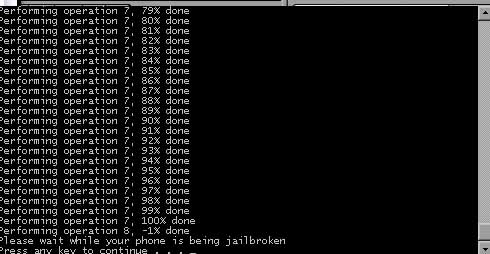
DevTeam created a quick solution for jailbreaking an iPhone. It is called QuickPwn. It is in beta, so be careful. It will allow you to pwn (jailbreak) your device very quickly without restoring!
Who should use this tool? This is for those that are not planning to restore. It’s not clear what the activation state is after the process therefore, I only recommend this for those that have a contract carrier or an unlocked phone already.
If you are on a stock device and using AT&T or a contract carrier, this is the perfect jailbreak for you. You will not lose your contacts or have to do any backups. Finally, if you are going to restore anyway, especially if you need to unlock a 2g, you may as well use winpwn or such.
Currently QuickPwn requires your device to be running version 2.0.1 of the iPhone/iPod firmware. And it runs only on Windows. This requirement will change in a subsequent release.
You can download it .
WinPwn 2.0.0.4 with support of 2.0.1 firmware
released just a day ago. And now WinPwn - iPhone jailbreaker and unlocker for windows is avaliable. The main new feature - it supports firmware 2.0.1.
Download 2.0.0.4: [] []
Download firmwares: iPhone , , , iPhone 3G ,
2.0.0.4 features:
- Support for both 1.1.4, 2.0, 2.0.1
- Root partition resize support
- Installer support
- Support for WinXP and Vista 32/64bit.
Notes are as usual:
- You MUST do a full uninstall of winpwn before installing the new version
- Make sure you have the latest version of iTunes (from 7.7)
- WinPwn uses 300MB of ram at peak due to the ipsw being extracted in memory
- You must first click browse and load an IPSW to use WinPwn (i thought this was clear)
- For 2.0 only the *5A347_Restore.ipsw files are valid. The 345 image will not work
- If you see Failed to load image catalog/payload catalog, this is fine and won’t cause problems
- If you already have service with AT&T do not activate or install Youtube Fix
- As usual jailbreak for iPhone and iPhone 3G, unlock only for iPhone.
- It is recommended to use at least 550mb partition size to accommodate a space issue that causes some folks errors such as “the ipsw failed to create”.
How to:
iPhone 2.1 Beta 3
iPhone OS 2.1 beta 3 is now available and is to be used for testing only. View the Pre-Installation Advisory for iPhone OS 2.1 beta 3, Readme, and Release Notes before installing the new versions of the iPhone OS and SDK. As a reminder, pre-release software is Confidential Information and is subject to the terms outlined in your Registered iPhone Developer Terms and Conditions with Apple.
Again, there were 8 betas released for 2.0 between March and July. If Apple keeps this up, could we be looking at a September release for 2.1?
Related links:
PwnageTool 2.0.2 is avaliable

PwnageTool 2.0.2 is out. It will support new firmware 2.0.1. It will jailbreak and unlock the old iPhone and jailbreak new iPhone 3G. Here are the download links:
Installer 4 Beta is included, it is added in any mode by default. The main installer package management interface within PwnageTool isn’t enabled yet, and will report that installer.app isn’t available, but the actual Installer.app package is added as a default option in both modes.
The latest Cydia is also enabled by default. We recommend to use Cydia, not Installer.
Negative feedback on 2.0.1. Update bricking some iPhones.
Here is some negative feedback on 2.0.1.
- A small number of blog readers and have reported the update bricked their handsets or . Didn't show up during testing by many labs.
- There are several reports that updating to 2.0.1 on an iPhone in Airplane mode may result in bricked phones.
- Users who paid Vodaphone to unlock their phones for international roaming have the update breaks connections with their carriers.
- A few users occasional lag in the Contacts, SMS and e-mail apps. From our testing, typing in the Contacts app is still laggy, but SMS and e-mail is faster.
- No surprise whatsoever: Updating results in losing access to your jailbroken (i.e. hacked) apps. 2.0.1 updates iPhone 3G's baseband, you may never be able to unlock the handset again if you run this update.
- Many users are reporting 2.0.1 is slow with backup. This more likely has to do with the version of iTunes they're running; many have said iTunes 7.7.1 sped up backup and syncing.
Related posts:
Installing 2.0.1. Solving problems. Avoid bricked phone.
Here is an . If you want to install please read this first:
Disable airplane mode before installing Prior to installing the iPhone OS 2.0.1 update, make sure that Airplane mode is not enabled on your iPhone. Having Airplane mode turned on can result in a non-functional phone when the update is applied. You may receive the error message:
“Information for activation cannot be obtained from the iPhone”
Fortunately, you can disable Airplane mode from the emergency screen if your iPhone is put into an inactivated state by a problematic update.
“iTunes could not update the carrier settings on your iPhone” Several users are receiving the error message “iTunes could not update the carrier settings on your iPhone. An unknown error occurred (OxE80000001).”
If this error occurs, try clicking the “Restore” button in iTunes rather than “Update.”
Problems installing:
New firmware 2.0.1
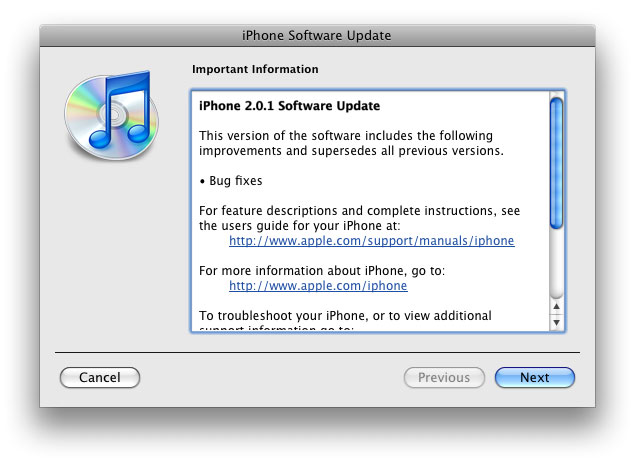
The main purpose is bug fixing. Many applications work faster. Here is the list of changes:
- Drag an app icon across multiple pages in one motion, rather than having to drag it, drop it, pick it up again and drag it over to next page, and repeat.
- Contacts are now more responsive.
- Backup is much faster.
- Apple may have changed the calibration of the iPhone's reception "bars" while connected to a 3G network to reflect a stronger signal than before.
- Keypad loads quicker.
- Screen rotation in Safari appears to be smoother.
- Some apps may ask to be updated after the firmware upgrade.
- SMS typing faster.
- Google Apps works faster.
- Netshare still works (for those who use it).
- Works with iPod.
- Multimedia content is kept after update.
- No Support from Pwnage and WinPwn. If you update you'll loose unlock and jailbreak.
Firmware 2.1 beta2 is out
Just a week after the first iPhone 2.1 beta seed, Apple has released another 2.1 firmware release to developers. The new version appears to include several bug fixes.
"This is the second beta of the iPhone SDK targeting iPhone OS 2.1, including bug fixes to iPhone OS as well as an early implementation of the Apple Push Notification Service API. This API is not yet integrated with a live push server."
Related posts:
Firmware 2.1b - no problem for Pwnage
Apple created a new . Of course DevTeam tried their Pwnage on 2.1 firmware. Here's a screenshot of 2.1 running on an unlocked iPhone 1G:
So far Pwnage has worked for 1.1.4, all eight (!) 2.0 betas, 2.0 itself, and now 2.1 beta1.
Unlock for IPhone 3G - almost there
DevTeam posted a new interesting screenshot. They successfully downgraded modem firmware. This is not an unlock (yet), but it is a good illustration of the first progress made with regard to hacking the 3G baseband. They accomplished this by being able to execute their own code on the baseband that allows to circumvent security checks and flash the baseband with older, disallowed firmware. Please note this has been accomplished using software only, the iPhone 3G has not been disassembled or hardware modified in any way.
Firmware 2.1
Apple is already providing developers with a new iPhone firmware beta with enhanced location-finding that could lead to true navigation as well as the roots for background push services.
The one of new features is update to core Location - it can now recognize the cardinal direction of an iPhone with GPS as well as its velocity, both of which are ingredients necessary to providing turn-by-turn directions. The additions confirm statements recently by Apple's Greg Joswiak, who rejected earlier claims that iPhone 3G's GPS antenna wasn't powerful enough to handle navigation and in turn explained that "complicated issues" are holding the device back from serving as a true navigation unit.
Apple is also implementing a rough version of its background push notification service in the 2.1 firmware. Announced at the Worldwide Developers Conference, the feature lets third-party native programs receive data such as alerts or new messages without actively running. The measure saves processing power without interrupting some apps that depend on constant access to the Internet.
The inclusion of this early version of the code alludes to the 2.1 update becoming public at the same time as the push notification service itself, which is tentatively due for September. In the meantime, Apple and its US partner AT&T are known to be testing iPhone 2.0.1, a maintenance release that likely fixes some of the outstanding bugs with the initial 2.0 release.
via appleinsider
Java for IPhone / IPhone 3G firmware 2.0 exists
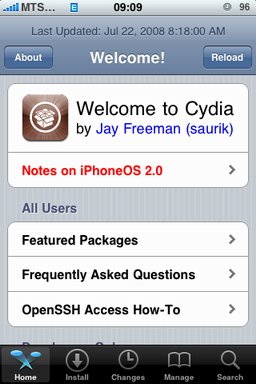
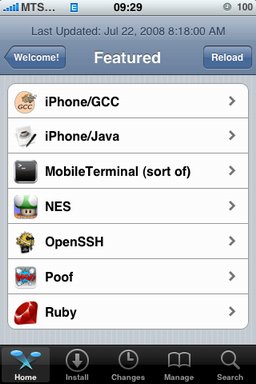
After successfull of the IPhone/IPhone 3G with firmware 2.0 it is possible to install . And what is more exciting, there are many applications there, including Java.
Related articles:
screenshots are from iphoneapps.ru
PwnageTool 2.0.1 released

Yesterday there was a . Now version 2.0.1 is avaliable.
Here is the list of bugfixes:
- It auto-finds the bl39 and bl46 files better, if they’re on your computer
- It creates the ~/Library/iTunes/Device Support/ folder if not present, which should help with some 1600 errors people have been having.
- Many people have reported the PwnageTool not starting up at all (the icon never stops bouncing). This issue should be resolved now.
- The Sparkle AppCast URL is fixed in this version, so automatic updates should work for future releases.
Because of the AppCast URL fix, we recommend that everyone who downloaded PwnageTool 2.0 get this version, if they want to stay up to date automatically.
If PwnageTool 2.0 pwned your phone correctly the first time, you do not need to pwn again with 2.0.1.
The file can be found on , or at .
If you choose to download it from other mirrors, you may want to verify that the SHA1 of the file is 10b6c7dc22286e7b70c3d5a92cda7d117426fda9.
 Leave a comment, read comments [1]
PwnageTool 2.0 released - jailbreak and unlock for 2.0 firmware
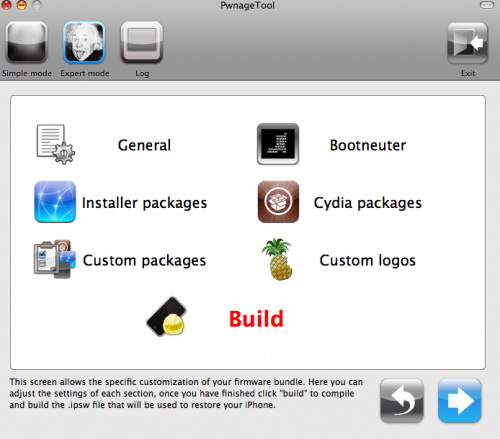
Now older IPhone users users can upgrade to firmware 2.0 and IPhone 3G users have a possibility to have jailbreaked IPhones. That is because PwnageTool 2.0 is released today. Download links are: , , .
Just a reminder: this tool jailbreaks and unlocks older iPhones, and jailbreaks iPhone 3Gs and iPod Touches. No unlock for Iphone 3G yet. The supported firmware is 2.0 only. Platform is Mac OS.
If you get Error 1600 from iTunes (or if you see in your log a failure to repare x12220000_4_Recovery.ipsw), try: mkdir “~/Library/iTunes/Device Support” ; if that directory already exists, remove any files in it. Then re-run PwnageTool.
Reminder: as of right now, there are no apps out for 2.0. Over the next few days some will come out. So do not update yet if you have some favorite 1.1.x apps you are using! 2.0 will not run 1.1.4 apps
UPDATE:
Unlocked firmware 2.0 demo
ВумЕуфь published another interesting video - IPhone with firmware version 2.0 unlocked and fully working. Itunes and Cydia Installer is just fine with 2.0.