 iPhoneRoot.com

News from category ‘Video’
PhoneIt-iPad will turn your iPad 3G into a phone
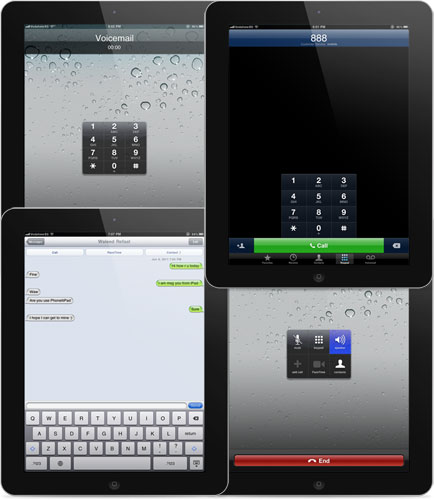
The iPhoneIslam team created a hack that brings us cellular calling and texting on a jailbroken iPad 3G.
The new hack is called PhoneIt-iPad and is available in Cydia repository http://apps.iphoneislam.com/ for $20. Take a look at the video:
 Leave a comment, read comments [1]
iPad with 3D display
Here is an interesting iPad modded with a 3D display at the Display Taiwan 2011 exhibition in Taipei. It requires 3D glasses, but still quite interesting gadget. In future iPad 3 might have such functionality.
iOS 5 for iPad video walkthrough: Notification Center, iMessages, Music, Safari, Twitter, and more
9to5mac created an eleven minute walkthrough video of iOS 5 on the iPad. The video covers Messages with the iMessage service, Notification Center, new Music application, updated Safari, tweaked Mail, Twitter integration, updated Calendar, Settings, Reminders, the new keyboard, and more. Take a look:
WWDC 2011 in 120 seconds
Here is a quick video for very busy people. It highlights the basic new features introduced during WWDC 2011 keynote.
If you have more time it is worth watching the full version (or just download it).
AirPlay Mirroring in action
One of the new iOS 5 features that has been met with great enthusiasm at WWDC 2011 keynote is AirPlay Mirroring:
AirPlay Mirroring, you can now mirror your entire iPad 2 right to your television, wirelessly, using Apple TV
This is really cool. Here is a video of AirPlay Mirroring in action:
How to upgrade to iOS 5 without developer account
Before you even start thinking about it -
- you do it at your own risk
- you will probably loose warranty
- you cant go back to iOS 4.x once you go to iOS 5
- Apple will probably fix this soon.
The exploit uses a combination of Voiceover and the pull down notifications to activate the phone. The user that found this exploit says the device continues to work after restarts (so you won’t need to activate it every time you restart). The steps are:
Video: iOS 5 runs on iPhone 3GS
Here’s a good video of iOS 5 on iPhone 3GS. Some things users will be missing. Overall, the speed seems to be pretty good and the experience is largely the same as the iPhone 4.
Apple Official Promo Video: "Introducing iOS 5"
Here is an official almost 6 minute promo video from Apple about iOS 5.
Apple Official Promo Video: "Introducing OS X Lion"
Here is an official promo video from Apple about OS X Lion.
WWDC 2011 Video is Now Available on Apple's Site

Yesterday Apple started its WWDC 2011 with a keynote event about the next generation of software for its devices. Today the company made its 118-minute presentation publicly on Apple.com.
On the keynote Apple CEO Steve Jobs along with senior vice president of iOS Software Scott Forstall and senior vice president for Worldwide Product Marketing Phil Schiller unveiled new version of its mobile operational system, new cloud service iCloud and took a closer look at Mac OS X 10.7.
Worldwide Developers Conference 2011 will take place until June 10. More than a hundred of technical sessions should help developers in creating applications for Lion and iOS 5.
German vandals put Windows logo on upcoming Apple Store
Check out this video of German guys defacing the upcoming Hamburg Apple Store with a giant Windows logo.
This is funny that they have installed the logo incorrectly. The green is supposed to be at the top right and the blue is at the bottom left.
iPad in hands of magician
Well, this is just awesome. This guy is great, he is a real magician.
iOS 5 Concept: Dynamic Icons [Video]
Jan-Michael Cart has posted an interesting iOS 5 concept video demonstrating an idea for dynamic icons. Each icon dynamically transforms to indicate notifications, time, some other info. We doubt this will appear in iOS 5, but the idea is quite interesting. Take a look:
iPad 3G was hacked: users will be able to make calls and send sms
The iPad 3G has been hacked by iPhoneIslam, who managed to enable full phone and SMS functionality.
A hack that will change the game. Can you imagine turning your iPad to a fully functional phone.
With No Special Hardware all what you need is Jailbroken iPad 3G and your iPad 3G will do anything you expect from iPhone... Phone Calls, SMS, FaceTime by Phone Number... ETC
New hack will be available on the Cydia Store 'very soon'.
Take a look at the demo video below:
Step-by-step Tutorial: How to Untether Jailbreak Apple TV 2G Using Seas0nPass (Windows / Mac OS) [iOS 4.3]

Using this tutorial you will be able to untether jailbreak iOS 4.3 running on Apple TV 2G. This tutorial uses Seas0nPass for Mac OS X or Windows.
UPDATE: Please, consider reading our Jailbreak & Unlock FAQ, especially if you have questions or troubles.
Step one
- Make sure you're running the latest version of iTunes.
- Download Seas0nPass: [10.6 or later] | [XP or later]
- A micro USB cable will be required to connect Apple TV 2G to computer.
- Disconnect all iPods, iPhones, and iPads from the computer before running Seas0nPass.