 iPhoneRoot.com

News from category ‘Software’
iPhone 3.1.3 SDK now available

Along with a new firmware for iPhone and iPod Touch Apple released a new version of SDK - 3.1.3. It's a required update, otherwise Xcode will not recognize or work with your 3.1.3 device. You can download it at .
As usual the iPhone SDK includes Xcode, the iPhone simulator, and other tools for developing applications for iPhone and iPod Touch. If you want to develop for the iPad, you'll need the SDK version 3.2 instead.
 Leave a comment
Apple Releases iPhone OS 3.1.3
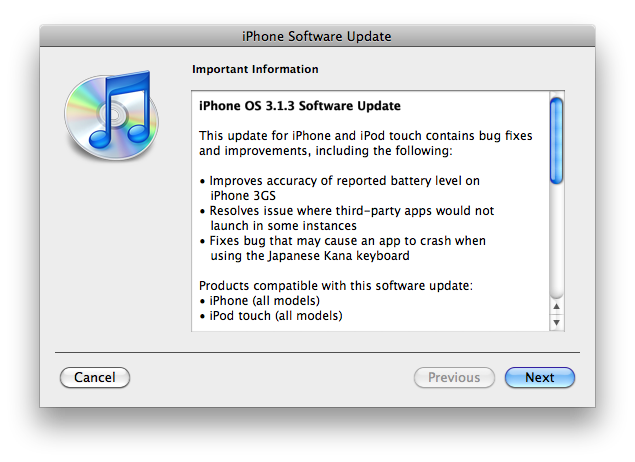
Apple has just released new firmware 3.1.3 (7E18) for iPhone 3GS, iPhone 3G, iPhone 2G, iPod touch, iPod touch 2G and iPod touch 3G.
The update includes:
- Improves accuracy of reported battery level on iPhone 3GS
- Resolves issue where third-party apps would not launch in some instances
- Fixes bug that may cause an app to crash when using the Japanese Kana keyboard
- Other security updates ()
So this is a minor update, which fixing only the accuracy of the 3GS battery meter and the stability of some third-party app launches. This update is avaliable via iTunes.
New firmware 3.1.3 also introduces a new version of the baseband, the 05.12.01. So if you need unlock do not update! DevTeam also warns us:
If you care about your jailbreak and unlock, don’t update your device - 3G and 3G(S) owners should pay particular attention to this warning.
PwnageTool and redsn0w are not yet compatible with 3.1.3
Experimenters show that the latest version of redsn0w 0.9.2 is able to jailbreak iPhone 2G, iPhone 3G and iPod touch 1G. Just point it at the 3.1.2 IPSW (download here) after doing update or restore to firmware 3.1.3. Sounds like DevTeam will release an updated version of redsn0w that will handle firmware 3.1.3 officially. They say iPod touch 2G with firmware 3.1.3 is also jailbreakable.
Users report that unlock software, blacksn0w and ultrasn0w, doesn;t work with the new baseband.
Wil Shipley: Apple copied my Delicious Library
During the iPad demonstration when the iBooks was presented some of us could notice that it looks exactly like Delicious Library. And its developer Will Shipley noticed that too.
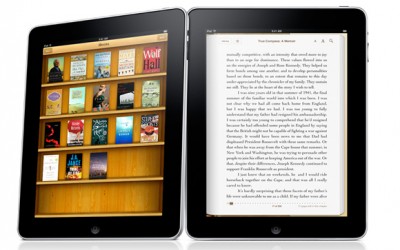
So in a few days later he gave an interview to The Washington Post, mainly to complain about the striking similarity:
- But the thing about iBooks is, it's a book-reader. So, of course they looked around, found the best interface for displaying books (Delicious Library's shelves), and said: "yup, this is what we're doing".
He said the he did not copyright the idea of wooden shelves and showing photo-realistic books on it. Because if he tried, it needed to be valued somehow, and then Apple would sent its lawyers and they would ask how much was the value and how it was determined.
But still it is flattering. He made something that has been acknowledged by a huge company known for their design potential. And Shipley say on that:
- But your [designs] aren't really yours. They have lives of their own. So when your designs do change the world, you have to accept it. You have to say, 'Ok, this was such a good idea, other people took it and ran with it. I win.'

Scammers exploit Apple iPad fever
Newsworthy events are often targeted by hi-tech criminals. The iPad wasn’t the exception.
On the last week terms like “Apple” and “iPad” were among the most popular on different search sites and services because of the Steve Jobs’ presentation. That caused hi-tech scammers to tune their booby-trapped webpages to show up near the top of search results with that terms. So when the user enters such words as “Apple iPad rumor” or “Apple iPad size”, he has a probability to go to the sites that will peddle rogue security software to him.
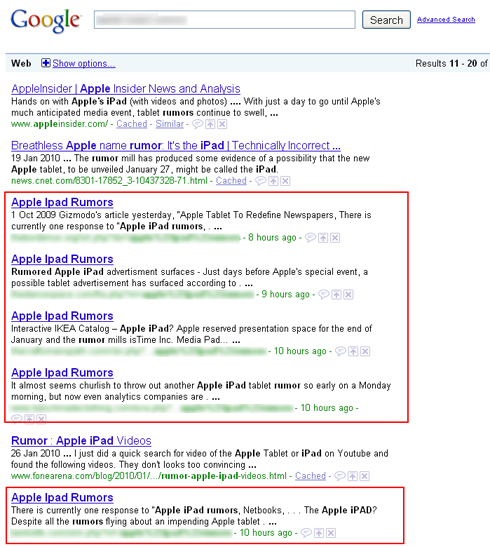
Moreover, some sites were tuned in such way they could define user’s OS and choose a different type of attacking it. Other sites send users to web pages that pose Google’s search engine and manipulate the results people see. The only way to stay protected from these scammers is to be attentive to strange sites and links, to have an up to date security software installed and the latest OS system patches.
[Via ]
Apple releases iTunes 9.0.3
Yesterday Apple updated iTunes version to 9.0.3.
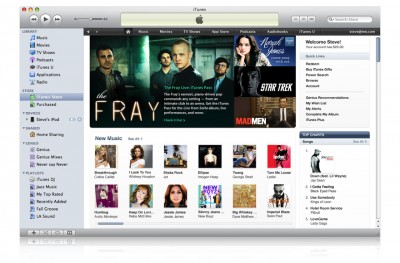
First of all, now the app can finally remember your password while you're making your purchases. Also some problems with syncing Podcasts and Smart Playlists with iPod were solved. An update contains some improvements in stability and performance. Also it fixes a few minor issues and bugs.
iTunes 9.0.3 is available now for update from the software update mechanism in Mac OS X and Windows or on .
How to turn the iPhone into the iPad
The specialists from RedmondPie made a video showing how to turn the interface of the iPhone into that of an iPad. They used simple packages that are already available via Cydia (for jailbroken iPhone).

Everything is very simple, just follow these steps:
- Install Winterboard from Cydia.
- Install the Winterboard theme "Simple iPad Theme" from Cydia.
- Install MakeItMine from Cydia. This utility is needed to change the Carrier name to "iPad".
- Download the application Shrink to reduce the size of the icons.
- Install NYTimes, Classics and Kindle applications from AppStore.
The result is shown on the photo above!
Here is a full instructional video:
Read the rest of this entry »
Comparison Table: iPad vs Other Tablets

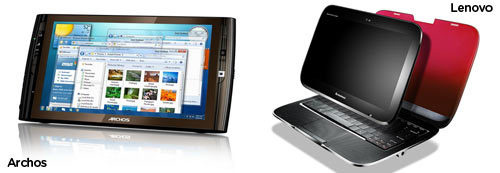
A few days ago Apple introduced the iPad, but obviously it is not the only device of its kind on the market. Gizmodo created a comparison table, where they are analyze different features of 8 devices:
- Apple iPad
- HP Slate
- Fusion Garage JooJoo
- Notion Ink Adam
- Dell Mini 5
- Archos 7 Android
- Lenovo IdeaPad U1
- Archos 9
Here is the table:
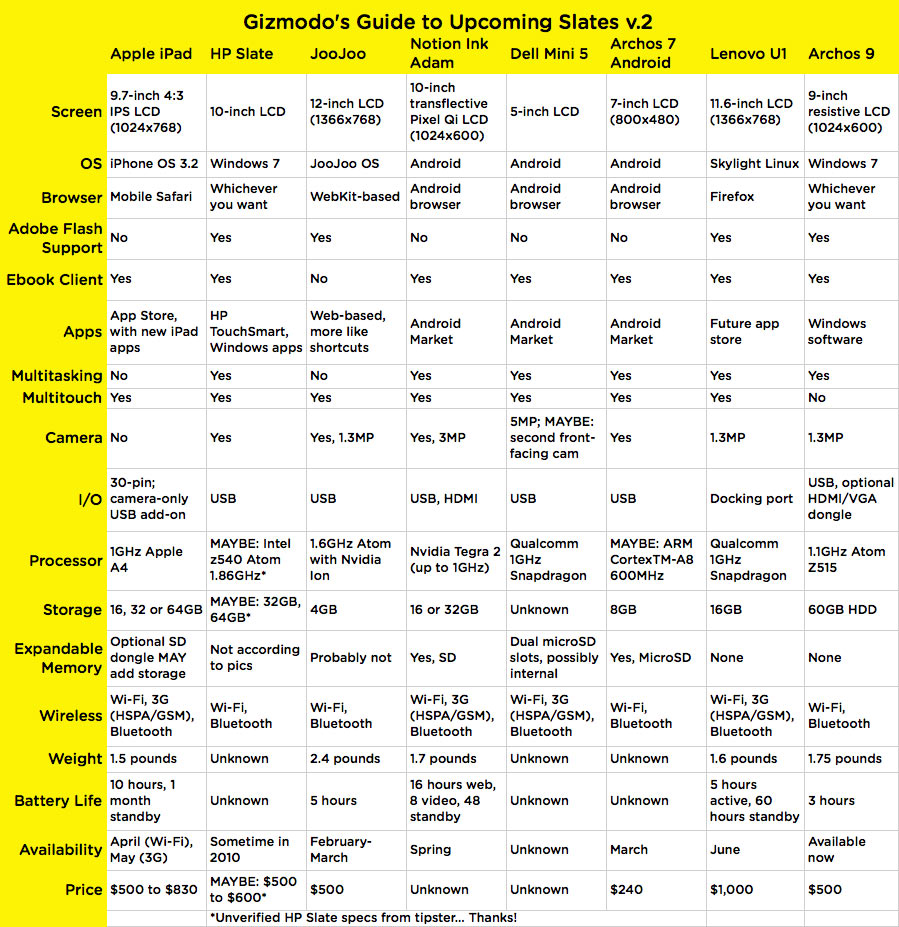
As you can see, these wonderful devices have different strengths and weaknesses, all users have to do is to choose which ones are more important, visit the store and... buy an iPad 🙂
iPad at the Grammy Awards [Video]
Can you believe it? Stephen Colbert pulled out an iPad at the Grammy Awards to find his list of nominees for the Song of the Year:
"I'm sorry where's the list. Oh, I know! It's on my iPad. Jay-z, did you not get one of these in your gift bag? Am I cooler than you? Hunnie, Hunnie, does this make me look cool?"
Congratulations to Apple, that was cool! Take a look at the video:
Apple Opens Official YouTube Channel, Posts iPad Video and Keynote
Apple has finally opened an . Now all users can easily watch and embed official Apple videos.
There are total 5 videos avaliable right now - the iPad video and the entire Keynote split into 4 videos. All the videos are avaliable in high quality (HD 720p):
Introducing the iPad:
iPhone Dev-Team Releases Jailbreak Utility RedSn0w version 0.9.2
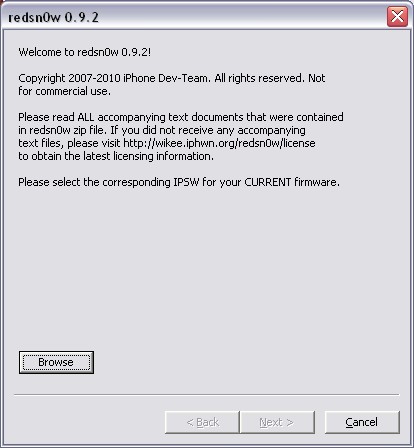
Redsn0w is a cross-platform jailbreaking tool for iPhone and iPod Touch. New version redsn0w 0.9.2 supports the latest firmware 3.1.2.
redsn0w 0.9.2 supports:
-
All iPhones and iPod touches
-
Windows and Mac OSX (x86)
-
Apple firmwares 3.0 and 3.1.2
We expect to see Linux version quite soon.
If you need a carrier unlock, redsn0w will handle iPhone 2G by itself (by installing the BootNeuter utility). For the iPhone 3G and iPhone 3GS use Cydia after you're jailbroken to install ultrasn0w (baseband 04.26) or blacksn0w (baseband 05.11).
If you have a late-model iPhone 3GS, or if you have an iPod touch 2G whose serial number begins with “MC” (newer than week 40 of last year), or any iPod touch 3G, you can use redsn0w to jailbreak but you are currently restricted to “tethered” rebooting. That means you need to connect your device to a computer each time you boot it - so just try no to reboot.
You can download redsn0w 0.9.2 here.
iPad screen's aspect ratio consideration
A month ago John Gruber, author of the , posted on twitter: “Shouldn't the iPhone shoot 16:9 video? Who wants 4:3 video nowadays?”
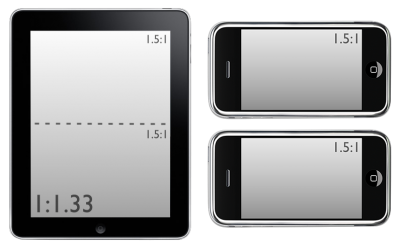
Many people admit that they expect all screens to be closer to 16:9 aspect ratio. However from the first look it is obvious that iPad does not have 16:9 screen. We can see from the picture above the iPad screen is apparently equivalent in its aspect ratio to 2 iPhone screens, stacked in landscape mode, which is 4:3. It is primarily meant to be used in portrait mode, and it looks like a video playback is a secondary function. Indeed a 16:9 video looks a bit skinny on the iPad.
So will 4:3 video get back to business or it is just another feature of more comfortable e-book reading?
TellTale releases games for Mac

Telltale Games is a famous company that brought us new forms of retro games such as Sam & Max and Secret of Monkey Island. The rumors about Mac versions of their games are confirmed – they will release the whole catalog for OS X next month, just before the Macworld Expo. We may even see iPhone and iPad versions since most of the games use the same platform. This was expected as there are many Mac fans both in the customer base and in the team.
Telltale’s games are already available on other platforms (PC and consoles), but the company is known for putting fans first, so we can even expect some extra goodies to come.
Steve Jobs about Google and Adobe
On the next day after the iPad presentation Steve Jobs gave a conference at Town Hall. Among others the Google and Adobe subjects were discussed.

According to a person, who was not authorized to speak with the press by Apple, but was present on this event, Jobs didn’t mince his words in his speech. This is what he exactly said about Google:
- We did not enter the search business. They entered the phone business. Make no mistake they want to kill the iPhone. We won’t let them.
After this one of the journalists tried to discuss another subject, but Jobs continued his thought that caused audience to roar:
- I want to go back to that other question first and say one more thing. This don’t be evil mantra: “It’s bullshit.”
A few minutes later Apple’s CEO also commented the situation with Adobe:
- They are lazy. They have all this potential to do interesting things but they just refuse to do it. They don’t do anything with the approaches that Apple is taking, like Carbon. Apple does not support Flash because it is so buggy. Whenever a Mac crashes more often than not - it’s because of Flash.
Also Jobs added:
- No one will be using Flash. The world is moving to HTML5.
4 more things to transfer from iPad to iPhone
As the new A4 CPU is rumored to be the next CPU for the 4th generation of iPhones, proposes four more features to transfer from iPad to iPhone:

1. Bluetooth Keyboard Support.
Apple iPad is claimed to support Bluetooth 2.1 + EDR that lets you connect Apple Wireless Keyboard, wireless headphones or other devices. This feature isn't supported yet in iPhones.
2. Desktop file syncing for third party applications
Now iPad allows you to drag-and-drop files from computer to the storage folders of third party applications. At one moment you're editing your document on a Mac, and at the second you're viewing it on your iPad.
3. Apps identify themselves as supporting their specific file types.
On the iPhone even if you have installed a specific application, you will need to find a way to get that file into the application's storage space. On the iPad you can open a file from the desktop or even from an email.
4. PDF Creation Support
There was always a problem of saving files that other people need to see in the friendly format. New iPad has built-in PDF creation functionality for iWork, which is very convenient.
With this improvements iPad can obviously be considered as a sign of innovations to come for the iPhone.
Steve Jobs: iPad to offer 9.99$ e-books, Word support and 140 hours of music
After the iPad presentation on Wednesday Walt Mossberg, The Wall Street Journal journalist, had a conversation with Steve Jobs who revealed interesting information about the new product.
Books for the iPad were rumored to cost between $13 and $15, and Mossberg asked, why customers will purchase books on this price if Amazon charges only $9.99. Jobs answered: “The prices will be the same”.
Later Mossberg inquired Steve whether he can use Pages application to write his review and then send it to his editors in the Microsoft Word format, as his colleagues doesn't know anything about Pages. Jobs told that the mobile version of Pages allows saving files as Word documents.
The journalist also asked about battery life on the device, and Jobs answered that iPad offers 140 hours of music playback with the screen off or 10 hours of reading. It seems not so much in the comparison with e-books, but Jobs revealed that 10 hours is enough, as nobody reads for 10 hours, and plugging the device or docking it in the end is "not a big deal".